
| TL;DR – Microsoft Entra passwordless password change arrives in late October 2026 through My Sign-Ins. – Eligible users authorise it with a passkey, FIDO2 security key or Windows Hello for Business, without knowing the current password or completing SSPR. – The feature is disabled by default and applies to the whole tenant, with no announced user or group scope. – Passwordless password change, SSPR and account recovery remain separate journeys. – Treat the feature as a credential bridge and test every legacy and hybrid dependency behind the new password. |
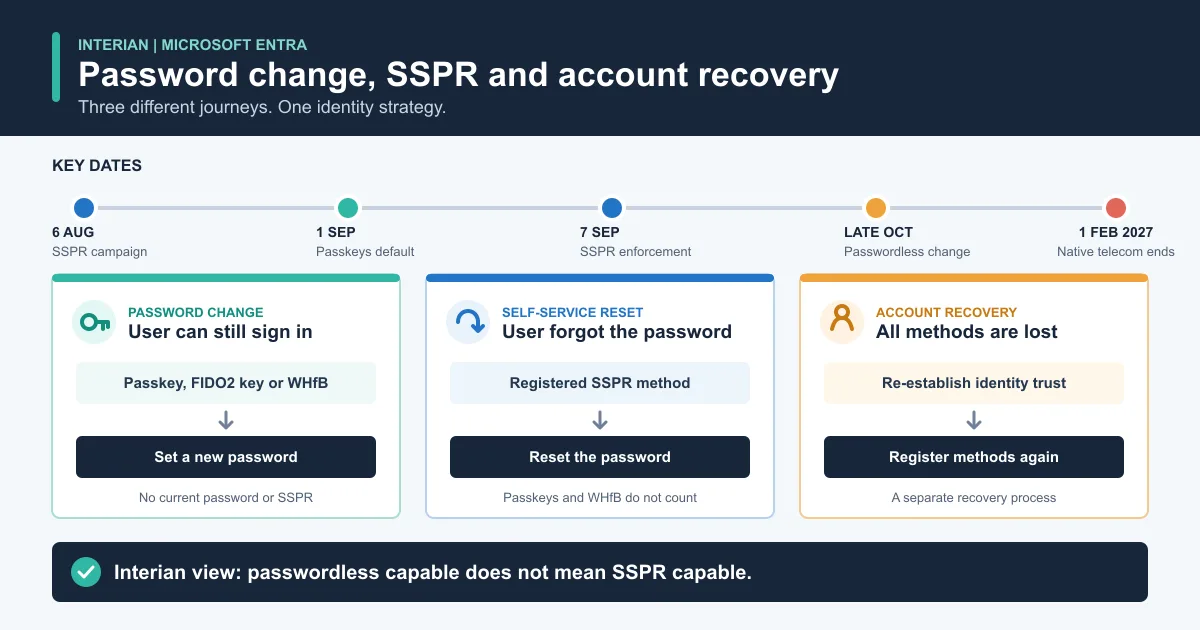
Passwordless password change, SSPR and account recovery solve different problems. A user can be ready for one flow and unprepared for another.
Microsoft Entra passwordless password change offers a useful answer to an awkward operational problem.
From late October 2026, eligible users will be able to open My Sign-Ins, authenticate with an existing passwordless credential and set a new password. They will not need to know their current password, complete an SSPR flow or contact the help desk.
At first sight, this is a small convenience feature. In an enterprise environment, it changes something more important: a strong passwordless credential can authorise the creation of a new reusable password.
That is valuable, but it deserves a deliberate security and support decision.
Key point for administrators: this feature is not a replacement for SSPR. It is a separate password change route for users who can still prove their identity with an eligible passwordless credential.
How Microsoft Entra Passwordless Password Change Works
Message Center post MC1437671, published on 23 July 2026, describes the new Microsoft Entra capability.
Microsoft currently states that:
- rollout is scheduled for late October 2026 in Worldwide and GCC tenants;
- the feature is off by default and requires administrator activation;
- the setting applies to the entire tenant, with no user or group based scope;
- eligible users must have a registered passkey, FIDO2 security key or Windows Hello for Business credential;
- eligible users must also maintain a password;
- the new option will appear in My Sign-Ins;
- the user can set a new password without entering the existing password;
- SSPR enrolment is not required for this flow;
- administration interfaces and supported APIs will become available when the feature is released.
Microsoft Learn documentation is also expected at release. Until then, the exact admin control, API resource, audit events and detailed behaviour remain undocumented.
Why Passwordless Users Still Need Password Changes
Passwordless adoption does not always mean that the password has disappeared from the identity system.
Many organisations still depend on passwords for:
- older applications that do not support modern authentication;
- on premises Active Directory resources;
- VPN, wireless or other network access services;
- operational processes that have not yet moved to phishing resistant authentication;
- emergency access to a service that still accepts a username and password.
A user who signs in every day with Windows Hello or a passkey may rarely type their password. They may not remember it when an older application asks for it, or when a password policy requires a change.
Microsoft Entra passwordless password change removes that friction. The user proves possession of an eligible strong credential, then creates a new password for the remaining password based services.
There is also a security consequence. The new password can potentially be used in places that do not benefit from the phishing resistance of the credential that authorised its creation. Enabling the feature is therefore not just a user experience decision. It is a decision about which legacy access paths a passwordless identity can unlock.
Password Change Is Not SSPR
Three Microsoft Entra processes now need to be designed separately.
| Process | Starting point | How identity is proven | Result |
|---|---|---|---|
| Passwordless password change | The user can still sign in with an eligible passwordless credential | Passkey, FIDO2 security key or Windows Hello for Business | A new password is set |
| Self-Service Password Reset | The user has forgotten the password but still has enough registered SSPR methods | An SSPR method permitted by policy | The password is reset |
| Account recovery | The user has lost access to all registered authentication methods | Identity proofing through the configured recovery process | Trust is re-established and authentication methods can be registered again |
The distinction matters because Microsoft does not currently list passkeys, FIDO2 security keys or Windows Hello for Business as SSPR methods. The Microsoft Entra authentication method matrix lists them for sign-in and, where applicable, MFA, but not for SSPR.
Authenticator notifications, email OTP, software OATH, SMS and voice can currently support SSPR, depending on policy. Microsoft provided SMS and voice delivery is scheduled to retire in February 2027, so they should not be treated as the long term answer.
The new October flow does not change the SSPR method matrix. It creates a dedicated route for changing a password with an already registered passwordless credential.
This leads to a simple but important rule:
Passwordless capable does not mean SSPR capable.
If a user loses the device or security key containing the passwordless credential, the new password change feature cannot help. That user still needs SSPR, another usable authentication method or a configured account recovery process.
The Autumn 2026 Identity Timeline
The October release is part of a much larger Microsoft Entra transition. Administrators should plan these dates together without treating them as one feature.
| Date | Microsoft Entra change | What administrators should do |
|---|---|---|
| 6 August 2026 | In tenants that require SSPR registration at sign-in, the updated campaign begins for users who do not have enough registered methods | Find users who are enabled for SSPR but are not SSPR capable |
| 1 September 2026 | Passkeys become the default experience for users enabled for SMS or voice, with Microsoft managed registration prompts | Prepare users, devices and support teams for passkey registration |
| 7 September 2026 | SSPR stops accepting directory sourced phone and email attributes unless they were explicitly registered as authentication methods | Confirm every in scope user has enough valid SSPR methods |
| Late October 2026 | Passwordless password change becomes generally available in Worldwide and GCC tenants | Test the released controls before deciding whether to enable the tenant wide setting |
| 1 February 2027 | Microsoft provided SMS and voice authentication retires across Microsoft Entra, including SSPR | Move users to stronger methods or configure an approved customer managed telecom provider where required |
The 6 August and 7 September dates come from the latest version of MC1325414. Some earlier community coverage still contains the original dates, so use your tenant Message Center entry as the operational source of truth.
Microsoft says that about 86 per cent of SSPR verifications already use registered methods. That still leaves a meaningful exception population in larger tenants, including administrators and users whose contact information exists only as a directory attribute.
The Most Important Readiness Gap
The most useful readiness check is not a simple count of registered methods. It is the difference between capability flags.
Microsoft Graph exposes these fields in the userRegistrationDetails report:
isPasswordlessCapablemeans the user has an allowed passwordless method such as FIDO2, Windows Hello for Business or Authenticator passwordless sign-in;isSsprRegisteredmeans the user has registered the number of methods required by the SSPR policy, whether or not SSPR is enabled for that user;isSsprEnabledmeans policy allows the user to use SSPR, whether or not enough methods are registered;isSsprCapablemeans both requirements are met: SSPR is allowed and the user has enough registered methods.
This creates four practical populations:
- Users who are passwordless capable and SSPR capable have both a strong daily sign-in and a separate reset route.
- Users who are passwordless capable but not SSPR capable may benefit from the October password change feature if they have one of the eligible methods, but can still fail a normal SSPR journey.
- Users who are SSPR enabled but not SSPR capable need attention before enforcement begins on 7 September.
- Users who are neither passwordless capable nor SSPR capable need a broader authentication onboarding plan.
The second group is easy to miss. It is also the clearest reason to evaluate the two capability flags together.
There is one important reporting limitation. isPasswordlessCapable is broader than the announced October eligibility. It can also include Microsoft Authenticator passwordless sign-in, which MC1437671 does not currently list for this feature. Use MethodsRegistered to identify the actual method, then confirm support against the release documentation.
What Administrators Should Check
Start in Microsoft Entra admin centre > Entra ID > Authentication methods > Activity > Registration. Open the user registration details and review these columns:
- Passwordless Capable
- SSPR Registered
- SSPR Enabled
- SSPR Capable
- Methods registered
- Is Admin
The report can take up to 36 hours to reflect changes, so do not use it as a real time validation tool.
For repeatable analysis, the same data is available through Microsoft Graph. The following example identifies passwordless users who are not SSPR capable:
Connect-MgGraph -Scopes "AuditLog.Read.All"
$registration = Get-MgReportAuthenticationMethodUserRegistrationDetail -All
$registration |
    Where-Object { $_.IsPasswordlessCapable -and -not $_.IsSsprCapable } |
    Select-Object UserPrincipalName, IsAdmin, IsSsprRegistered,
        IsSsprEnabled, IsSsprCapable, MethodsRegistered
Review the result rather than automatically changing policy. A user may be outside the intended SSPR population, may need a different method because of accessibility or device constraints, or may be a privileged account with stricter recovery requirements.
Also check the users who are SSPR enabled but not capable. They represent the immediate September risk, regardless of whether you intend to enable passwordless password changes in October.
A Tenant Wide Setting Changes the Pilot Plan
Microsoft says the passwordless password change control will be tenant wide. There is no announced option to target a pilot group or exclude sensitive users.
That limits the normal phased rollout model.
Before enabling the setting in production:
- Test the released feature in a separate test tenant where possible.
- Confirm which passwordless methods and passkey types are accepted in your environment.
- Verify the behaviour for cloud only and synchronised identities.
- Confirm how password policy, password protection and expiry rules are applied.
- Record the audit and sign-in events produced by a successful and failed change.
- Check whether Conditional Access, authentication strengths or identity risk policies affect the journey.
- Validate the experience for privileged accounts before exposing it tenant wide.
- Prepare the help desk to distinguish password change, password reset and complete account recovery.
Targeting passwordless authentication methods to a small group may reduce initial eligibility, but it should not be used as an improvised pilot control if it conflicts with your wider passkey strategy.
Hybrid Identity Questions Still Need Testing
The announcement does not yet document how the new flow interacts with every hybrid identity design.
Organisations using password hash synchronisation, pass-through authentication, federation or password writeback should validate the October implementation against their own architecture.
The test plan should include:
- a cloud only user;
- a synchronised user with password writeback enabled;
- a synchronised user where password writeback is unavailable;
- an expired password and a password that must be changed at next sign-in;
- on premises password complexity, history and minimum age policies;
- an on premises account lockout;
- sign-in to a representative legacy application after the password change;
- audit logs, alerts and incident response visibility;
- Conditional Access and user risk remediation behaviour.
Do not assume that behaviour documented for SSPR password writeback automatically applies to this separate password change flow. Microsoft plans to publish the detailed documentation at release.
Interian View
This feature should be treated as a credential bridge.
It lets a phishing resistant credential authorise a new password that may then be accepted by password based systems. That can reduce support calls and remove a real obstacle to passwordless adoption. It can also extend the impact of a compromised authenticator or device into legacy services if monitoring and policy are weak.
The right design has three control areas:
- Authentication: decide who receives passkeys, FIDO2 security keys and Windows Hello for Business, and protect their registration.
- Recovery: maintain a valid SSPR route and a plan for users who lose every registered method.
- Residual passwords: identify where passwords are still accepted, minimise those dependencies and monitor every password change.
Do not slow down passkey adoption because passkeys are not SSPR methods. Pair the passkey programme with a separate recovery design that remains usable after a lost device, staff change or security incident.
Success is not a high passkey registration percentage on its own. Success means that a user can sign in securely, recover safely and reach legacy services only through an explicitly accepted path.
Practical Readiness Checklist
- Review MC1437671 and MC1325414 in your own tenant Message Center.
- Export Passwordless Capable, SSPR Enabled and SSPR Capable status.
- Resolve users who are SSPR enabled but not SSPR capable before 7 September.
- Identify passwordless users who still depend on password based applications.
- Confirm which SSPR methods remain viable after the February 2027 SMS and voice retirement.
- Review recovery requirements for administrators and other sensitive accounts.
- Document a total loss recovery process for users who lose every registered method.
- Build cloud only and hybrid identity test cases for the October release.
- Validate password policy, writeback, Conditional Access and risk behaviour.
- Confirm audit events and alerting before enabling the tenant wide control.
- Update user guidance and help desk scripts with the three distinct recovery journeys.
- Recheck Microsoft Learn when the final product documentation is published.
Final Thoughts
Microsoft Entra passwordless password change solves a genuine operational problem. A user who can prove identity with a passkey or Windows Hello should not need to remember an old password simply to create a new one for a legacy service.
The feature does not remove the need for SSPR, account recovery or password retirement work. In fact, it makes the differences between those controls more visible.
Use the months before release to measure both passwordless and SSPR capability, map the services that still accept passwords and prepare a hybrid test plan. Then decide whether the tenant wide switch supports your security model, rather than enabling it as a convenience setting.
Further Reading
- Microsoft Entra ID Account Recovery: The Missing Link in Passwordless Identity
- Microsoft Entra Passkeys: Auto-Enable Changes for Administrators
- Automate Your Onboarding and Offboarding with Entra Identity Governance
- Microsoft Entra authentication method matrix
- Passkeys by default and retirement of Microsoft provided SMS and voice authentication