Tag Endpoint management

Step-by-Step: Build a Copilot Agent for Smarter Intune Alerts in 15 Minutes

Interian | Securing Insights

Every IT professional knows the struggle: an Intune notification pings with a vague error code or cryptic alert about a device compliance issue, failed update, or potential security threat. You're left scratching your head, wondering, "What does this even mean?" These unclear messages can bury critical issues, like non-compliant devices or malware risks, in a flood of noise. Imagine if those alerts came with clear, human-readable explanations and actionable steps.

Replacing MDT with Autopilot Device Preparation: A Step-by-Step Guide

Interian | Securing Insights

Discover how Autopilot Device Preparation can streamline Windows device deployment in modern, cloud-driven IT environments. This guide explains a step-by-step process—from setting up security groups and configuring Intune policies to utilising Delivery Optimisation for improved network efficiency. While Autopilot simplifies deployment with zero-touch provisioning, it currently lacks key features such as removing OEM bloatware, custom Windows imaging, and clean OS reimaging for every new device. Explore how these limitations can be addressed, and consider complementary solutions like the PowerShell Deployment Solution (PSD), to fully meet your organisational needs.

Maximising Security and Performance with Microsoft Defender Antivirus and Intel TDT

Interian | Securing Insights

In an era where sophisticated cyber threats and performance demands converge, Microsoft Defender Antivirus (MDAV) rises to the challenge with advanced hardware acceleration. By integrating Intel Threat Detection Technology (TDT), MDAV enhances endpoint protection while maintaining efficiency. Features like Accelerated Memory Scanning and Cryptojacking Detection offload resource-intensive tasks to the GPU, ensuring robust security without straining system resources.

Explore how to optimise these cutting-edge features using Microsoft Intune, from enabling Intel TDT and File Hash Computation to deploying best practices for consistent performance and protection. This guide is your roadmap to leveraging hardware-accelerated cybersecurity in a futuristic, secure IT environment.

Microsoft 365 DSC: Automate, Configure, and Monitor Like a Pro

Interian | Securing Insights

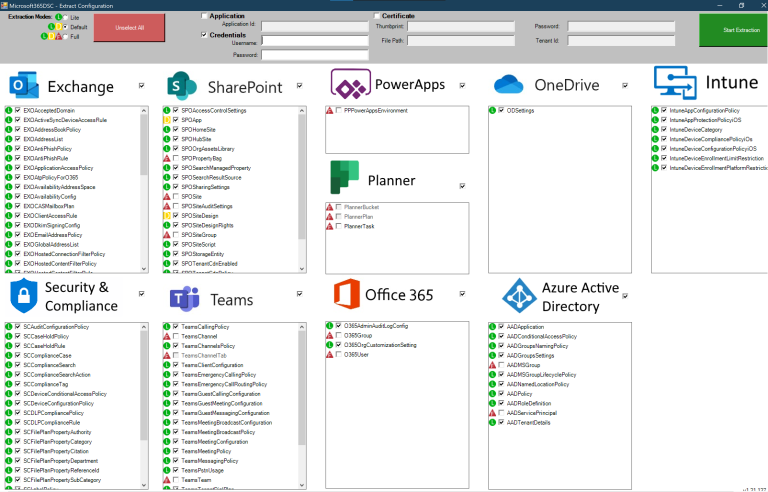
Discover how Microsoft 365 Desired State Configuration (DSC) empowers IT professionals to automate, monitor, and maintain tenant configurations with ease. This blog dives into the benefits of DSC, including drift prevention and multi-tenant synchronization, while providing a step-by-step guide for deployment. Learn from real-life examples covering Exchange Online, Intune, and Entra, and explore additional resources to streamline your configuration management. Whether you're using DSC, Azure Runbooks, or Terraform, find the tools to optimize your automation strategy. Read on to master tenant management!

Comprehensive Guide to Setting Up Microsoft Entra Global Secure Access (GSA) with Internet Access, Licensing, and Key Differences with SSE

Microsoft Entra Global Secure Access (GSA)

Learn how to implement Microsoft Entra Global Secure Access (GSA) for secure internet access. This step-by-step guide covers everything from activating GSA for your tenant to configuring web content filtering, security profiles, and conditional access policies. Understand the key differences between GSA and Security Service Edge (SSE) and how to improve your organisation's security posture. Plus, find out about licensing updates and how to enhance Microsoft Entra ID capabilities.

Introducing Enhanced File Integrity Monitoring (FIM) in Microsoft Defender for Cloud

Interian | Securing Insights

Enhance your security with Microsoft Defender for Cloud’s improved File Integrity Monitoring (FIM). This powerful tool detects unauthorized changes to critical files and system configurations in real-time, ensuring compliance with regulations like NIS2 and PCI-DSS. Learn how FIM integrates with Microsoft Defender for Endpoint, provides real-time alerts, and helps safeguard your critical assets with proactive threat detection.

Unlocking DUDE: A Guide to Dynamic User and Device Enumeration

Interian | Securing Insights

DUDE (Dynamic User and Device Enumeration) is a powerful tool for IT administrators to automate the process of retrieving and managing user and device data from Azure AD. Leveraging Microsoft Graph API and PowerShell, DUDE streamlines security monitoring, compliance reporting, and device management. This guide covers its architecture, setup, common use cases, and real-world applications to enhance IT workflows. Learn how DUDE can save time and ensure up-to-date, compliant IT environments.

Secure Your Intune Environment with Multi-Admin Approval: Everything You Need to Know

Interian | Securing Insights

Multi-Admin Approval (MAA) is a security feature introduced in March 2023 in Microsoft Intune, enhancing security by requiring multiple admin approvals for high-risk actions. This powerful tool helps prevent unauthorised changes, reduces risks, and supports compliance. In this guide, we’ll explore how MAA works, its benefits, required licences, and provide a step-by-step tutorial on setting it up to safeguard your Intune environment.

How to Declutter Endpoints by Deleting Stale User Profiles Using Intune

Interian | Securing Insights

Managing shared or newly built Windows devices can be challenging, especially when old user profiles accumulate and pose security risks. With Microsoft Intune, you can easily declutter your endpoints by automatically deleting stale profiles. This guide walks you through setting up a configuration profile to remove profiles that have been inactive for 60 days, ensuring your devices remain secure and efficient.