Microsoft Entra Backup and Recovery matters because technical changes only become useful when teams can translate them into ownership, risk and practical next steps. This article explains the context, the impact and the actions to consider.
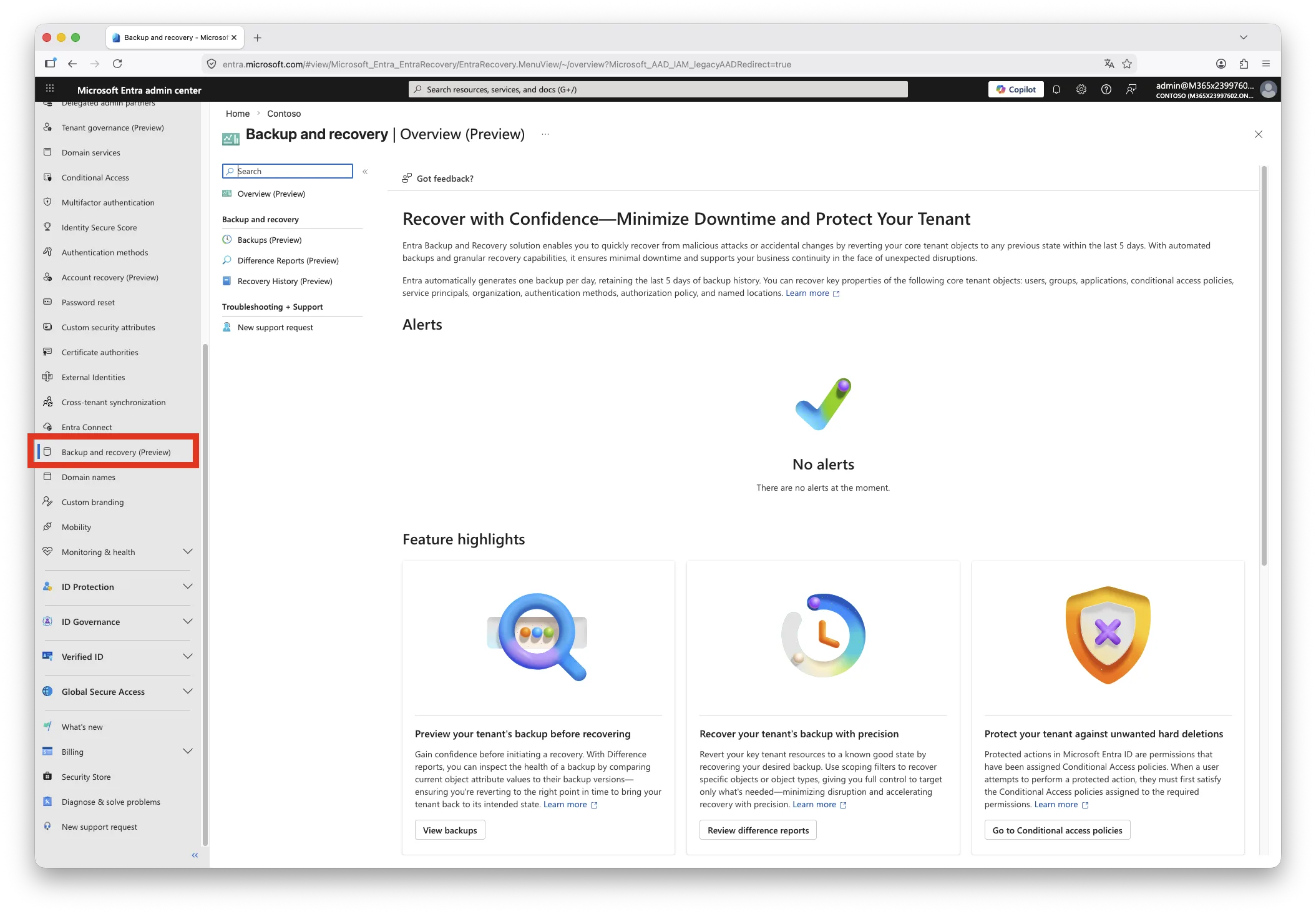
On 19 March 2026, Microsoft quietly released one of the most requested enterprise identity features to Public Preview: a native, platform-managed backup and point-in-time recovery capability for Entra ID tenant configuration. No big announcement, no Message Centre notification. Just a new blade in the Entra admin centre. This post cuts through the surface-level excitement, maps the exact mechanics, and explains what this changes and what it decidedly does not.
| TL;DR > Daily automated snapshots, five-day retention, geo-collocated with your tenant. No configuration, no opt-out. > Supports users, groups, apps, service principals, CA policies, named locations, auth method policy, partial authorisation policy, organisation object, and Agent IDs. > Recovers original Object IDs and relationships intact. That is the differentiator versus every external tool. > Hard-deleted objects cannot be recovered. Objects post-dating the snapshot are soft-deleted on restore. Plan accordingly. > Difference reports have a cold-start data-loading phase: up to 1 hour for small tenants, up to 2.5 hours for tenants exceeding 1 million objects. Plan this into any incident response runbook. > Only one job (diff report or recovery) can run at a time in a tenant. Large recoveries can take up to 30 hours for 500 K changes. > Recovery jobs can be cancelled mid-flight, but changes already applied before cancellation persist. Recovery history in the portal is itself only retained for five days. > Five-day window is insufficient for detecting slow-burn security incidents. This does not replace upstream drift detection. > Requires Entra ID P1 or P2. Workforce tenants only. B2C and External ID not supported. |
Why this feature matters
Protecting Entra tenant configuration has, until now, been a self-assembled discipline. The typical stack involves scheduled exports via Entra Exporter or Microsoft Graph PowerShell, storing JSON snapshots in a repository, and relying on third-party products for anything resembling structured recovery. Those tools work, but they share a hard architectural limitation: external tools cannot reliably restore the original Object ID of a deleted or corrupted object. Recovery means recreation, which means a new identifier, which means hours of manual work re-linking applications, group memberships, Conditional Access assignments, and RBAC scopes to the replacement object.
Native backup breaks that constraint. Because Microsoft manages the backup and recovery pipeline within the Entra platform, it can restore an object to its pre-incident state including its original identifier and all associated relationships. That single property is the engineering achievement that changes what recovery from identity misconfiguration looks like in practice.
Backup mechanics and constraints
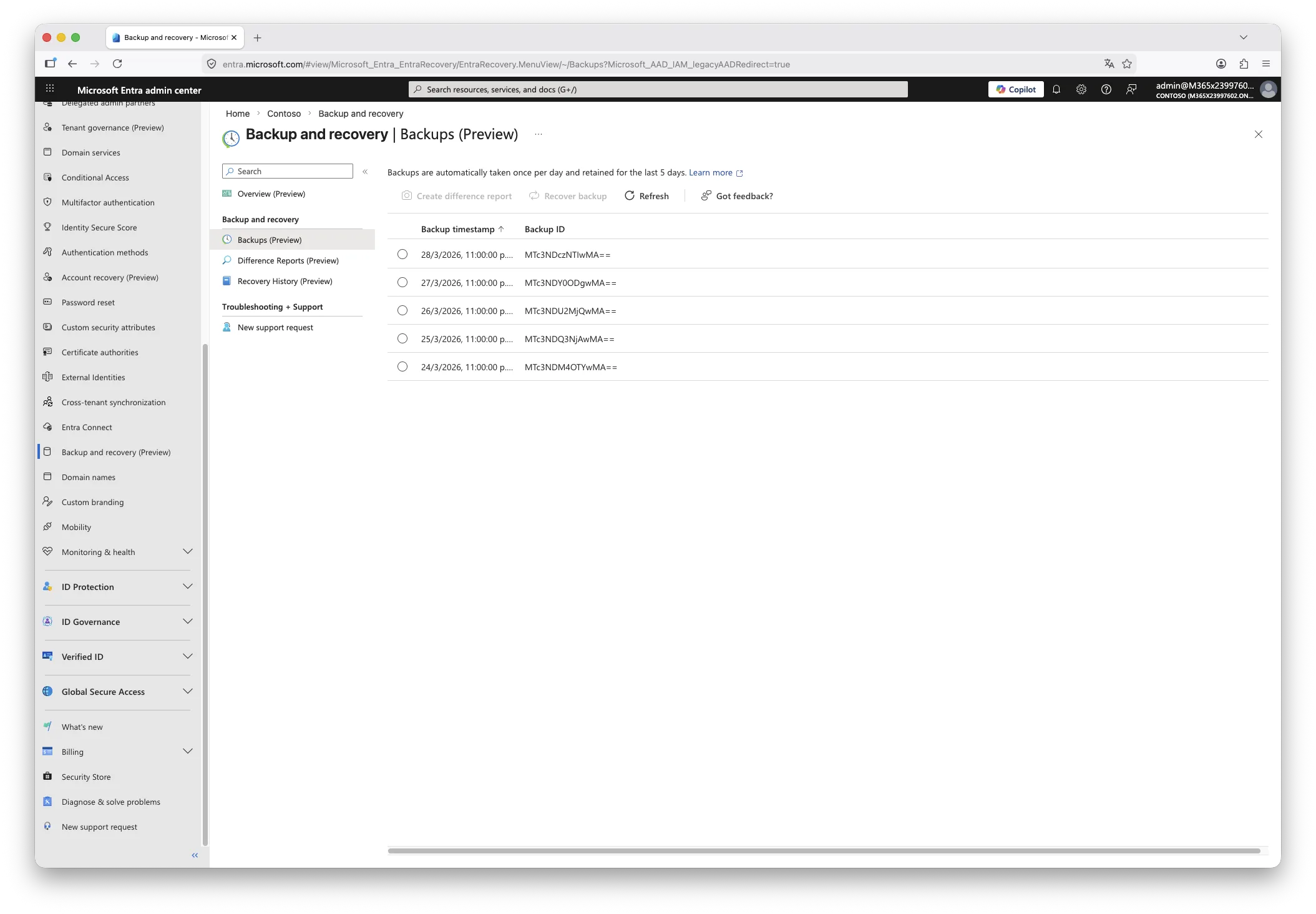
The backup process is entirely Microsoft-managed. There is nothing to configure, schedule, or enable. Snapshots are taken automatically once every 24 hours and five days of history are retained at any point in time. The backup resides in the same geographic region as the tenant, as determined by the region selected during tenant creation. Backup data cannot be inspected, modified, or exported by any signed-in user, including Global Administrators. No account holds the privilege to disable or delete the backup store.
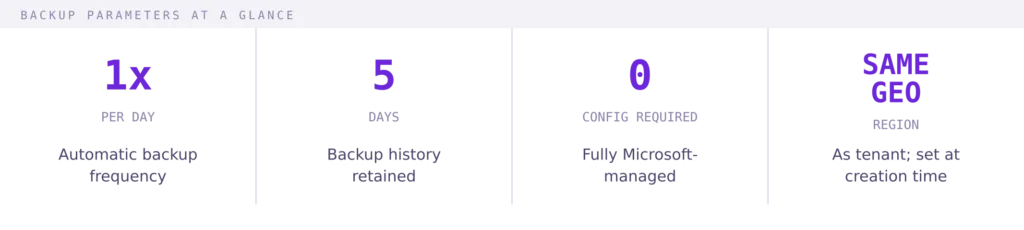
The 24-hour cadence and five-day window together define your maximum recovery point objective at 24 hours. Anything changed within the last day before the incident may not be captured in the most recent snapshot, and any incident that went undetected for longer than five days will have no usable baseline in this system. Both constraints are deliberate design decisions, not gaps that are likely to disappear before general availability.
Supported objects
The backup scope covers the following object and policy types:
- Users
- Groups
- Applications
- Service Principals
- Conditional Access Policies
- Named Locations
- Authentication Method Policy
- Partial Authorisation Policy
- Organisation Object
- Agent IDs
Agent IDs receive explicit coverage because they consist of both user and service principal objects with distinct type characteristics. This is directly relevant to organisations deploying Microsoft Copilot agents and third-party integrations that rely on Agent ID-based identities. The organisation object itself is backed up, which means tenant-level settings such as technical contact details and default user permissions are included in the recovery scope.
Note what is not included: Microsoft Intune device configuration and compliance policies sit outside this scope. Any configuration that lives in Microsoft 365 services other than Entra ID is unaffected by this feature. The scope is specifically the Entra directory layer.
Prerequisites and RBAC
Two requirements must be met before the feature is available in the Entra admin centre:
Workforce tenant: B2C and External ID tenants are not supported.
Entra ID P1 or P2: The feature is licensed at this tier. Early field reports indicate some tenants see it without P1/P2 licensing, but the official prerequisite remains P1 or higher and organisations should not rely on unlicensed access for operational processes.
Two purpose-built roles control access to the feature:
| ROLE | WHAT IT CAN DO | ROLE ID |
| Entra Backup Reader | View available backups, view difference reports comparing backup state to current state, review recovery history | f42252d9-… |
| Entra Backup Administrator | All Backup Reader permissions, plus: initiate difference reports and trigger recovery operations | b6a27b2b-… |
All Entra Backup Administrator permissions are also included in the Global Administrator role. There is no separate toggle; GA holders can already initiate recovery without explicit role assignment. This is worth surfacing in your privileged access reviews, as it means any account eligible for Global Administrator activation also implicitly holds recovery capability.
Field observation:
Restricted Management AUs are one of the most underused capabilities we see in enterprise tenants. Most organisations have not protected their break-glass accounts, emergency service principals, or executive identities behind an RMAU. The cost of not doing so becomes apparent the moment a tenant-wide incident involves one of those identities being modified unexpectedly, whether by mistake or by design.
Difference reports: workflow and performance
The workflow to initiate recovery involves three sequential steps: view available backups, generate a difference report against the chosen snapshot, and then trigger recovery from the report. You cannot skip directly to recovery without a difference report.
The difference report compares the selected backup snapshot against the current live state of the tenant. Only objects that changed between the two states are shown. Filters allow narrowing by object type or by specific Object ID, which is the right approach when you know exactly which object was affected. Without filters, all changed objects across all supported types are included, which in active tenants can easily run into thousands of entries.
PERFORMANCE REALITY CHECK
Difference report generation has two phases. The first run against a given backup triggers a data-loading phase where backup data is staged before comparison begins. This phase is opaque in the UI with no progress indicator. Subsequent runs against the same backup snapshot skip the loading step and complete significantly faster.
Only one job can run in a tenant at any time. A running difference report blocks a recovery job, and vice versa. In an incident response scenario, this serialisation means you cannot run a scoped diff report and a broad recovery simultaneously.
Microsoft publishes the following estimates for first-run report generation time by tenant object count:
| Tenant size (objects) | Estimated first-run duration |
| 1 to 50,000 | Up to 1 hour |
| 50,000 to 300,000 | Up to 1 hour 30 minutes |
| 300,000 to 1,000,000 | Up to 2 hours |
| More than 1,000,000 | Up to 2 hours 30 minutes |
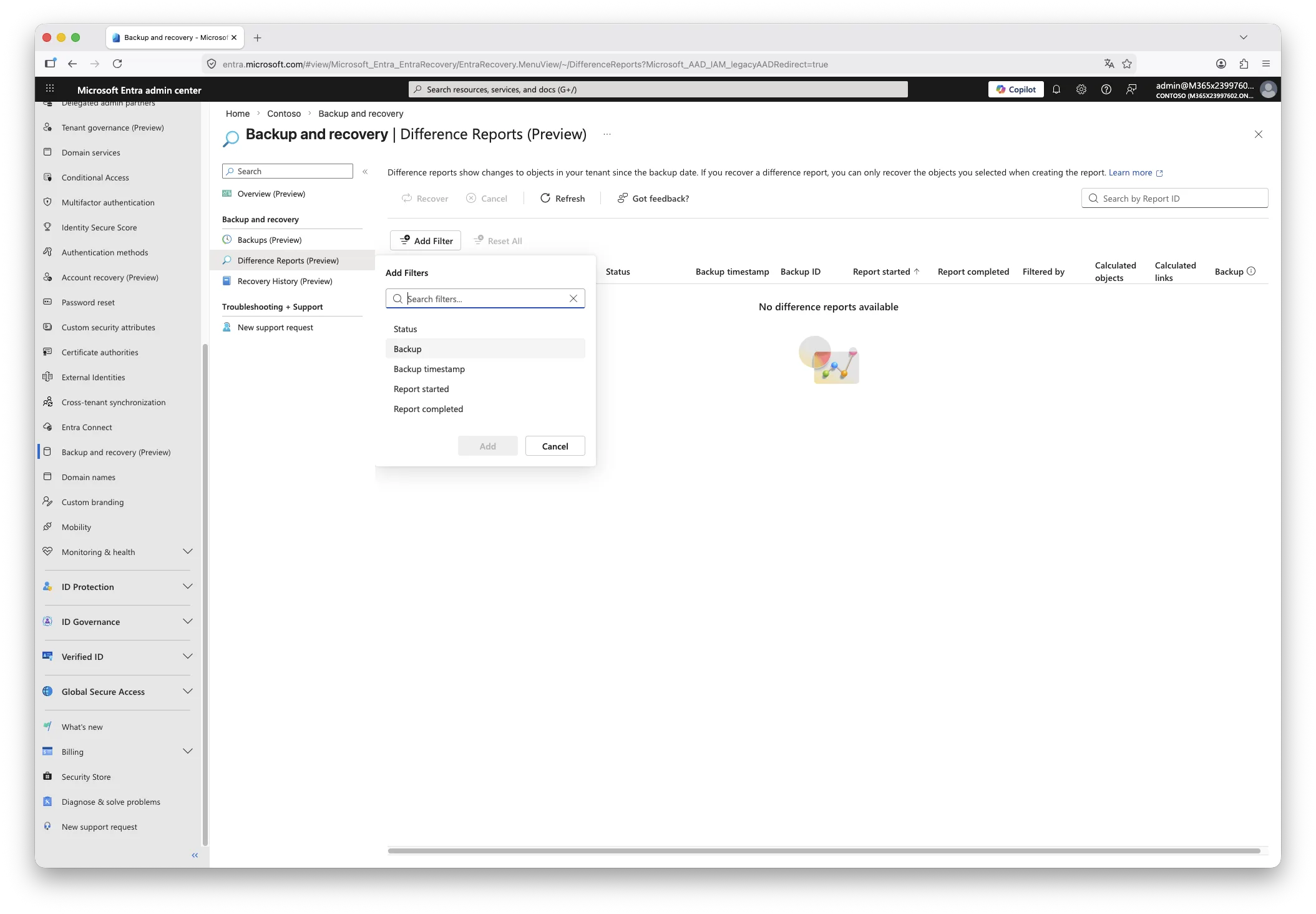
Real-world reports confirm these estimates are realistic. A tenant with fewer than 50 users has been observed requiring over 75 minutes for a first-run report. This is the most significant operational friction point in the current preview. Any incident response runbook that includes a diff report step should account for this window explicitly, and should ideally generate a baseline diff report on a scheduled cadence so that the backup data is already loaded when an incident occurs.
One notable absence: there is no export capability for difference report results. Reviewing thousands of changed objects through the portal UI is impractical in a large, active tenant. An exportable report format suitable for SIEM ingestion or AI-assisted triage would be a meaningful improvement before general availability.
Recovery behaviour in detail
When a recovery job runs, the platform applies deterministic rules based on the state of each object relative to the selected snapshot:
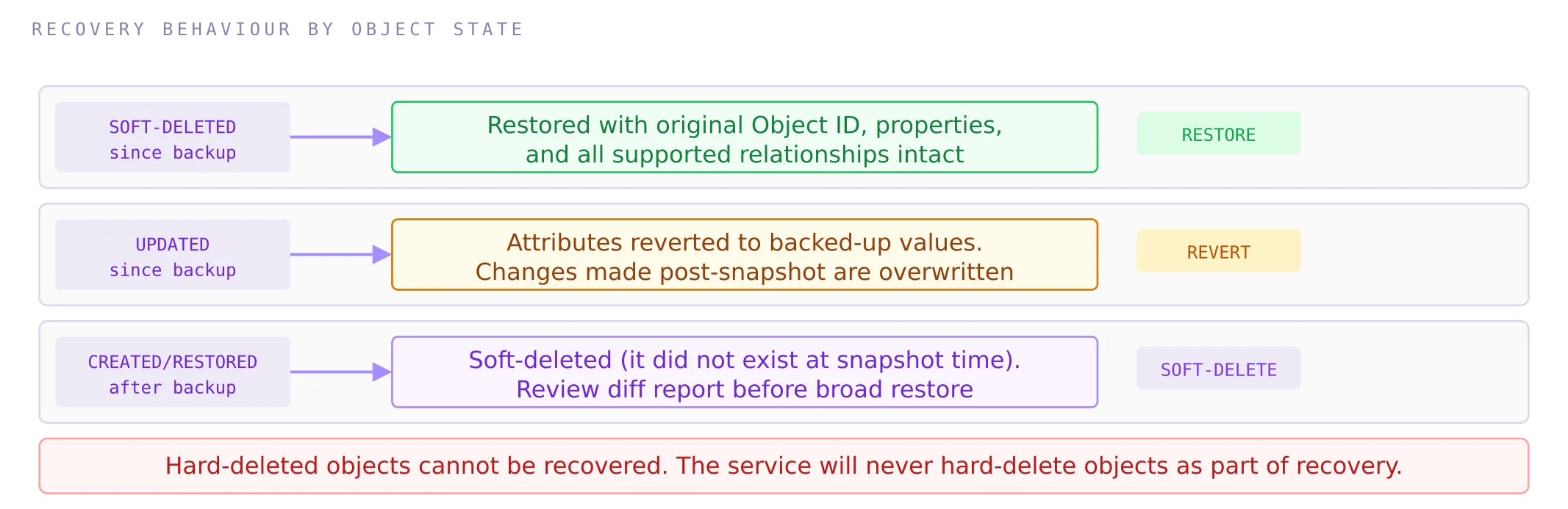
Two invariants hold regardless of the objects involved: the backup and recovery service will never hard-delete an object from your tenant as a side-effect of recovery, and it will never recover an object that was already hard-deleted. This makes the service safe to use in partial restore scenarios, but it also means that recovery from a hard-deletion event is outside this system’s capability.
Granular single-object recovery
Recovery does not have to be all-or-nothing. When reviewing a difference report, individual object entries can be targeted with a “Recover this object” action, which initiates a scoped recovery job for that one object without touching anything else in the report. This is particularly useful for incidents with a narrow blast radius. A practical example: a user inadvertently removed from a security group governing Azure Virtual Desktop access loses desktop sessions immediately. Recovering the group membership for that specific user, scoped by Object ID through a filtered diff report, restores access without rolling back unrelated changes elsewhere in the tenant.
Recovery job performance scales with the volume of changes: processing 500,000 object and relationship changes can take up to 30 hours. For an incident response scenario in a large, active tenant, that timeline must be factored into your RTO. Recover by Object ID or by type first if you need to restore access to specific resources quickly, rather than attempting a full-scope recovery.
Cancelling a recovery job
In-progress recovery jobs can be cancelled via the Recovery History section in the admin centre. Any changes already applied before cancellation remain in effect. There is no automatic rollback of partial recovery. If you cancel mid-flight, you will need to assess the state of the tenant manually before deciding whether a fresh recovery run from the same or a different snapshot is appropriate.
Recovery history and audit
All recovery actions are recorded in the Entra audit log, which is the correct place to reference them for compliance and post-incident review. The Recovery History section in the admin centre shows completed and in-progress jobs, including the number of affected objects, but currently does not surface a detailed list of which specific objects were recovered. Recovery history entries in the portal UI are retained for only five days after the recovery completion date. If you need a longer record, export the audit log entries to your SIEM or long-term storage as part of your incident documentation process.
Hybrid identity and SOA constraints
For organisations using Microsoft Entra Connect or Cloud Sync, objects sourced from on-premises Active Directory carry a Source of Authority of the local directory. Those objects will appear in difference reports when their attributes change, but they cannot be recovered through this mechanism. The source of authority constraint means that authoritative recovery must happen in on-premises AD, after which synchronisation will propagate the corrected state to Entra.
There is an exception: groups that have been converted from on-premises management to cloud-managed (SOA moved to Entra) become fully recoverable through Backup and Recovery once the conversion has occurred. If a recovery from a backup predating that conversion were to run, it would not revert the SOA back to on-premises; the cloud-managed status persists.
What it does not solve
Understanding the boundaries of this feature is as important as understanding its capabilities.
The five-day window is an RPO floor, not a detection backstop
A threat actor who makes subtle, targeted changes to service principal permissions, Conditional Access exclusions, or authorisation policies and remains undetected for more than five days will have no usable baseline to recover to. Identity compromise campaigns routinely persist for weeks before detection. The backup retention window does not make this feature suitable as a primary detection or forensic mechanism. Audit log retention, SIEM integration, and the drift detection capabilities in Unified Tenant Configuration Management address that problem; this feature does not.
No long-term retention
Third-party solutions can retain months or years of configuration history. Compliance requirements that mandate long-term retention of directory configuration state, such as evidence of CA policy evolution for audit purposes, are not met by this feature. The appropriate response is to continue exporting configuration snapshots for archival alongside using native backup for operational recovery.
No export of difference reports
As noted, the absence of export capability for difference reports is a significant usability gap for large tenants. Reviewing thousands of changed objects in a portal UI during an incident is not a practical workflow.
Recovery history is itself short-lived
Recovery history entries in the portal are retained for only five days after job completion. The audit log is the authoritative record, but teams that rely on the portal UI for operational visibility need to be aware that completed recovery jobs will age off. Export audit log entries as part of your post-incident documentation if longer retention is required.
No Message Centre notification at launch
The feature appeared in the Entra admin centre on 19 March 2026 without a Microsoft 365 Message Centre notification. The first official Microsoft reference to the feature came via a blog post announcing RSA 2026 innovations, published late on 20 March. Organisations that rely on Message Centre as their change management feed for Microsoft service updates would not have been alerted. The documentation link in the admin centre initially pointed to Microsoft 365 Backup for SharePoint Online and Exchange Online, an unrelated product, rather than the Entra Backup documentation. Both are issues likely to be corrected by GA, but they are worth noting as context for the low-key nature of the preview launch.
Intune and non-Entra configuration excluded
Anything outside the Entra directory layer, including Intune device configuration, compliance policies, Microsoft Defender for Identity settings, and Microsoft 365 service configuration, is outside scope.
Governance and architectural considerations
Pair with drift detection, not instead of it
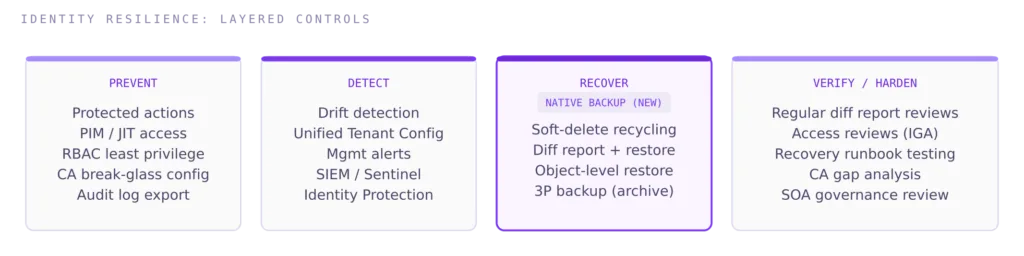
The most resilient identity governance posture combines proactive drift detection (diff reports on a scheduled cadence, Unified Tenant Configuration Management alerts) with native backup as the recovery layer. Detection surfaces the incident; backup provides the remediation path. Neither replaces the other.
Use protected actions for hard-deletion prevention
Microsoft’s own guidance recommends configuring protected actions in Entra to prevent unexpected permanent deletion of high-value objects, such as break-glass accounts, core Conditional Access policies, and critical application registrations. Protected actions add Conditional Access enforcement to specific operations, requiring step-up authentication before a hard-deletion can proceed. This is the right preventative control to pair with backup as the recovery control.
Air-gap considerations remain valid
The backup store is Microsoft-managed and co-located with your tenant. In a scenario involving a compromised tenant or a requirement to restore identity configuration into a new tenant, the native backup may not be accessible or sufficient. For organisations with stringent recovery requirements, a complementary export to a controlled, isolated location via Entra Exporter or a supported third-party tool remains architecturally justified as an additional layer.
NIS2 framing
For organisations in scope of the NIS2 Directive, the introduction of a native, auditable recovery mechanism for identity configuration is a relevant improvement to the evidence base for business continuity and resilience measures under Article 21. Conditional Access policies, authentication method settings, and authorisation policies are direct controls on access integrity. The ability to recover them to a verified prior state following a misconfiguration or compromise incident is directly mappable to the continuity requirements.
That said, the five-day retention window and 24-hour backup cadence must be documented as explicit constraints in your recovery time and recovery point objective statements. A security incident that remains undetected for longer than five days is not recoverable through this mechanism alone. The management body should be briefed that native backup closes a significant operational gap but does not remove the need for continuous monitoring, audit log retention, and tested recovery procedures. The control is additive to, not a replacement for, the broader resilience programme.
FINAL THOUGHT
Microsoft Entra Backup and Recovery in Public Preview is a genuine improvement to the identity resilience toolkit. The object-identity-preserving recovery mechanism solves a problem that no external tool could solve cleanly, and the zero-configuration, tamper-resistant backup model is the right architectural choice for a capability of this sensitivity.
The operational constraints are real and worth designing around explicitly: a 24-hour RPO, a five-day retention window, slow first-run difference reports, a single-job execution model, and no export capability. For large, active tenants the recovery timeline for broad restores can stretch into hours or days. And for security incidents that evolve over weeks, this feature simply has no answer.
The correct framing is that native backup is a last-resort recovery control with known boundaries. It does not reduce the value of upstream prevention, continuous detection, or structured drift monitoring. Those capabilities address the class of incidents this feature cannot reach. Use them together.
This post will be updated when the feature reaches general availability or Microsoft substantially expands the supported object scope and retention window.
Preview note
All behaviour described in this post reflects the Public Preview as of March 2026. Preview features are subject to change before general availability. Validate behaviour in your own tenant before incorporating this feature into operational runbooks.
Further Reading
- Unified Tenant Configuration Management: Drift Detection Across Multi-Tenant Environments
- Entra Tenant Governance: How It Works in Practice
- Administrative Boundary Design in Microsoft Entra ID
- Microsoft Entra Backup and Recovery Overview (Preview)
- Low-Key Debut for Entra ID Backup and Recovery
- Microsoft Entra Backup and Recovery
- Microsoft Entra ID Gets Native Backup and Recovery
- Backup, Difference Report, and Recovery Model
- Microsoft Entra to Receive Native Backup Capabilities