How Microsoft is turning account recovery from a high-risk helpdesk process into a verified self-service identity workflow — and why it is still a preview you should treat as strategic.
| TL;DR > Microsoft Entra ID Account Recovery (currently in public preview) lets users who have lost all their authentication methods recover access themselves (through government-issued ID verification and a biometric Face Check) instead of calling the helpdesk. > It closes the weakest link in most passwordless strategies: the fallback recovery process that attackers love to socially engineer. > It requires Entra ID P1, a Face Check licence (Entra Suite or standalone), and a supported Identity Verification provider from the Microsoft Security Store. A Temporary Access Pass policy is currently mandatory. > It is still a preview with real limitations: recovery matches on exact first/last name, and users with identical names are blocked for now. Pilot it in evaluation mode today; do not yet make it your only recovery path. |
For years, password resets and MFA recovery have remained one of the weakest operational links in enterprise identity security.
Even organisations that invested heavily in Conditional Access, MFA, phishing-resistant authentication and Zero Trust often still rely on a surprisingly fragile recovery process:
- User calls the helpdesk
- A helpdesk operator manually verifies identity
- A temporary password is issued
- An MFA reset is performed
- The user re-registers their credentials
This process is slow, operationally expensive, and introduces significant social engineering risk.
Microsoft is now attempting to change that model with Microsoft Entra ID Account Recovery.
Important status check
At the time of writing, Account Recovery is in public preview, not general availability. Microsoft’s own documentation invites organisations to “try the preview.” Treat it as a capability to pilot and plan for, not yet a production-ready replacement for your helpdesk recovery process.
The concept is simple but strategically important: instead of recovering an account through a helpdesk interaction, users recover their identity directly through verified government-issued identification and biometric validation.
And in practice, that changes far more than just password resets.
Why This Matters
Passwordless strategies often fail at the recovery stage.
Many organisations successfully deploy Windows Hello for Business, FIDO2 security keys, passkeys, Microsoft Authenticator, Conditional Access and phishing-resistant MFA, but still keep legacy fallback mechanisms that quietly undermine the entire security model.
Because eventually devices get lost, phones break, users replace laptops, credentials disappear, and recovery becomes urgent.
At that moment, organisations typically fall back to temporary passwords, helpdesk verification, manual MFA resets, insecure identity questions, or unsupported emergency processes.
That creates a major inconsistency in Zero Trust maturity. Microsoft Entra ID Account Recovery aims to close that gap.
What Is Microsoft Entra ID Account Recovery?
Microsoft Entra ID Account Recovery (also referred to as Self-Service Account Recovery, or SSAR) is a self-service identity recovery workflow integrated with Microsoft Authenticator, Microsoft Entra Verified ID, Face Check, and third-party Identity Verification (IDV) providers.
The process works roughly like this:
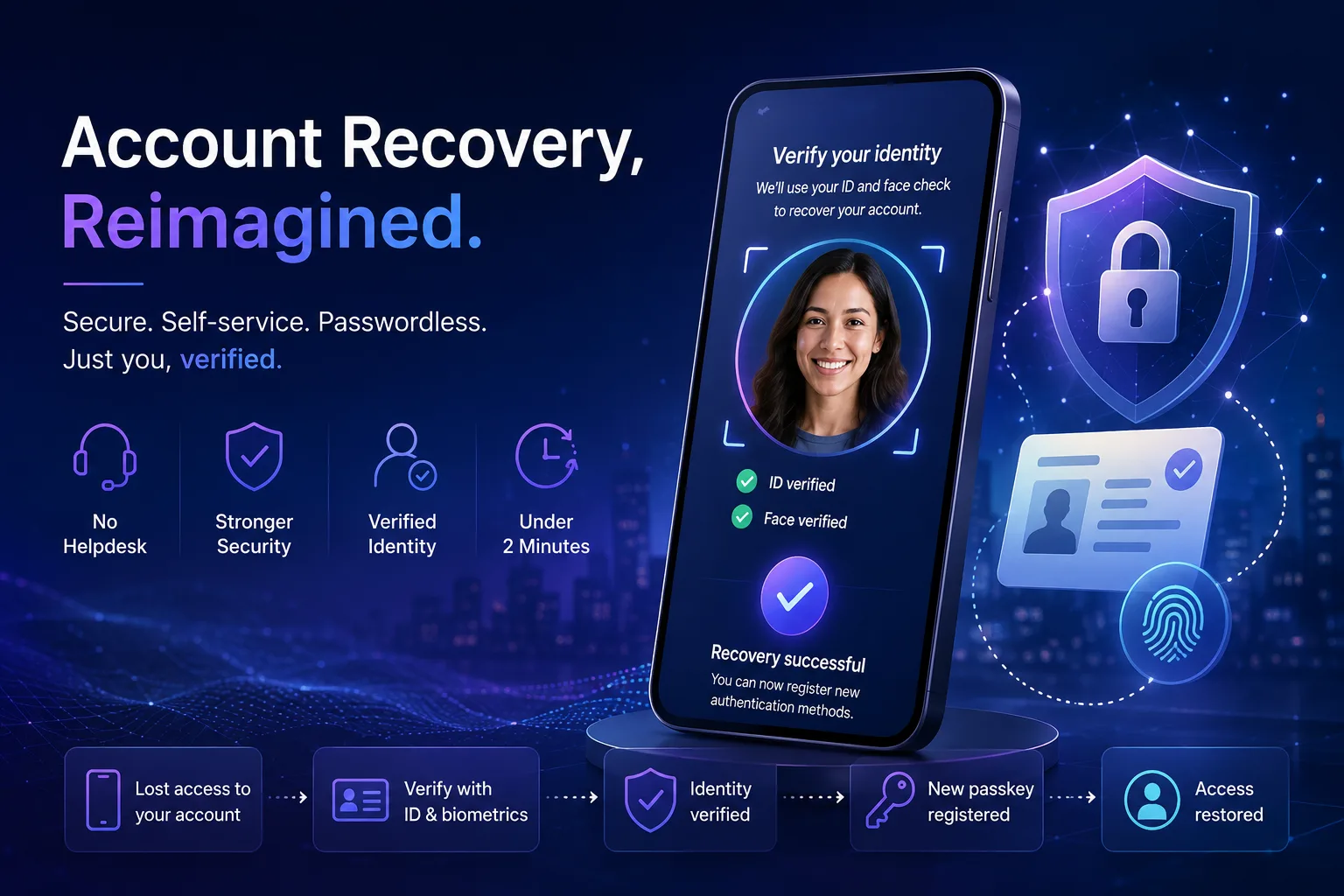
- The user loses access to all authentication methods.
- During sign-in, the user selects an option to recover their account.
- Eligibility is checked against tenant policy.
- The user is redirected to a configured Identity Verification Provider, where their identity is verified using a government-issued ID, document fraud and liveness checks, and a biometric Face Check.
- A Verified ID is issued and stored in Microsoft Authenticator.
- The user presents the Verified ID to Entra ID, which validates it and matches the identity attributes to the account.
- The user receives a Temporary Access Pass and is guided through registering new authentication methods.
No helpdesk interaction. No temporary password issued by IT. No manual MFA reset.
Microsoft positions this as a core component of the broader passwordless future.
Traditional Recovery vs Modern Recovery
| Traditional Recovery | Entra ID Account Recovery |
| Helpdesk-driven | User-driven |
| Manual identity verification | Verified identity proofing |
| Temporary passwords | Passwordless recovery |
| MFA reset by an admin | Self-service |
| High operational cost | Lower operational overhead |
| Social engineering exposure | Stronger identity assurance |
| Hours or days | Minutes |
This is not merely a UX improvement. It is a governance and security architecture shift.
The Bigger Strategic Shift
The interesting part is not the recovery flow itself. It is what this enables organisationally.
1. Reduced Helpdesk Dependency
Password and lockout-related tickets remain one of the most common IT support activities, and recovery effort scales sharply with headcount:
| Organisation Size | Estimated Identity Recovery Volume |
| 1,000 users | Moderate |
| 10,000 users | High |
| 50,000+ users | Significant operational burden |
Microsoft includes a cost savings estimator on the Account Recovery page in the Entra admin center, which lets you model your own helpdesk costs, user count, and per-verification provider cost. Use your own figures here rather than relying on generic industry numbers; the estimate is only as good as your inputs.
2. Better Zero Trust Consistency
A mature Zero Trust environment cannot rely on weak recovery flows, otherwise attackers simply target the fallback process. This is historically how many breaches occur: phishing-resistant MFA is deployed, strong Conditional Access is enforced, identity governance is implemented, and then attackers socially engineer the helpdesk. Verified identity proofing removes human judgement from that step.
3. Stronger Passwordless Adoption
Many organisations hesitate to go fully passwordless because recovery scenarios remain unclear: What if users lose devices? What if they replace phones? What happens during travel? How do we avoid permanent lockouts? A verified recovery mechanism increases confidence in passwordless rollouts.
How the Architecture Works
At a high level, the flow looks like this:

The important distinction: the trust anchor shifts from “the helpdesk operator believes the user” to “identity is cryptographically and biometrically verified.” That is a major architectural evolution.
Prefer to see the experience rather than read about it? This walkthrough shows Self-Service
Account Recovery with Microsoft Entra in action:
Video: Self-Service Account Recovery with Microsoft Entra (YouTube).
Requirements
At the time of writing, Microsoft specifies the following:
Licensing:
- Microsoft Entra ID P1, and
- A Face Check licence, either via Entra Suite or as a standalone Face Check licence
- A cost is also incurred for the IDV provider offer you subscribe to through the Microsoft Security Store
Components
- Microsoft Authenticator
- A supported Identity Verification (IDV) provider, subscribed via the Microsoft Security Store
- Microsoft Entra Verified ID with Face Check
- A Temporary Access Pass policy (currently required for the recovery flow)
Administrative configuration
Administrators must enable the Account Recovery wizard, configure one or more identity verification profiles, define recovery governance, and validate the recovery experience.
Step-by-Step Deployment Guide
Step 1: Validate Passwordless Readiness
Before enabling recovery, assess your current MFA posture, passkey adoption, Windows Hello for Business maturity, Authenticator deployment, Conditional Access baseline, and break-glass account strategy. This should not be deployed in isolation; recovery must align with the broader identity architecture.
Step 2: Review Authentication Method Policies
Navigate to Microsoft Entra admin center → Protection → Authentication Methods and review your passkey policies, FIDO2 configuration, Authenticator settings, registration campaigns, and Temporary Access Pass policy. Confirm the TAP policy is enabled, as it is currently required for the recovery flow.
Step 3: Open the Account Recovery Wizard
In the Entra admin center, go to Entra ID → Account recovery and select Get Started. Setup typically takes 5–10 minutes.
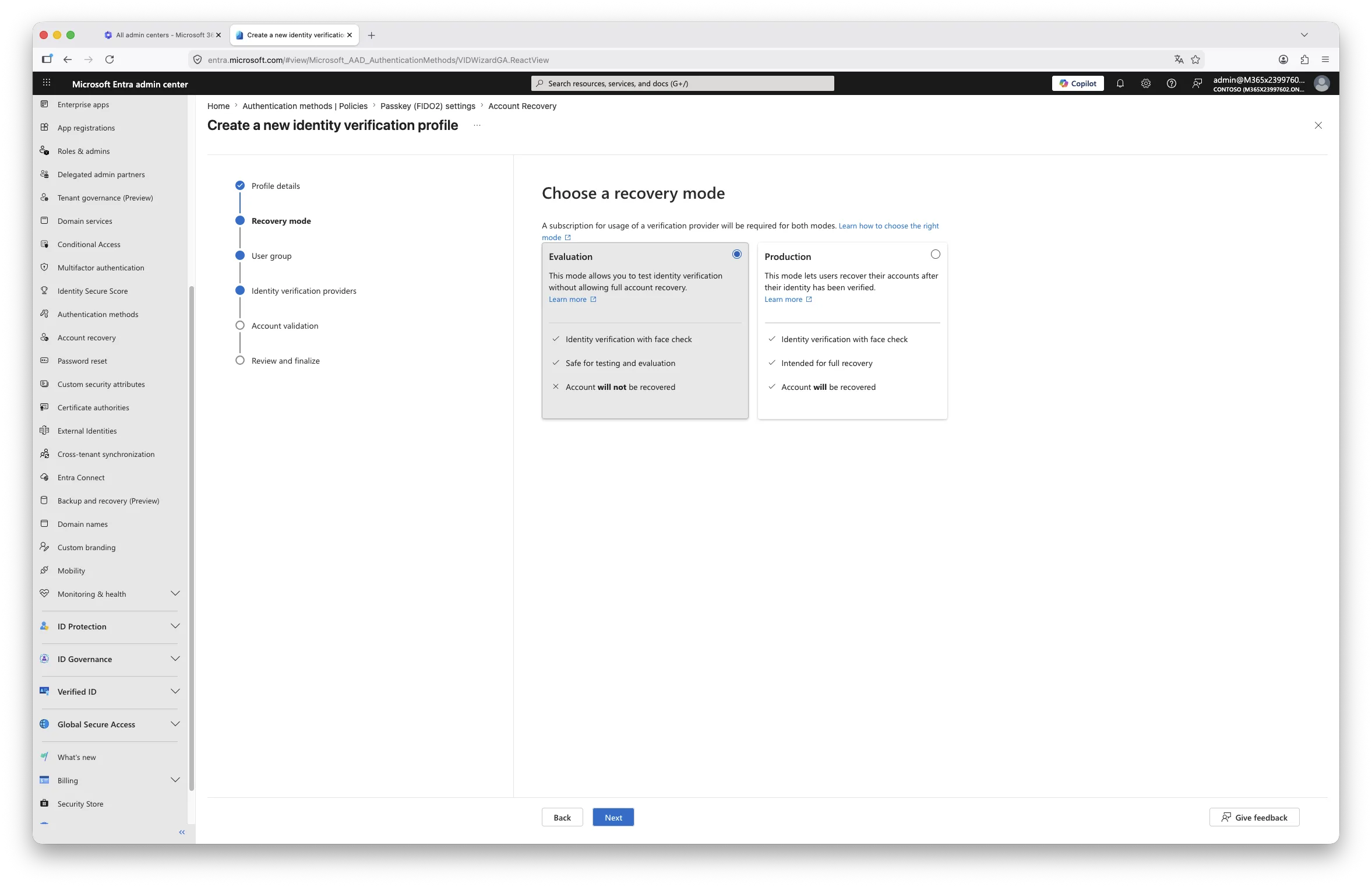
Choose a recovery mode:
- Evaluation mode: lets you test the identity verification flow without actually recovering accounts. Recommended for initial testing.
- Production mode: enables full recovery functionality.
Step 4: Define Scope and Integrate an IDV Provider
Select which user groups can use the recovery profile (include and exclude lists). Then select an Identity Verification Provider. For a provider you have not yet subscribed to, choose Get Solution to open its listing in the Microsoft Security Store and complete the subscription.
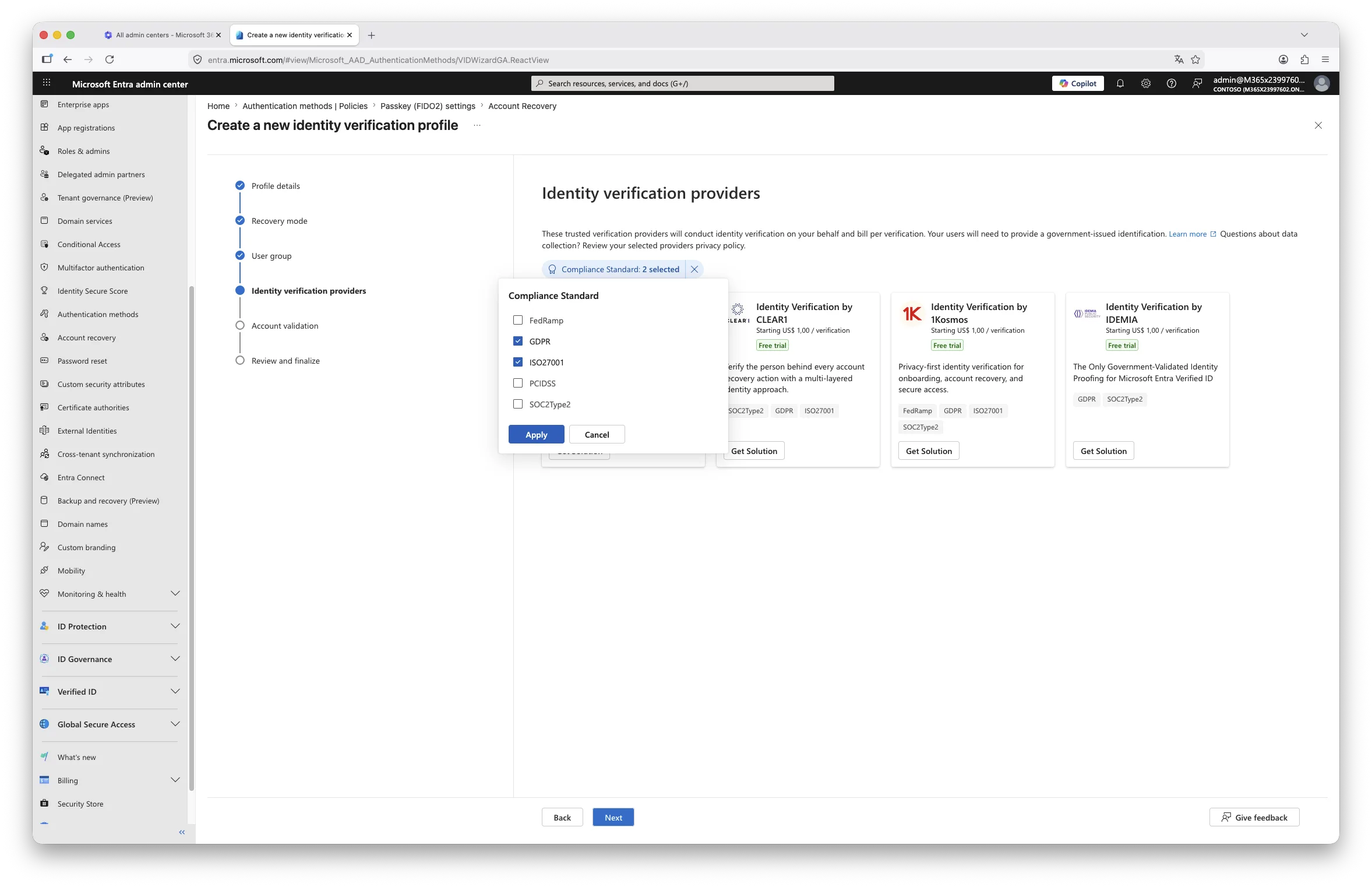
Before committing, review regional availability, GDPR implications, data residency, supported identity documents, retention policies, and biometric processing implications. For European organisations, a legal and privacy review is strongly recommended.
Step 5: Configure Account Validation
Configure how identity claims from the verification provider are matched against user properties in Entra ID. Note an important current limitation: matching is performed on the user’s first and last name only, and these must match the government-issued ID exactly. Users with identical names are blocked from recovery during the preview, which is another reason to start with a small, controlled pilot group.
Step 6: Pilot With Passwordless Users
Best initial candidates are IT admins, security teams, and early adopters. Validate scenarios such as a lost phone, device replacement, new laptop onboarding, travel, Authenticator migration, and complete credential loss.
For a step-by-step view of what users see during recovery, Microsoft documents the full end-user experience: How end users can set up account recovery (Microsoft Learn).

Step 7: Integrate Into Governance Processes
This is where many deployments fail. Recovery must become part of operational governance. Update your identity governance documentation, joiner/mover/leaver procedures, helpdesk runbooks, security awareness material, incident response playbooks, and recovery escalation paths.
Security Considerations
This feature improves security posture, but it is not “set and forget.”
Important governance questions to answer before scaling beyond a pilot:
- What happens if biometric or document verification fails?
- How are false positives and false negatives handled?
- What fallback process exists when recovery cannot complete?
- Which countries and identity documents are supported?
- How is biometric data processed and retained by the IDV provider?
- How do you handle privacy objections?
- Should sensitive accounts (CEO, finance controllers) be excluded from self-service recovery and kept on a human-in-the-loop process?
These questions matter particularly under GDPR, NIS2, internal privacy governance, and works council review processes.
Recommended Enterprise Approach
Small organisations: focus on reducing helpdesk overhead, improving user experience, and enabling passwordless adoption.
Mid-sized organisations: focus on operational scalability, governance integration, and recovery standardisation.
Large enterprises: treat this as an identity assurance capability, a Zero Trust maturity component, and a recovery governance transformation. At scale, this becomes a strategic IAM architecture topic.
Where This Fits in a Modern Entra Strategy
Microsoft is steadily building a fully passwordless identity lifecycle:
| Identity Phase | Microsoft Direction |
| Authentication | Passkeys / FIDO2 |
| Access Control | Conditional Access |
| Identity Risk | Identity Protection |
| Governance | Entra ID Governance |
| Privileged Access | PIM |
| Recovery | Account Recovery (preview) |
| Verification | Verified ID / IDV |
Interian Perspective
The most important lesson here is not technical. It is architectural.
Many organisations invest heavily in strong authentication but overlook recovery governance entirely. In practice, attackers frequently target helpdesk processes, fallback mechanisms, temporary access procedures, and emergency recovery workflows.
A mature passwordless strategy therefore requires three things together: strong authentication, strong governance, and strong recovery assurance.
Microsoft Entra ID Account Recovery is one of the first realistic attempts to modernise that final component at enterprise scale. It is still in preview, so we would not recommend depending on it as your sole recovery path yet, but for organisations seriously pursuing Zero Trust maturity, it is worth piloting now so you are ready when it reaches general availability.
Recommended Next Steps
Immediate actions
- Review your current recovery processes and quantify helpdesk dependency
- Assess your passwordless maturity
- Validate the privacy and data-residency implications of the available IDV providers
- Pilot Account Recovery in evaluation mode with a limited group
Strategic actions
- Integrate recovery into your Zero Trust architecture
- Align recovery governance with your IAM policies
- Update identity lifecycle documentation
- Include recovery in security exercises and tabletop testing
Final Thoughts
The future of identity is not just passwordless authentication. It is passwordless recovery.
Historically, recovery has been where enterprise identity security quietly breaks down. Microsoft’s Entra ID Account Recovery capability is interesting precisely because it attempts to eliminate that weak link, not through stronger passwords but through stronger identity assurance.
It is early days, and the feature is still a preview. But the direction of travel is clear, and it is worth getting ahead of.
Further Reading
- Microsoft is auto-enabling passkeys in Entra: configuration, sync and deployment best practices
- Require Risk Remediation: the game-changer for Conditional Access policies
- Introducing Microsoft Entra’s “Request on Behalf”: a better way to manage Temporary Access Passes
- Overview of Microsoft Entra ID Account Recovery (Microsoft Learn)
- Account recovery FAQs (Microsoft Learn)