Windows Recall is an AI-powered feature introduced for Windows 11, specifically designed for Copilot+ PCs. These devices, announced by Microsoft in May 2024, are equipped with advanced hardware, including a 40+ TOPS Neural Processing Unit (NPU), 16 GB of RAM, 8 logical processors, and at least 256 GB of storage with 50 GB free minimum, alongside Device Encryption or BitLocker and Windows Hello Enhanced Sign-in Security with a biometric option.
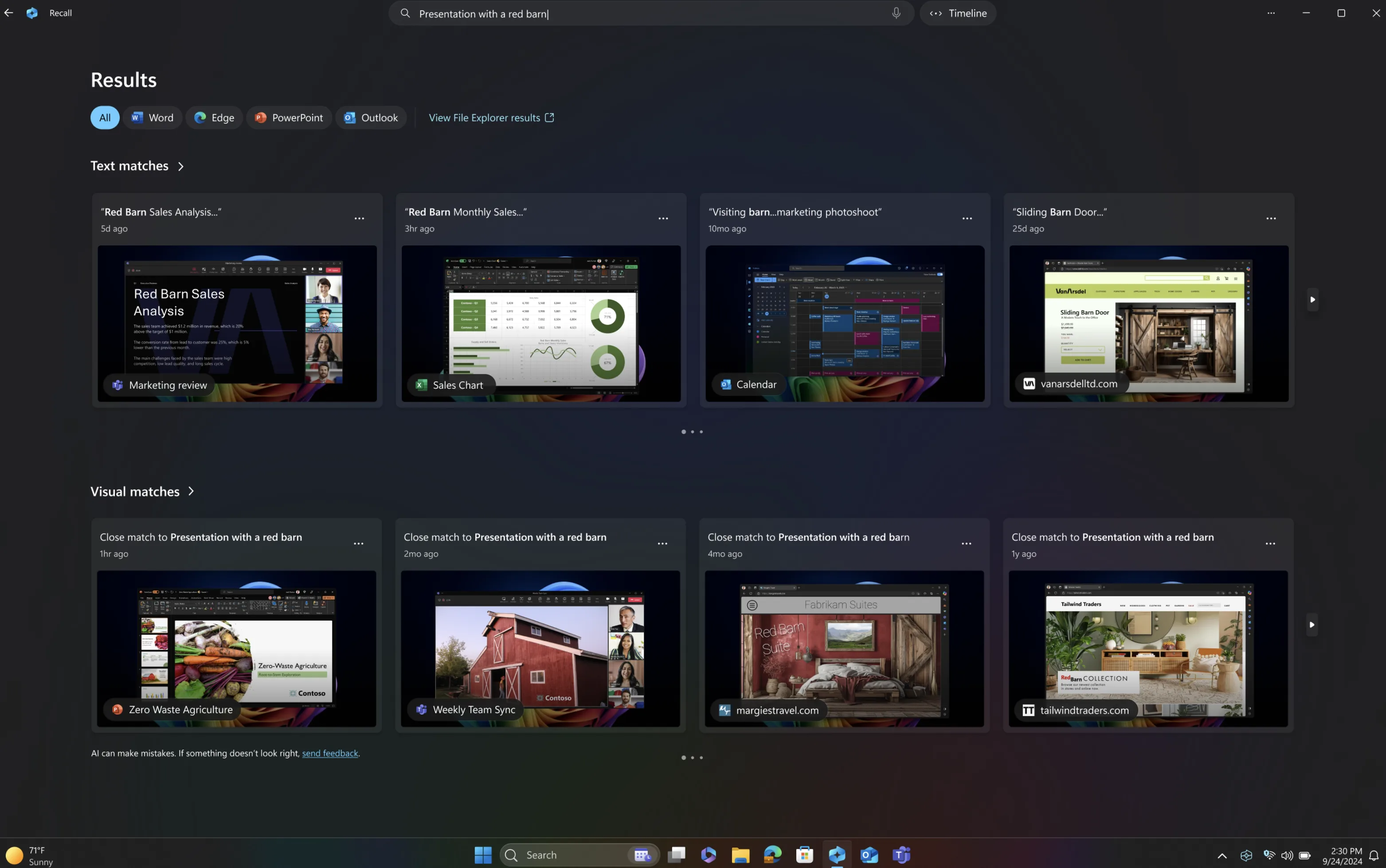
Recall takes snapshots of the user’s screen every few seconds, storing them locally for analysis and retrieval using natural language search. This allows users to find past activities, such as documents, websites, or apps, by describing what they remember, enhancing productivity with a “photographic memory” of PC usage.
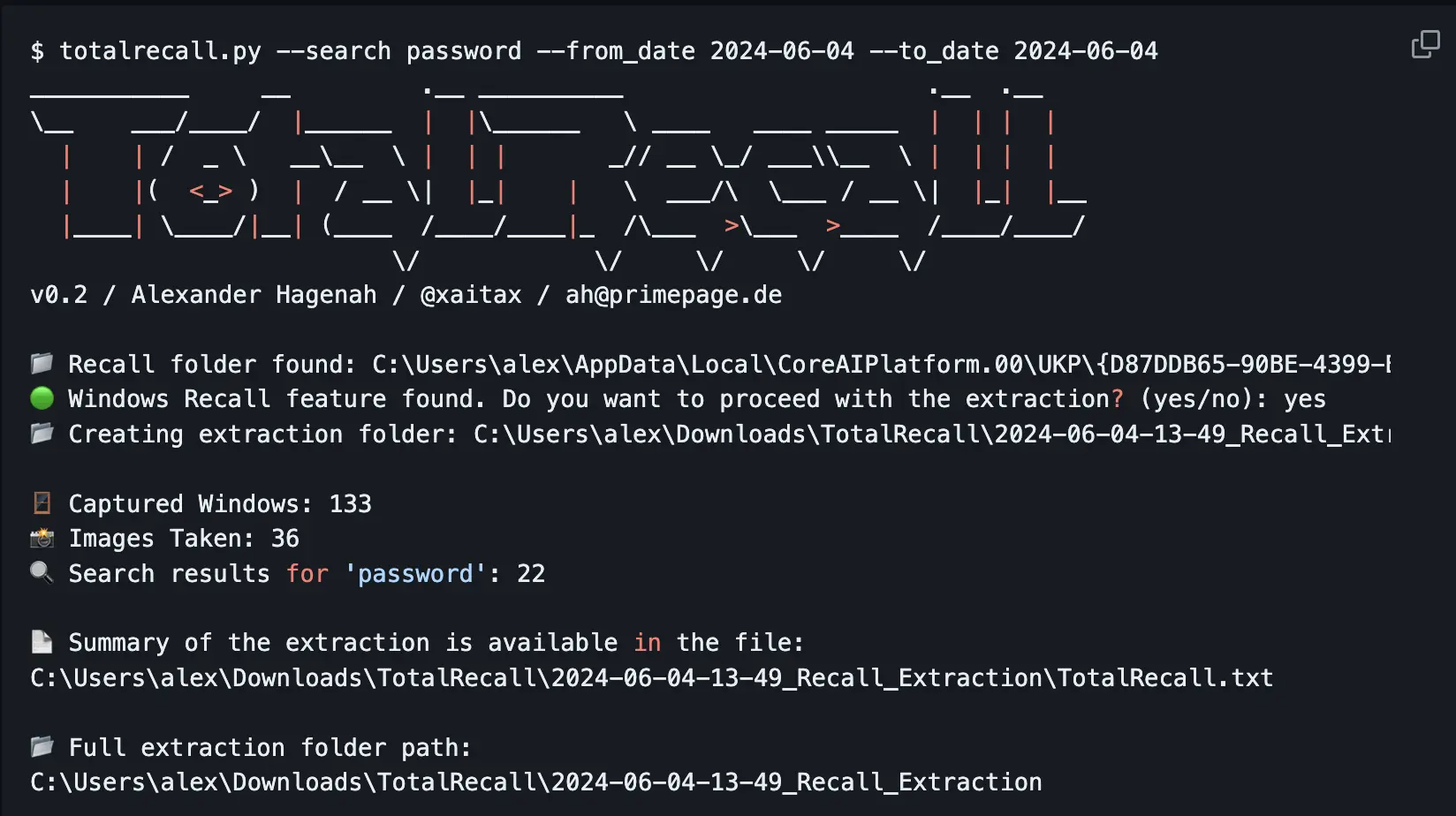
However, when Microsoft first unveiled Windows Recall in May 2024, it faced substantial criticism from privacy advocates and security experts; including m. The primary concern was that Recall could capture sensitive information, such as passwords, credit card numbers, and personal communications, storing them in a database that could be vulnerable to exploitation. Early versions of the feature were not encrypted by default, and its initial opt-out nature (enabled by default) amplified fears of unauthorised access, especially by malware or compromised devices. Critics, including cybersecurity experts, labelled it a “privacy nightmare,” highlighting the risk of data breaches if the snapshot database was accessed by unauthorised parties. The backlash led to Microsoft delaying the feature’s launch, initially planned for June 18, 2024, and limiting its distribution to Windows Insiders for further testing.
The New Release: April 2025 Updates
By April 13, 2025, Microsoft had rolled out Windows Recall to Windows Insiders in the Release Preview channel, incorporating significant updates to address the initial concerns. Key improvements include:
- Opt-In Requirement: Recall is now disabled by default, requiring users to explicitly opt-in to enable it, ensuring they have control over whether snapshots are saved. https://blogs.windows.com/windows-insider/2024/06/07/update-on-recall-preview-security-and-privacy-features-for-windows-11/
- Encryption and Access Control: Snapshots are stored locally and encrypted, with access restricted to the signed-in user via Windows Hello Enhanced Sign-in Security, requiring biometric authentication. Encryption keys are protected via Trusted Platform Module (TPM) and operated within a Virtualization-based Security Enclave (VBS Enclave), ensuring other users cannot decrypt the data. https://learn.microsoft.com/en-us/windows/client-management/manage-recall
- Sensitive Information Filtering: By default, Recall filters out sensitive data, such as passwords, national ID numbers, and credit card numbers, using the Microsoft Classification Engine (MCE), the same technology used by Microsoft Purview. https://support.microsoft.com/en-us/windows/privacy-and-control-over-your-recall-experience-d404f672-7647-41e5-886c-a3c59680af15
- Removability: Users can remove Recall entirely using the “Turn Windows features on or off” settings in Windows, deleting any previously saved snapshots. https://support.microsoft.com/en-us/windows/retrace-your-steps-with-recall-aa03f8a0-a78b-4b3e-b0a1-2eb8ac48701c
- Enterprise Controls: Microsoft has developed additional policies for IT administrators, allowing fine-grained control over Recall’s functionality, such as setting storage limits and filtering specific apps or websites, which can be managed via Intune.
These updates aim to balance the feature’s productivity benefits with enhanced security and privacy, responding to the feedback from the initial backlash and ensuring it’s suitable for enterprise use.
Security Risks for CISOs and Mitigation Strategies
For Chief Information Security Officers (CISOs), Windows Recall presents both opportunities and significant security risks, particularly in regulated environments. The primary risks include:
- Data Exposure: If not properly configured, Recall could capture and store sensitive organisational data, such as financial records or confidential communications, which could be exposed in the event of a breach. This is particularly concerning for organisations handling sensitive data, where unauthorised access could lead to compliance violations.
- Malware Exploitation: Malware could potentially access the Recall database, extracting sensitive information from snapshots, especially if the device is compromised. Early concerns highlighted that unencrypted data could be an attractive target for attackers.
- Compliance Issues: Organisations subject to regulations like NIS2 must ensure that Recall does not compromise their compliance status, particularly regarding data protection and access control.
To mitigate these risks, CISOs can implement the following strategies, leveraging Intune for centralized management:
- Policy Enforcement: Use Intune policies to control who can enable Recall and how it is configured. For example, disabling Recall on devices handling highly sensitive data can reduce exposure.
- Regular Audits: Periodically review Recall settings and snapshots to ensure no sensitive data is being stored unnecessarily, aligning with best practices for data governance, which can be facilitated through Intune reporting.
- User Education: Train users on the proper use of Recall, emphasising the importance of not enabling it on devices with sensitive information and understanding its privacy implications, with policies enforced via Intune.
These measures, combined with the updated security features in the April 2025 release, can help CISOs manage the risks associated with Recall while leveraging its productivity benefits.
Step-by-Step Guide with Intune
Managing Windows Recall in an enterprise environment using Microsoft Intune is essential for maintaining security and compliance. Below is a detailed step-by-step guide, effective as of April 13, 2025:
- Access Microsoft Intune Admin Center
- Navigate to https://intune.microsoft.com/.
- Navigate to Device Management
- Select Devices, then Manage Devices, and finally Configuration.
- Create a New Policy
- Click Create, then select New policy.
- Configure Policy Basics
- Set the Platform to “Windows 10 and later.“
- Choose Profile type as “Settings catalog.“
- Enter a Policy Name (required) and an optional Description. Eg W11-WindowsRecallControl
- Click Next.
- Add Settings
- In the Configuration settings section, click Add Settings.
- In the Settings Picker, search for the “Windows AI” category.
- Select Recall-Related Policies
- Choose policies like:
- AllowRecallEnablement to control enabling Recall.
This policy setting allows you to determine whether the Recall optional component is available for end users to enable on their device. By default, Recall is disabled for managed commercial devices. Recall isn’t available on managed devices by default, and individual users can’t enable Recall on their own.- If this policy isn’t configured, end users will have the Recall component in a disabled state.
- If this policy is disabled, the Recall component will be in disabled state and the bits for Recall will be removed from the device. If snapshots were previously saved on the device, they’ll be deleted when this policy is disabled. Removing Recall requires a device restart.
- If the policy is enabled, end users will have Recall available on their device. Depending on the state of the DisableAIDataAnalysis policy (Turn off saving snapshots for use with Recall), end users will be able to choose if they want to save snapshots of their screen and use Recall to find things they’ve seen on their device.
- SetDenyAppListForRecall and SetDenyUriListForRecall to exclude apps and websites from snapshots.
- This policy allows you to define a list of apps that won’t be included in snapshots for Recall.
Users will be able to add additional applications to exclude from snapshots using Recall settings.
The list can include Application User Model IDs (AUMID) or name of the executable file.
Use a semicolon-separated list of apps to define the deny app list for Recall.
Eg: code.exe;Microsoft.WindowsNotepad_8wekyb3d8bbwe!App;ms-teams.exe
- This policy allows you to define a list of apps that won’t be included in snapshots for Recall.
- SetMaximumStorageDurationForRecallSnapshots and SetMaximumStorageSpaceForRecallSnapshots to limit storage.
- This policy setting allows you to control the maximum amount of disk space that can be used by Windows to save snapshots for Recall.
- You can set the maximum amount of disk space for snapshots to be 10, 25, 50, 75, 100, or 150 GB.
When this setting isn’t configured, the OS configures the storage allocation for snapshots based on the device storage capacity. - 25 GB is allocated when the device storage capacity is 256 GB. 75 GB is allocated when the device storage capacity is 512 GB. 150 GB is allocated when the device storage capacity is 1 TB or higher.
- AllowRecallEnablement to control enabling Recall.
- Choose policies like:
- Configure and Apply the Policy
- Apply scope tags, assign to user/device groups, review, and click Create to deploy.
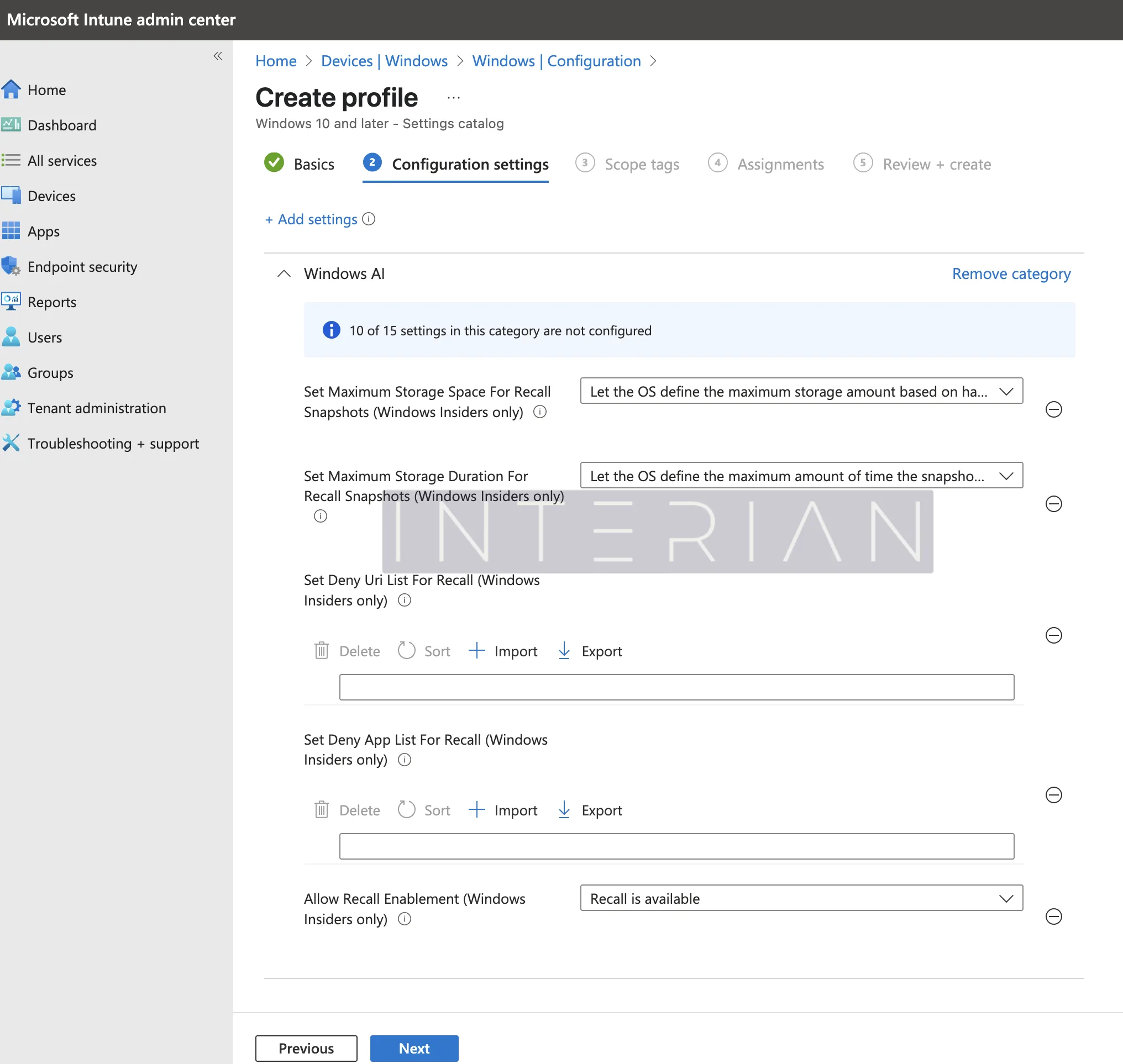
This guide ensures enterprises can tailor Recall to their security needs, aligning with best practices for data protection and compliance.
Relation to NIS2 Compliance
The Network and Information Security Directive 2 (NIS2), effective across EU member states since October 17, 2024, aims to enhance cybersecurity for critical sectors, including energy, transport, health, and digital infrastructure. It mandates organisations to implement measures for risk management, incident reporting, and securing network and information systems, with a focus on data protection and business continuity.
Windows Recall, when properly managed, can align with NIS2 requirements by enhancing organisational cybersecurity. Specifically:
- Risk Management: By controlling who can enable Recall and what data is captured (e.g., filtering sensitive information and setting storage limits), organisations can mitigate risks associated with data exposure, aligning with NIS2’s focus on risk assessments.
- Incident Response: Recall’s ability to store and search through past activities can aid in incident response and forensics, provided it is securely configured, supporting NIS2’s incident reporting obligations.
- Supply Chain Security: Ensuring all devices, including those with Recall enabled, meet security standards can help maintain supply chain security, a key NIS2 requirement.
However, organisations must carefully configure Recall to avoid compliance issues. Ensuring sensitive data is filtered out and that only authorised users can access snapshots is critical for meeting NIS2’s data protection standards.
Closing Section
Windows Recall, released in the preview channel in April 2025, offers significant productivity benefits but also introduces security challenges for CISOs and organisations under NIS2. The feature’s evolution—from initial backlash to enhanced security controls—demonstrates Microsoft’s response to user concerns.
By implementing the step-by-step guide with Intune and aligning Recall with NIS2 requirements, organisations can leverage its capabilities while maintaining their security posture and compliance status. Regular audits, policy enforcement, and user education are essential to mitigate risks and ensure Recall enhances rather than undermines organisational cybersecurity. As AI-driven features like Recall become more prevalent, proactive management and a deep understanding of both the technology and the regulatory landscape are key to balancing innovation with robust data protection.
Is your enterprise ready to navigate this evolving landscape?
Update 22/04/2026
Fresh Insights on Microsoft Recall Risks
Since publishing this post, I’ve come across some thought-provoking points from Kevin Beaumont, a UK cybersecurity expert, who’s shared his perspective on Microsoft Recall for Copilot+ PCs. In his recent DoublePulsar blog post, he examines the feature’s security and privacy concerns, focusing on the risks of storing sensitive data. Here’s a quick look at his key findings:
- Persistent Vulnerabilities: Despite Microsoft’s improvements, like opt-in settings and encryption, Kevin concludes that Recall’s screenshot functionality could still expose personal information, such as credit card details and chat logs, to potential exploitation.
- Safety Concerns: He raises serious doubts about the feature’s overall security, suggesting the risks may outweigh the benefits for many users.
For a detailed exploration, check out his post at Microsoft Recall on Copilot+ PC: testing the security and privacy implications. It’s a must-read for anyone considering Recall’s trade-offs.