
Phishing-resistant authentication is rapidly becoming the default security model across Microsoft 365 and Microsoft Entra. This shift is accelerating as passkeys are being automatically enabled in Microsoft Entra for many tenants from March 2026
This marks a structural shift in enterprise identity security: passkeys are moving from optional passwordless feature to a default authentication method within Microsoft environments.
For organisations operating Microsoft 365 at scale, this requires a clear configuration, governance and Conditional Access strategy rather than ad-hoc activation.
Understanding the shift to passkeys by default
Microsoft has been gradually moving away from passwords for several years through Windows Hello for Business, FIDO2 security keys and Microsoft Authenticator passwordless sign-in.
Passkeys represent the next step: phishing-resistant credentials based on FIDO2 and public/private key cryptography.
With Microsoft beginning to auto-enable passkeys within Entra, organisations should expect:
- Passkeys appearing as an available authentication method
- Increasing user prompts to enrol passwordless methods
- More native browser and device integration
- Greater reliance on phishing-resistant authentication for secure access
This is not just a user experience improvement; it is a core identity security change.
Passkeys vs traditional FIDO2 authentication
While FIDO2 security keys have existed in Entra for years, passkeys extend the concept.
Traditional FIDO2 security keys
- Physical key (YubiKey etc.)
- Stored locally on device
- Strong phishing resistance
- Requires hardware distribution
Passkeys
- FIDO2-based but device-bound or cloud-synced
- Stored in platform authenticators (Windows, iOS, Android)
- Can sync across devices via secure ecosystems
- Easier user adoption
Passkeys therefore remove one of the biggest barriers to passwordless: hardware distribution and user friction.
How passkeys work in Microsoft Entra
Passkeys rely on public/private key pairs stored in a secure enclave on a device or synchronised through a trusted platform ecosystem.
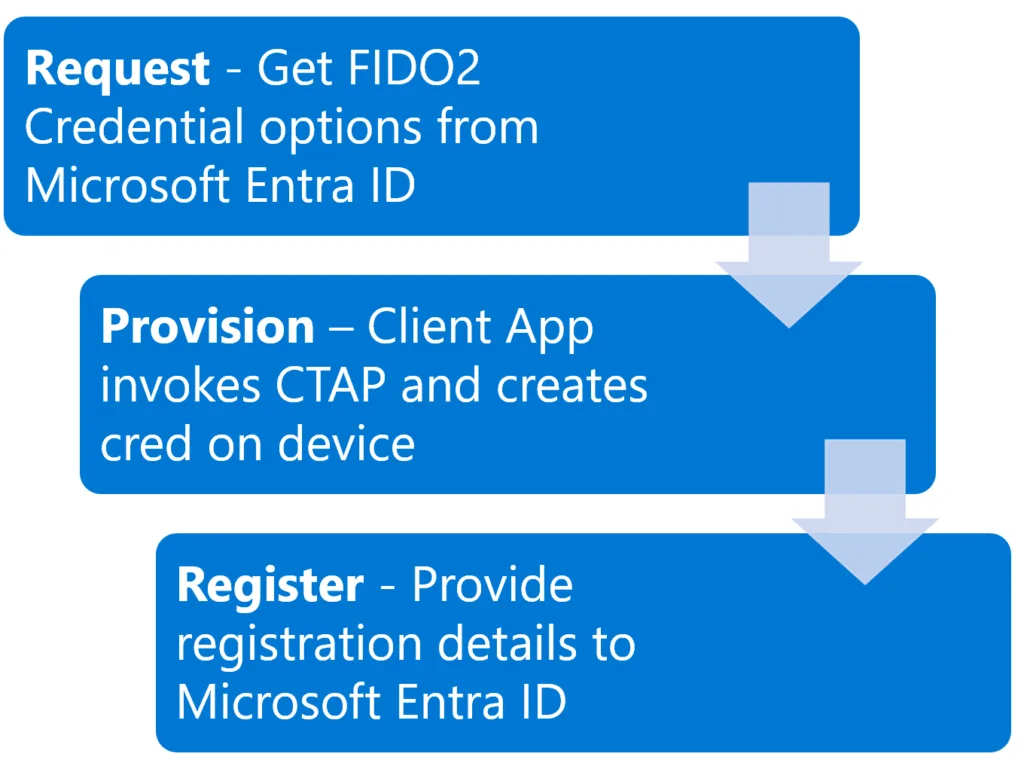
When a user authenticates:
- Entra sends a challenge
- The device signs using the private key
- The public key validates the response
- No password is transmitted
Authentication becomes:
- phishing resistant
- device-bound
- strongly tied to user presence (biometric/PIN)
Auto-enablement behaviour in tenants
When Microsoft enables passkeys by default:
- Passkeys appear as an available authentication method in Entra
- Users may see prompts to register a passkey
- Admins can configure and restrict usage
- Existing authentication methods remain functional
Auto-enablement does not mean uncontrolled rollout; configuration remains fully manageable.
Configuring passkeys in Microsoft Entra
Navigate to: Microsoft Entra admin centre → Protection → Authentication methods → Passkey (FIDO2)
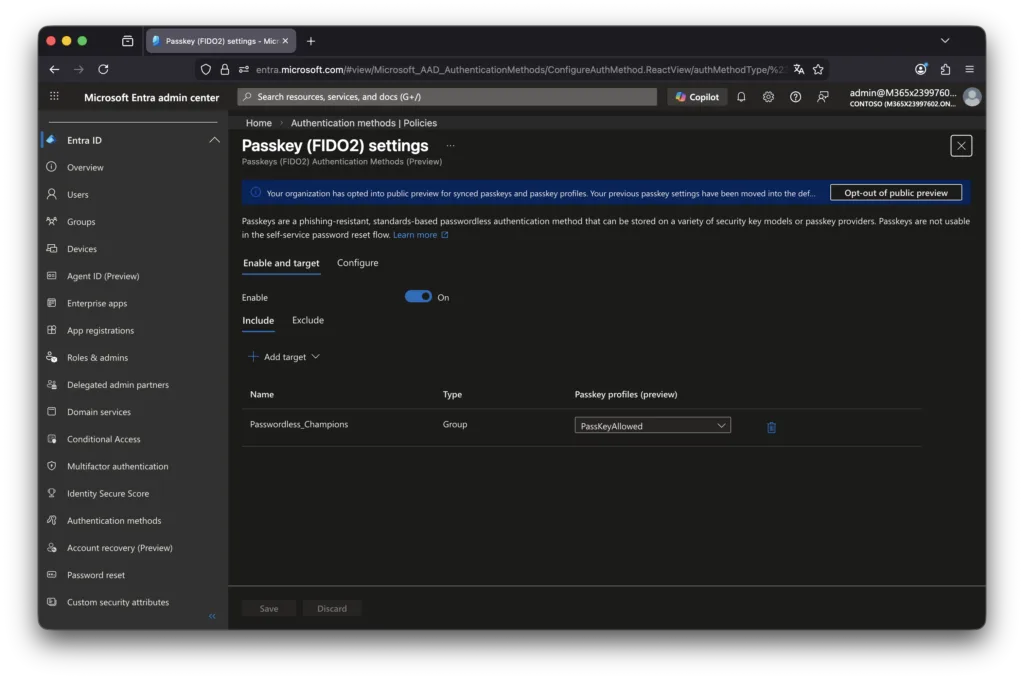
Key configuration elements:
Enable passkeys
Toggle FIDO2/passkey authentication:
- Enable for all users
- Or pilot group first
Recommended: start with pilot group.
Target specific users or groups
Assign to:
- IT/security team first
- early adopters
- passwordless pilot group
Avoid enabling for entire organisation immediately.
Enforce attestation (optional)
Attestation ensures only trusted hardware is used.
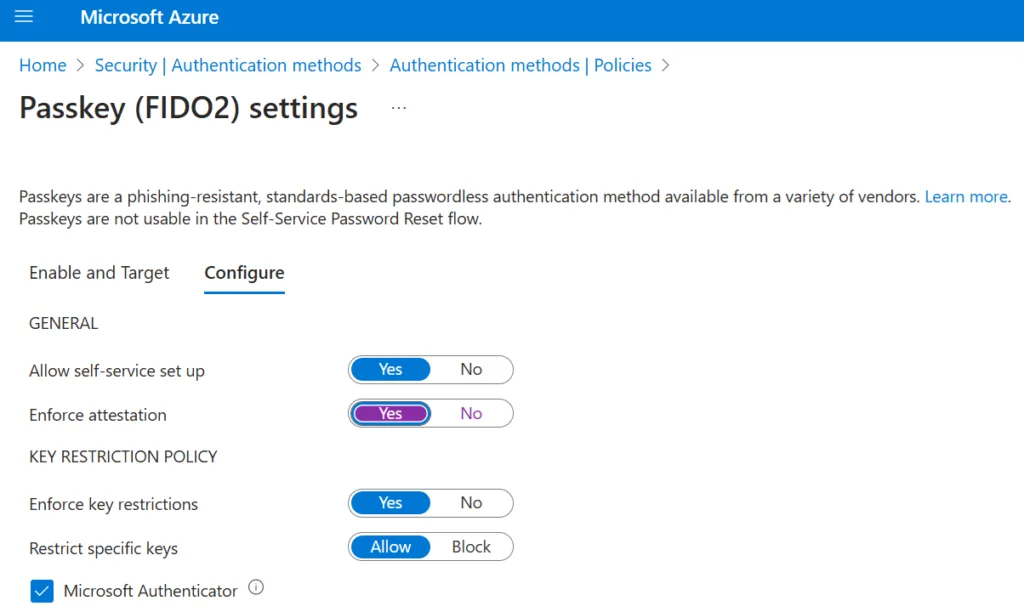
Enable if:
- high security environment
- regulated industry
- requiring certified authenticators
Disable if:
- broad device diversity
- BYOD heavy environment
Restrict key types (optional)
You can restrict:
- platform authenticators only
- hardware security keys only
- specific vendors
Most organisations should initially allow: platform passkeys + FIDO2 keys
Passkey sync across devices
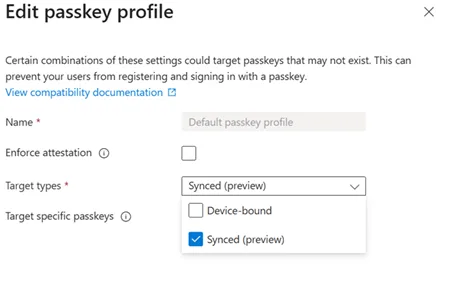
A key architectural decision is whether to prioritise synced passkeys for usability or device-bound passkeys for stronger assurance.
Synced passkeys improve user experience across multiple devices and ecosystems, but device-bound passkeys provide tighter control over where credentials are stored and how they are governed within enterprise-managed environments.
Enforcing attestation introduces an additional layer of assurance by validating the authenticity and provenance of the authenticator during registration. This can be particularly relevant in regulated environments where hardware-backed trust and supply chain integrity must be demonstrable. However, enforcing attestation may also reduce compatibility and increase operational complexity.
A major advantage of passkeys is synchronisation.
Depending on platform:
- Windows passkeys can sync via Microsoft ecosystem
- iOS/macOS via Apple iCloud Keychain
- Android via Google Password Manager
This enables:
- seamless login across user devices
- reduced re-enrolment
- improved usability
However, it introduces governance considerations.
Update 11 March 2026
Microsoft has now published MC1247893, introducing Microsoft Entra passkeys on Windows as a new phishing-resistant sign-in option for Entra-protected cloud resources.
This is particularly relevant for personal, shared and unmanaged Windows devices, where users can register device-bound passkeys in the Windows Hello container and use multiple Entra accounts on the same device, with each account registering its own passkey.
Importantly, these passkeys do not sync across devices: each device requires separate registration per Entra account. Microsoft also states that Windows Hello for Business remains the recommended option for managed, Entra-joined or registered devices.
Governance considerations of passkey sync
When passkeys sync across personal and corporate devices:
- Credentials may exist outside managed endpoints
- Device trust becomes more important
- Conditional Access must enforce compliance
- Strong device policies required
Passkeys remain phishing resistant, but device governance becomes critical.
From a security architecture perspective, passkeys will gradually shift the primary identity boundary from credentials towards devices and platform trust. As authentication becomes phishing-resistant by default, the focus of identity security will increasingly move towards device compliance, token protection and session governance. Organisations that do not align Conditional Access and device trust policies with passkey adoption risk creating a false sense of security despite deploying stronger authentication.
Conditional Access best practices
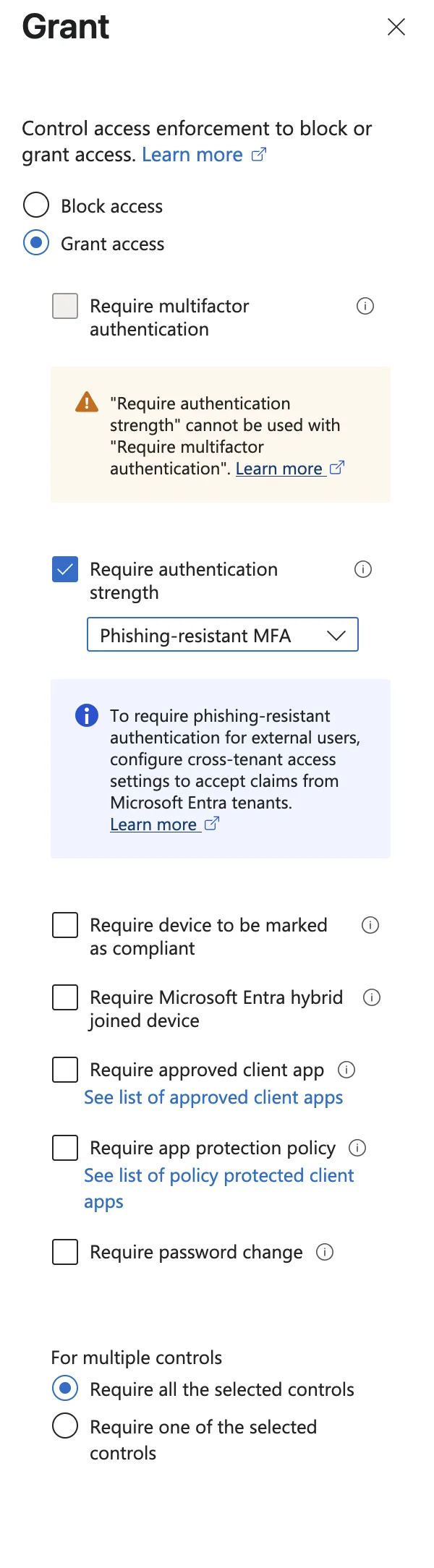
Passkeys should be combined with Conditional Access for full security value.
Microsoft’s authentication strength policies will play an increasingly central role in enforcing phishing-resistant authentication using passkeys and FIDO2 methods. Aligning Conditional Access policies with authentication strength requirements ensures that passkeys are not only enabled, but effectively enforced as part of a broader Zero Trust identity strategy.
Recommended policies
Require phishing-resistant authentication
Use Authentication Strength policies:
- Require phishing-resistant MFA
- Include passkeys and FIDO2
Enforce compliant or hybrid-joined devices
If using synced passkeys:
- require compliant device
- or hybrid join
This prevents access from unmanaged endpoints.
Block legacy authentication
Passkeys only provide value if passwords are not fallback.
Ensure:
- legacy protocols disabled
- basic authentication blocked
Recovery & fallback governance
As organisations transition towards passkeys and passwordless authentication models, recovery and fallback procedures become a critical design consideration. Lost or unavailable devices, platform changes and account recovery scenarios must be aligned with identity governance and security controls to prevent operational lockout risks.
Temporary Access Pass (TAP) should be configured as the primary controlled recovery mechanism for lost or replaced devices, allowing users to securely register new passkeys without reverting to weaker authentication methods. Break-glass accounts must be reviewed to ensure they remain phishing-resistant and securely governed, while helpdesk-driven recovery workflows should include strong identity verification and auditing to prevent social engineering abuse.
Without clearly defined recovery governance, passwordless authentication can unintentionally reintroduce credential-based attack paths through emergency access, unmanaged fallback methods or weak recovery procedures.
Deployment strategy (recommended approach)
Phase 1 — preparation
- Review authentication methods policy
- Define passwordless strategy
- Identify pilot users
- Review Conditional Access
Phase 2 — pilot rollout
Enable passkeys for:
- IT/security
- admins
- tech-savvy users
Test:
- registration flow
- cross-device usage
- recovery scenarios
Phase 3 — broader deployment
Gradually expand:
- department by department
- enforce authentication strength
- reduce password reliance
Phase 4 — passwordless-first model
Long-term goal:
- passkeys primary sign-in
- passwords fallback only
- eventually passwordless default
Common pitfalls to avoid
Enabling for all users immediately
Leads to confusion and support load.
No Conditional Access alignment
Passkeys without device policies reduce control.
Ignoring recovery scenarios
Lost device = authentication lockout if not planned.
Not educating users
Users must understand:
- what passkeys are
- how to register
- recovery options
Why this matters now
Microsoft auto-enabling passkeys signals a clear direction:
passwordless authentication will become standard in Microsoft environments.
Organisations that prepare early will benefit from:
- stronger phishing resistance
- reduced credential theft
- improved user experience
- better alignment with Zero Trust principles
Passkeys are not simply another authentication option; they are becoming a foundational identity control within Microsoft Entra.
Final thoughts
Microsoft enabling passkeys by default confirms that passwordless authentication is no longer a future objective but an active transition phase. Organisations that align passkey adoption with Conditional Access, device trust and identity governance will be significantly better positioned to reduce credential-based attacks and move towards a truly phishing-resistant Microsoft environment.
Related Microsoft identity and security insights:
- Exploring Conditional Access Bypasses in Microsoft Entra ID
- Is Your Guest Access in Entra Putting Your Organisation at Risk?
- Strengthening Cloud Governance and Resilience with Microsoft