Microsoft 365 Baseline Security Mode is part of Microsoft’s move toward a secure by default operating model. It gives administrators a central experience to evaluate and enable Microsoft recommended security settings that were previously scattered across workloads, portals and sometimes PowerShell.
For Interian, the interesting question is not which button Microsoft added. The better question is this: how should Microsoft 365 Baseline Security Mode, Secure Score and tenant governance work together? And for organisations dealing with CIS Controls or NIS2, the next question is even more practical: can this become usable evidence for a governed security baseline?
Interian view: Baseline Security Mode is best understood as a Microsoft curated hardening layer. It is valuable, but it should feed into tenant configuration governance rather than replace it.
| TL;DR Microsoft 365 Baseline Security Mode helps admins enable selected Microsoft recommended controls. Secure Score measures posture. Tenant governance decides ownership, exceptions, review rhythm and evidence. CIS Controls help translate this into practical safeguards. NIS2 raises the need for risk based, documented and reviewable security measures. |
What Is Microsoft 365 Baseline Security Mode?
Microsoft 365 Baseline Security Mode is an admin centre experience that helps administrators protect business data, reduce disruption, block unsafe end user practices, secure internal accounts and improve collaboration security.
According to Microsoft, it covers key Microsoft 365 services including Microsoft 365 Apps, SharePoint and OneDrive, Microsoft Teams, Exchange Online and the Microsoft Entra identity platform. It is available across Microsoft 365 subscriptions and plans, with workload specific administration controlled through role based access control.
The practical value is simple. Settings that used to require different admin centres or PowerShell are now easier to review from one place. The risk is equally simple. Easier access can make a setting feel safer than it is. That is why BSM should be treated as a guided review process, not as a one click tenant hardening project.
- Microsoft Entra ID: authentication hardening, administrator protection and application consent controls.
- Exchange Online: legacy access reduction, EWS impact review and mail related security configuration.
- SharePoint and OneDrive: legacy authentication, custom script, store access and sharing related controls.
- Microsoft Teams: Teams Rooms resource account restrictions and compliant device requirements.
- Microsoft 365 Apps: Office hardening such as ActiveX, DDE and legacy file format protections.
Where to find it: Microsoft documents the path as Microsoft 365 admin centre, Settings, Org Settings, Security and Privacy, Baseline Security Mode.
Microsoft 365 Baseline Security Mode Is Not Another Secure Score
One of the first misconceptions is that Baseline Security Mode replaces Microsoft Secure Score. It does not. Secure Score is primarily a measurement and recommendation system for security posture. Baseline Security Mode is more focused on configuration. It helps administrators review and turn on selected Microsoft baseline settings.
| Layer | What it answers | What it gives you | What it does not give you |
|---|---|---|---|
| Microsoft 365 Baseline Security Mode | Which Microsoft recommended settings should we review and enable? | A central admin centre path for selected controls across identity, Exchange Online, SharePoint, OneDrive, Teams and Microsoft 365 Apps. | A full tenant baseline, exception register, business approval model or audit story. |
| Microsoft Secure Score | How much of the recommended Microsoft security posture have we implemented? | A measurable posture signal, recommended actions, trend history and risk acceptance status. | A complete view of business risk, control ownership or configuration drift. |
| Tenant governance | What is our approved target state, who owns it, and how do we keep it stable? | Policy decisions, baselines, owners, exceptions, expiry dates, review evidence and drift monitoring. | Automatic security value unless the process is connected to real configuration and monitoring. |
| CIS Controls | Which safeguards should we implement in a practical control model? | A recognised control language, with CIS Control 4 directly focused on secure configuration of enterprise assets and software. | A Microsoft 365 configuration by itself. The controls still need to be mapped and implemented. |
| NIS2 | Can we demonstrate appropriate and proportionate cyber risk management measures? | A regulatory reason to document risk analysis, security policies, access control, asset management, incident handling, continuity and assessment of effectiveness. | A product checklist or a Microsoft specific baseline. |
This is why a Microsoft 365 baseline should not be built from one signal only. BSM gives a Microsoft recommended configuration layer. Secure Score gives a posture signal. Tenant governance turns both into decisions, exceptions and evidence. CIS Controls provide a practical control language, and NIS2 raises the expectation that those choices are risk based and reviewable.
What Kind Of Controls Are Included?
Microsoft has selected controls that reduce common Microsoft 365 attack paths. The current set is not one single switch. It is a collection of workload settings that administrators can review, assess for impact and enable independently.
| Control family | Examples included in BSM | What to validate before enabling |
|---|---|---|
| Privileged authentication | Require phishing resistant multifactor authentication for privileged administrator access to Microsoft admin portals. | Break glass accounts, existing Conditional Access policies, privileged role assignments and administrator communication. |
| Legacy authentication | Block legacy authentication flows and basic authentication prompts that do not support modern protection. | Older clients, service accounts, mail flows, scripts and any protocol dependency still used by the business. |
| Application credentials and consent | Block new password credentials on applications and restrict end user consent to certified or low risk applications. | Application owners, service principals, consent workflow, automation accounts and vendor integrations. |
| SharePoint and OneDrive | Block insecure file open protocols, FPRPC, legacy browser authentication, legacy client authentication, new custom scripts and Microsoft Store access for SharePoint. | Old site customisations, add ins, migration tools, intranet dependencies and low code solutions. |
| Microsoft 365 Apps | Open legacy file formats in Protected View, block ActiveX controls, block OLE Graph and OrgChart objects, block DDE server launches in Excel and block Microsoft Publisher. | Finance files, templates, older macros, business reporting workflows and any remaining Publisher use before October 2026. |
| Exchange Online | Disable organisation wide access to Exchange Web Services. | Office add ins, Power Query in Excel, Power BI and Fabric, Power Platform dataflows, cross tenant calendar sharing, MailTips, hybrid Exchange and Dynamics sync. |
| Teams Rooms | Prevent Teams Rooms resource accounts from accessing Microsoft 365 files, require managed compliant devices and block unmanaged sign ins. | Room account design, device compliance, meeting room operations and exception ownership. |
Many compromises still start with weak authentication, legacy protocols, excessive consent, vulnerable Office content or weakly governed collaboration settings. Bringing these controls into one admin centre experience lowers the operational barrier for organisations that know they should harden Microsoft 365 but struggle to turn recommendations into controlled configuration changes.
Important nuance: A recommended security setting can still have business impact. The right operating model is review, pilot, approve, enable and monitor.
Why Impact Analysis Matters
Exchange Web Services is the best example of why secure by default does not mean blindly enable everything. Disabling organisation wide EWS access can reduce legacy app usage and shrink the attack surface. At the same time, Microsoft documents potential impact for Office add ins, Power Query in Excel, Power BI and Fabric, Power Platform dataflows, cross tenant calendar features, MailTips, hybrid Exchange and some Dynamics on premises sync scenarios.
The MVP and Microsoft 365 community discussion around BSM makes the same point from the field. Tony Redmond highlighted that EWS can still appear in places administrators might not expect, such as older Outlook group behaviour. Amy Babinchak framed BSM as a migration target, not a flip switch. That is the right lens for Interian as well.
That does not mean the recommendation is wrong. It means the change must be governed. A tenant with no EWS dependencies can move quickly. A tenant with business critical integrations needs a dependency register, remediation plan, rollout window and rollback decision point.
Practical rule: If the impact report shows zero impact, enable the setting. If dependencies appear, treat the recommendation as a governance item instead of a quick admin centre toggle.
A Baseline Is Not Governance
This is the core distinction. Baseline Security Mode answers the question: which Microsoft recommended settings should we consider enabling? It does not answer the questions that auditors, risk owners and security architects will ask later.
- Who owns this control?
- Why is this setting disabled?
- Which business service depends on the exception?
- Who approved the deviation?
- When does the exception expire?
- How do we detect configuration drift?
- Where is the evidence for the latest review?
These are not Microsoft product questions. They are governance questions. Baseline Security Mode can make the technical baseline easier to activate, but organisations still need a target state baseline, exception process, ownership model and monitoring cycle.
Where CIS Controls And NIS2 Fit
CIS Controls and NIS2 make this topic more relevant for organisations that need to show evidence, not only improve Microsoft settings.
CIS Control 4 is the closest fit because it focuses on secure configuration of enterprise assets and software. For Microsoft 365, BSM can support that control by making selected secure configuration settings easier to review and enable. It also touches related areas such as account management, access control, logging evidence, application governance and service provider risk.
NIS2 is different. It is not a Microsoft configuration framework and it does not prescribe Microsoft 365 Baseline Security Mode. It does, however, set a baseline expectation for cybersecurity risk management measures and reporting obligations. Article 21 includes topics such as risk analysis, information system security, incident handling, business continuity, supply chain security, secure acquisition and maintenance, assessment of effectiveness, cyber hygiene, cryptography, access control and asset management.
That is why BSM can support a NIS2 story, but it cannot be the whole story. For a NIS2 discussion, the evidence should show the approved tenant baseline, the business reason for exceptions, the review cycle, the owner and how configuration drift is detected.
| NIS2 or CIS need | How Microsoft 365 evidence can help | Gap to govern |
|---|---|---|
| Secure configuration baseline | BSM settings, Secure Score actions and tenant baseline exports. | Microsoft recommendations still need organisation approval and exception handling. |
| Risk analysis and security policies | Impact reports and documented decisions for each control. | Business impact and accepted risk must be recorded outside BSM. |
| Access control and asset management | Admin MFA, app credential controls, consent settings and Teams Rooms restrictions. | Ownership, service accounts, room accounts and app owners need a lifecycle process. |
| Assessment of effectiveness | Secure Score trend, drift reports and periodic baseline reviews. | A score alone is not audit evidence unless linked to controls and decisions. |
| Incident handling and continuity | Reduced attack surface from legacy authentication, EWS and Office hardening. | Response plans, recovery plans and escalation paths sit outside BSM. |
The Interian Angle
For Interian, Baseline Security Mode is most relevant because it connects security configuration with governance. It gives Microsoft 365 teams a better starting point, but it also exposes the weak spots that often sit outside the product screen.
Many organisations already have legacy authentication exceptions, old app secrets, custom SharePoint scripts, meeting room device exceptions and overlapping Conditional Access policies. BSM makes those topics visible. It does not automatically decide which risk is acceptable, which exception is temporary, or which business owner must fix a dependency.
That is where this topic becomes bigger than a feature announcement. A mature tenant baseline should include the Microsoft recommendation, the chosen target state, the reason for any deviation, the owner, the expiry date and the evidence that the setting is still monitored.
A Practical Operating Model
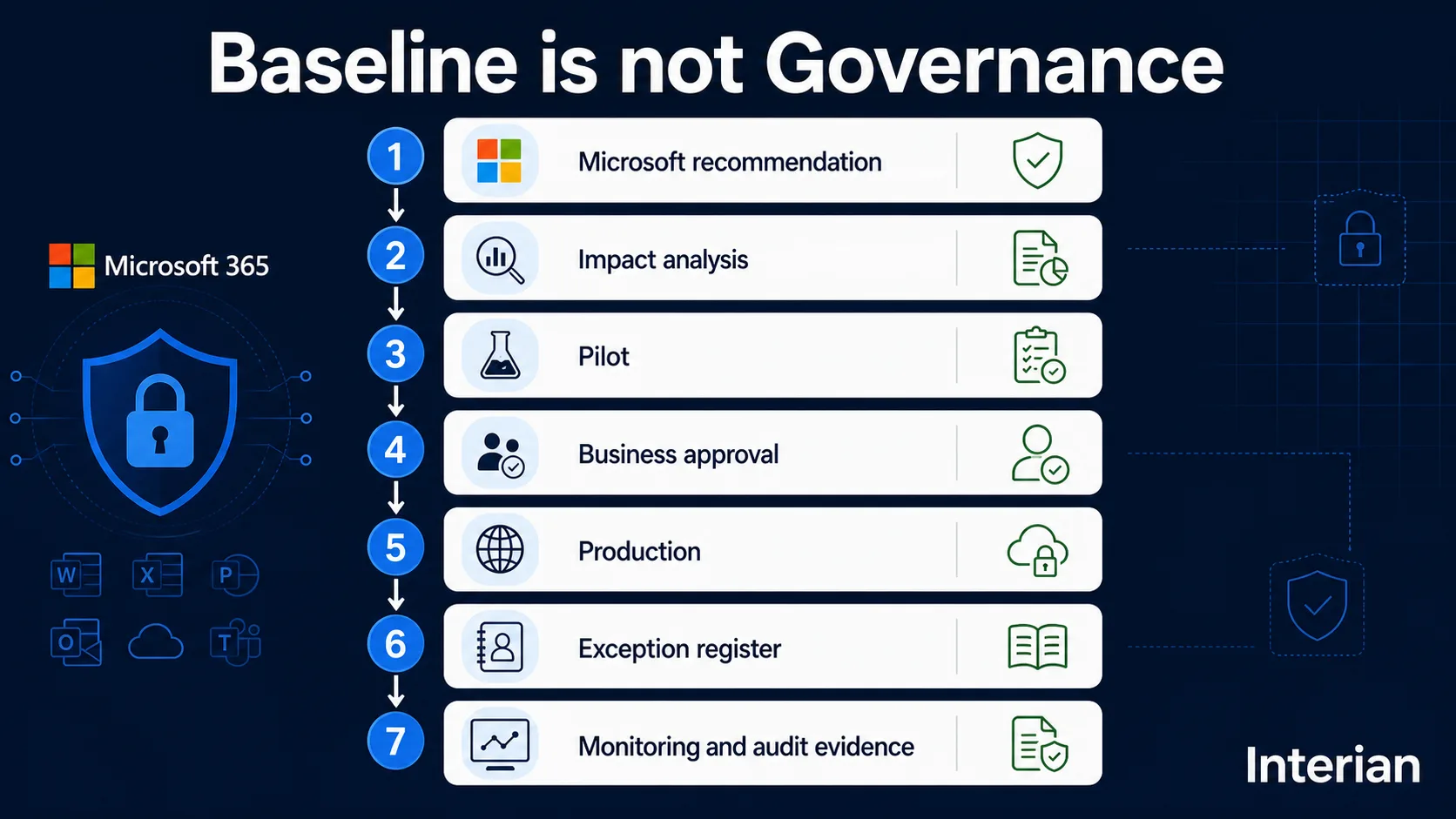
For most organisations, Baseline Security Mode should trigger a repeatable operating model rather than a one time clean up exercise. The seven stages below mirror Figure 1 above.
- Microsoft recommendation: BSM surfaces a setting to review, not a mandate to enable it immediately.
- Impact analysis: Run the impact report and separate settings with no impact from those with business dependencies.
- Pilot: Validate with representative users, apps and locations before wider rollout.
- Business approval: Record ownership, risk acceptance and communication before enabling in production.
- Production: Enable the setting across the tenant once impact and ownership are confirmed.
- Exception register: Document scope, expiry, remediation owner and review date for anything left disabled.
- Monitoring and audit evidence: Detect drift from the approved baseline, keep change history, and revisit as Microsoft updates its recommendations.
The Conditional Access Draft Policy Nuance
Microsoft documents an important nuance for tenants that accessed Baseline Security Mode between November 2025 and early February 2026. Those tenants might see two disabled draft Microsoft Entra ID Conditional Access policies associated with Baseline Security Mode. Microsoft states that this behaviour does not represent a security incident and has no effect on tenant security because the policies are disabled drafts.
This is a useful reminder that configuration governance is not only about enabled settings. Drafts, disabled objects, owners and change origin can all matter when administrators or auditors review a tenant. Community writers have also pointed out the operational risk of having Microsoft managed policies next to existing Conditional Access designs. Two sources of truth are manageable only when ownership and exceptions are clear.
Microsoft 365 Baseline Security Mode Practical Recommendations
Do
- Review each Baseline Security Mode recommendation individually.
- Run impact reports before enabling a setting.
- Prioritise controls with zero impact and high security value.
- Create a remediation plan for settings with many dependencies, such as EWS.
- Connect each accepted exception to an owner, expiry date and review cycle.
- Use Secure Score as a posture signal, not as the only governance record.
Do Not
- Assume every Microsoft recommendation can be enabled immediately.
- Treat Baseline Security Mode as a complete tenant security baseline.
- Use a Secure Score percentage as evidence that governance is mature.
- Forget that Microsoft can add, change or retire recommended settings over time.
Final Thoughts
Baseline Security Mode is a welcome addition to Microsoft 365. It lowers the friction between recommendation and configuration, especially for organisations that have not yet translated Microsoft guidance into a controlled tenant baseline.
But a baseline is not the same as governance. A secure Microsoft 365 tenant is not defined only by which settings are enabled today. It is defined by why those settings exist, who owns them, how exceptions are handled, how drift is detected and how the organisation can prove the control state tomorrow.
That is where Microsoft 365 Baseline Security Mode fits into Interian’s governance approach. It gives organisations a better starting point, while Secure Score, CIS Controls and NIS2 help shape the governance conversation around posture, safeguards and evidence.
Further Reading
- Microsoft Entra SMS and Voice MFA Retirement: What Should Replace Them?
- Microsoft is auto enabling passkeys in Entra: configuration, sync and deployment best practices
- Exploring Conditional Access Bypasses in Microsoft Entra ID
- Office 365 for IT Pros: Microsoft Baseline Security Mode Rolls Out
- Petri: Why Microsoft 365 Baseline Security Mode Is a Migration Target, Not a Flip Switch