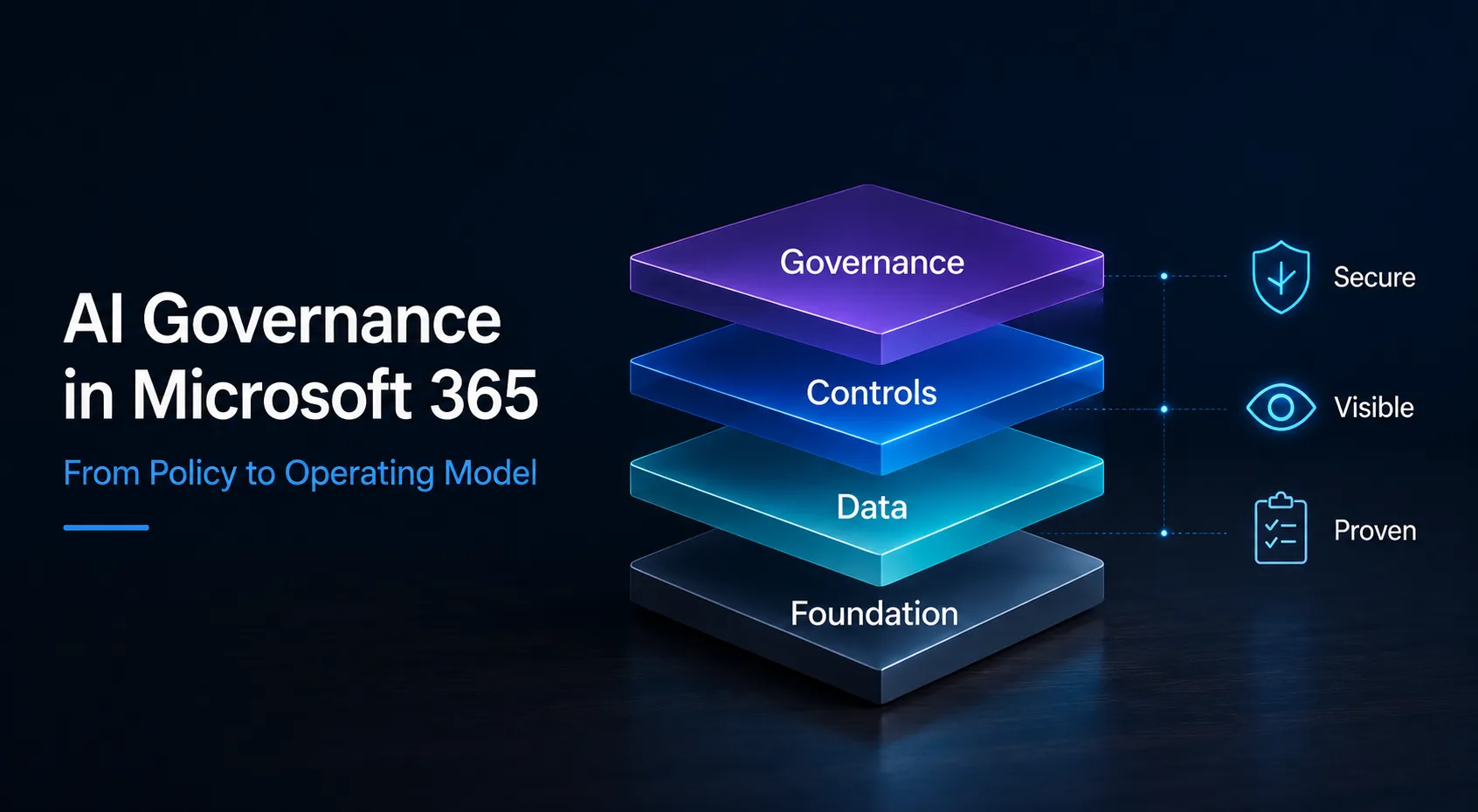
AI Governance in Microsoft 365 needs more than a policy document. It needs a practical operating model for Copilot, Purview, Entra, Defender, ownership, evidence and day to day decision making.
| TL;DR Most organisations have an AI policy. Very few have AI governance. A policy is a document; governance is something that runs every day. This post lays out a six-layer operating model, maps each layer to a concrete Microsoft 365 control, explains where Copilot security, the EU AI Act and ISO/IEC 42001 fit, and ends with five things you can do this week, starting in Microsoft Purview. |
You’ve written the policy. Now what?
Over the past year almost every organisation I work with has produced an AI policy. Acceptable use,
prohibited use, a few lines about not pasting customer data into ChatGPT. Good. Necessary, even.
But let’s be honest about what it is: a document.
We learned this lesson once already, in security. Writing an Information Security Policy never made
anyone ISO 27001 compliant. Compliance came from processes, ownership, controls and
continuous monitoring. AI governance follows exactly the same pattern, and a lot of organisations
are about to relearn it the hard way.
The real questions a CISO has to answer are not “are employees allowed to use AI?” They are:
- Which AI systems are actually in use, including the ones nobody approved?
- What data can they reach?
- Who owns them?
- How is the risk managed?
- And when the regulator, the auditor or the board asks, can you prove any of it?
A policy answers none of those. An operating model does.
A short, real example. A mid-sized engineering firm was convinced it had “no AI problem”, usage
was banned, case closed. One Microsoft Purview DSPM for AI scan later, we counted more than
thirty generative AI tools in daily use and a Microsoft 365 Copilot that would cheerfully summarise an AI Governance in Microsoft 365 · Interian blog.interian.be | 2
HR folder nobody had ever locked down. The policy said one thing. The tenant said another.
Governance lives in the gap between the two.
The operating model: six layers, three jobs
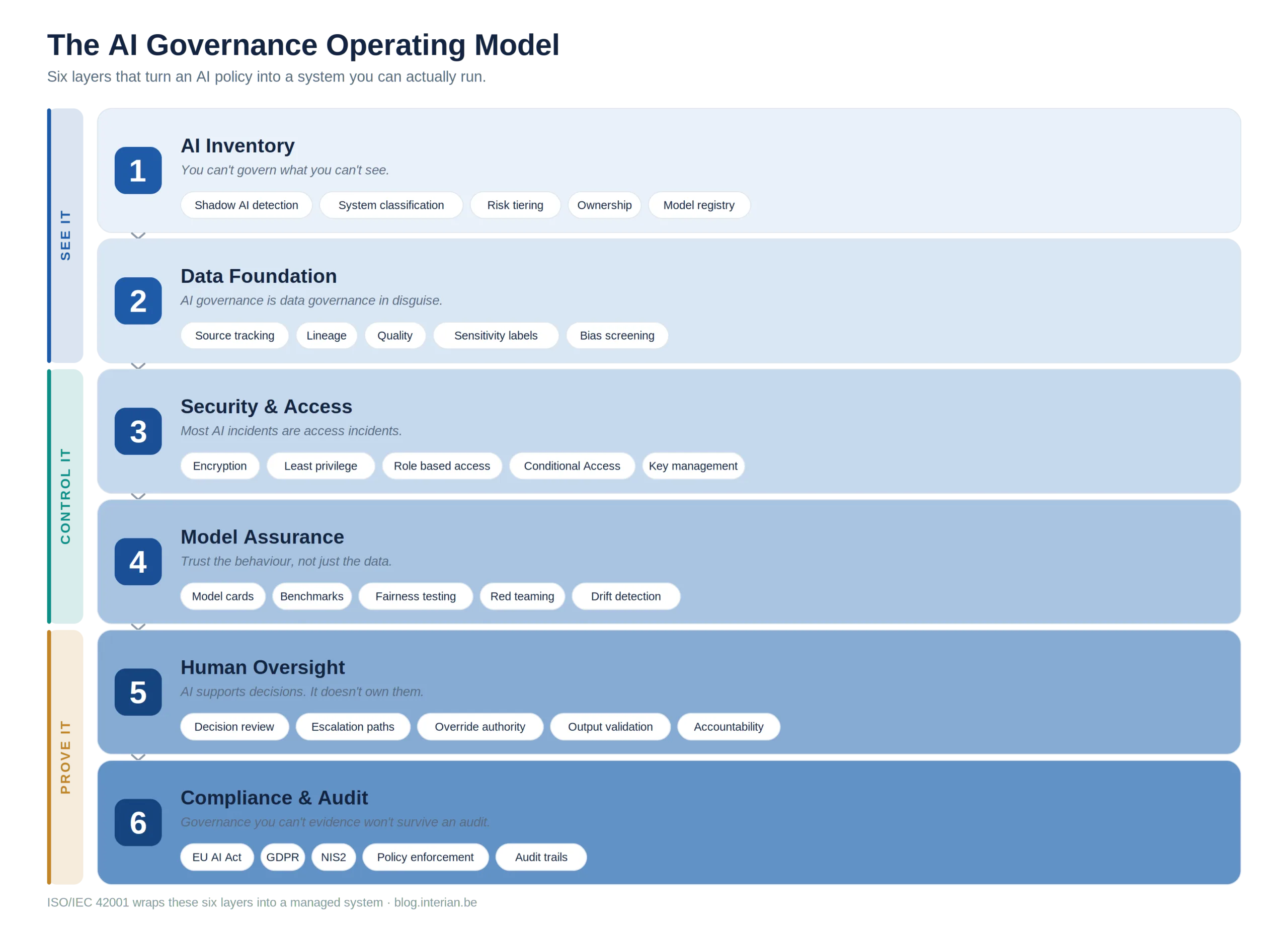
The model above looks like six layers, but it really does three jobs. See it. Control it. Prove it. If any
one of those three is missing, you don’t have governance, you have paperwork.
See it, Layers 1 and 2. You can’t govern what you can’t see. The AI Inventory layer is about
discovery and ownership: shadow AI detection, classification, risk tiering, a model registry. The Data
Foundation layer is the uncomfortable truth that AI governance is mostly data governance in
disguise. The moment Copilot can read SharePoint, Teams and OneDrive, every oversharing sin you
have been ignoring becomes an AI risk.
Control it, Layers 3 and 4. Security and Access is where most “AI incidents” are actually decided.
Excessive permissions, shared accounts, an exposed key, a misconfigured connector. These are not
AI failures, they are identity and access failures wearing an AI mask. The principle is the one you
already apply in Zero Trust: verify explicitly, grant least privilege. Model Assurance extends control
into the behaviour of the system itself, through testing, benchmarking, red teaming and drift
detection, which matters more every quarter as agents start acting, not just answering.
Prove it, Layers 5 and 6. Human Oversight is the heart of the EU AI Act: AI can support a decision,
but a named human stays accountable for it. And Compliance and Audit is the layer everyone forgets until an investigation starts: usage policies, risk assessments, access logs, audit trails. Governance you cannot evidence will not survive scrutiny.
Where the model stops being a slide
Frameworks are easy to admire and hard to operate. The good news for Microsoft 365 estates is that almost every layer already has a home in tooling you are probably licensed for.
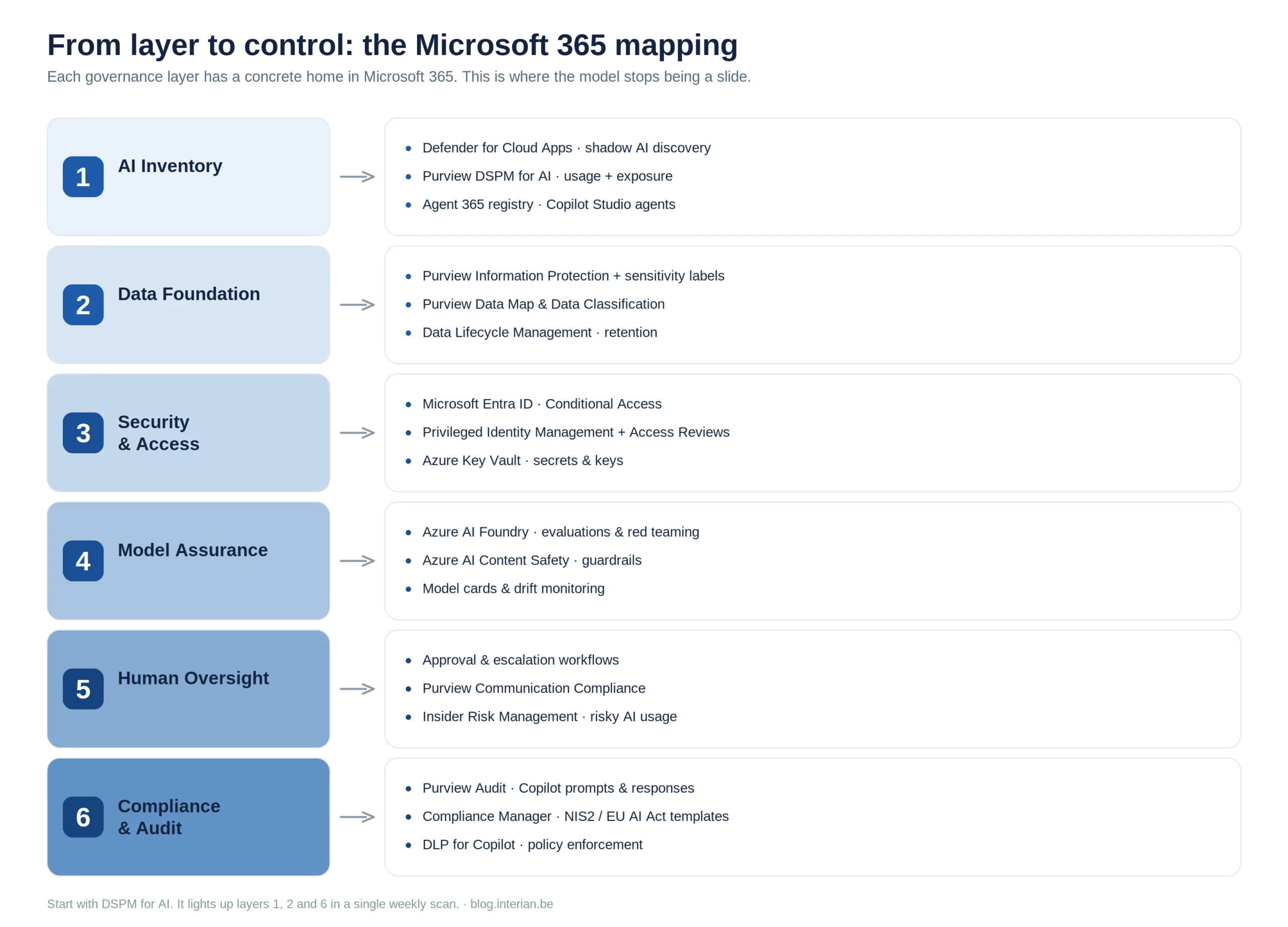
A few things worth calling out from that mapping:
• Discovery is no longer a manual exercise.
Microsoft Purview DSPM for AI is now your front door for AI usage. It surfaces Copilot interactions, third-party AI apps and oversharing exposure, and Microsoft has folded classic DSPM and DSPM for AI into a single, goal-driven view. Pair it with Defender for Cloud Apps for shadow AI at the network edge.
• Layer 3 is just identity governance you already do.
Entra Conditional Access, Privileged Identity Management and Access Reviews are not “AI controls”, they are your existing controls, pointed at the groups and apps that AI can now reach.
• Evidence is built in.
Copilot prompts and responses land in the Purview unified audit log, and Compliance Manager ships regulatory templates, including NIS2 and EU AI Act mappings, so your audit story is assembled as you go rather than reconstructed in a panic.
The point is not that Microsoft solves governance for you. It is that the model stops being a diagram the moment you attach each layer to a control you can actually configure.
The Microsoft governance stack for AI Governance in Microsoft 365
One way to hold all of this in your head is as a stack. At the base sits your data: SharePoint, Teams and OneDrive. Above it sits the AI that now reads that data: Microsoft 365 Copilot, agents and third-party AI apps. Above that are the controls you already operate, with Entra and Defender covering identity, access and threat, and Purview covering data security, classification and DSPM for AI. Compliance Manager turns those controls into evidence, and at the top sit the obligations you answer to: the EU AI Act, ISO/IEC 42001 and NIS2.
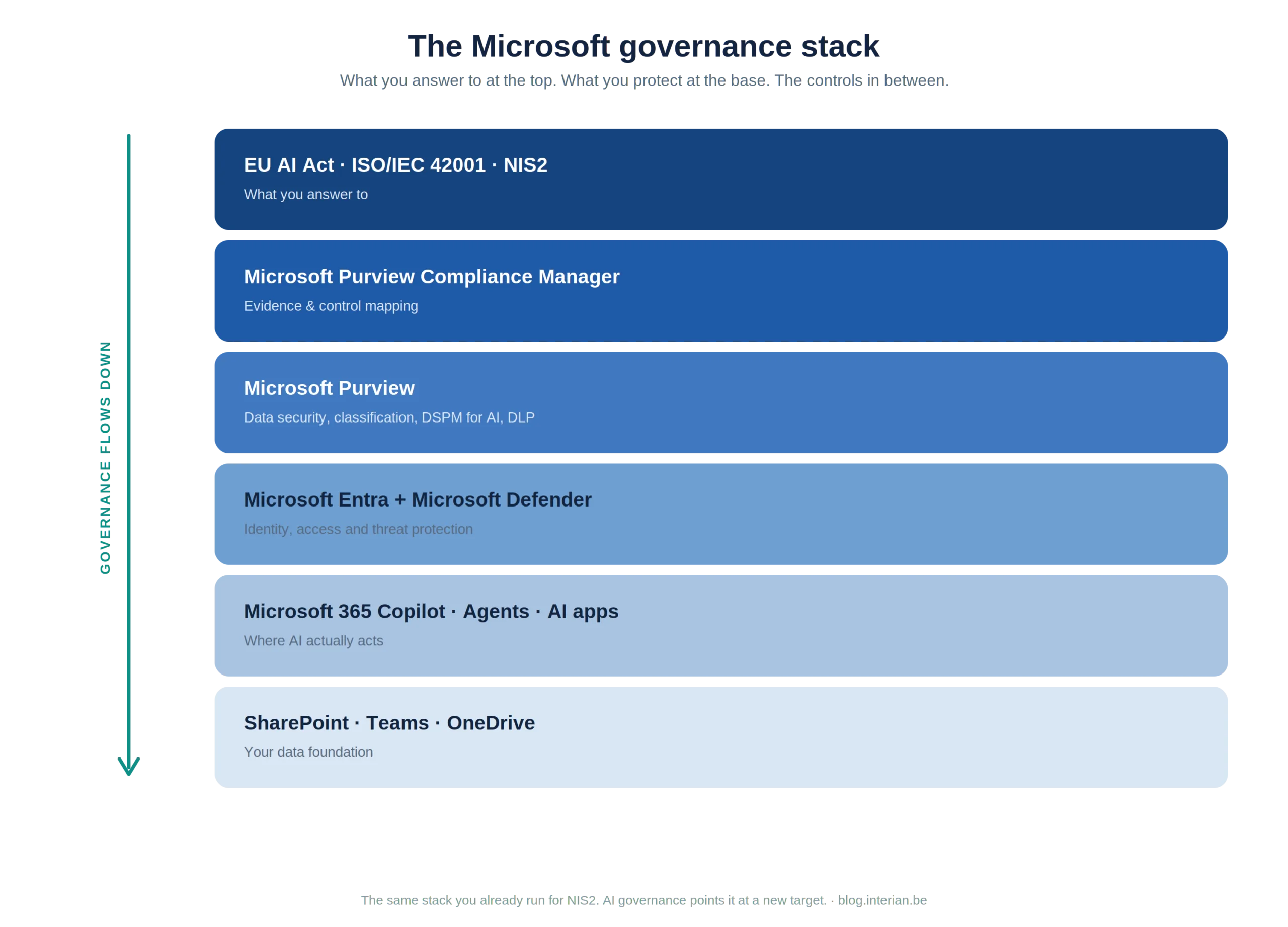
Governance flows downward. Every layer governs the one beneath it. The useful part for a Microsoft estate is that almost none of this is new tooling. It is the same stack you already run for NIS2, pointed at a new target.
Why Copilot governance is the first AI governance challenge
For most organisations, AI governance does not arrive as a strategic programme. It arrives the day Microsoft 365 Copilot is switched on. Suddenly a tool with each user’s full permissions can read, summarise and surface anything that user can reach, and a decade of “we will tidy up those permissions later” becomes a live exposure.
That is why Copilot governance is, in practice, the first AI governance most teams will ever do. The work is concrete and it lives almost entirely in Purview: run DSPM for AI to see what Copilot can reach, apply sensitivity labels to the content that matters, use Restricted SharePoint Search and Restricted Content Discovery to stop oversharing, and add DLP for Copilot on top to block sensitive prompts and restrict web grounding.
Get Copilot governance right and you have already built Layers 1, 2 and 3 of the operating model. Treat it as just a productivity rollout and you have built a data breach with a friendly chat interface.
Why DSPM for AI changes everything
If one capability turns AI governance from a slide into an operating discipline, it is Microsoft
Purview DSPM for AI. It is also the first thing we reach for when we assess a tenant, because it
answers four questions at once:
• AI discovery. Which AI tools and agents are actually in use, sanctioned or not.
• Oversharing assessment. Which sites and folders are exposed to far more people than anyone intended.
• Sensitive data exposure. Which classified or regulated content AI can currently reach.
• Copilot readiness. Whether your data estate is safe to switch Copilot on at all.
Where the EU AI Act actually lands
The EU AI Act has been in force since August 2024 and applies in phases, by risk tier. The parts a CISO should keep in view:
- Unacceptable-risk practices are banned, in effect since February 2025, alongside AI-literacy duties for staff.
- General-purpose AI model obligations have applied since August 2025.
- High-risk systems carry the heaviest load: risk management, data governance, logging, human oversight (Article 14), transparency and conformity assessment.
The timeline shifted in 2026. Under the Digital Omnibus on AI, the EU institutions reached a political agreement on 7 May 2026, still pending formal adoption, to push back the high-risk deadlines:
- Annex III high-risk systems (use based, such as recruitment and HR, access to essential services, and credit scoring) move from 2 August 2026 to 2 December 2027.
- Annex I high-risk systems (embedded in regulated products) move from 2 August 2027 to 2 August 2028.
Two cautions, though. First, most transparency obligations for deployers still apply from 2 August 2026, so if your staff interact with a chatbot or you publish AI-generated content, you owe disclosure this year regardless (provider watermarking under Article 50(2) is pushed to 2 December 2026). Second, until the Omnibus is formally adopted, the original dates remain the law on paper. The extra time is room to prepare, not a reason to stand down.
For most Microsoft 365 Copilot deployments the likely classification is limited risk, meaning transparency rather than the full high-risk regime. But the moment AI touches recruitment, performance, credit or eligibility decisions, you are in high-risk territory, and Layer 5 (human oversight) and Layer 6 (compliance and audit) stop being optional.
Where this meets the operating model: Article 14 human oversight is Layer 5. Data governance and logging map to Layers 2 and 6. And Compliance Manager now ships an EU AI Act template, so you can track your gaps against the regulation from inside the same portal you use for NIS2.
The missing layer: ISO/IEC 42001
AI Governance in Microsoft 365 · Interian blog.interian.be | 6Here is the trap. You can stand up all six layers, wire them to Purview and Entra, and still not have governance, because controls without a system around them drift. People leave, scopes creep, a new Copilot agent appears, and six months later your “governed” estate quietly is not.
That is the part ISO/IEC 42001 solves. It treats AI governance not as a pile of controls but as a management system, the same way ISO 27001 did for information security.
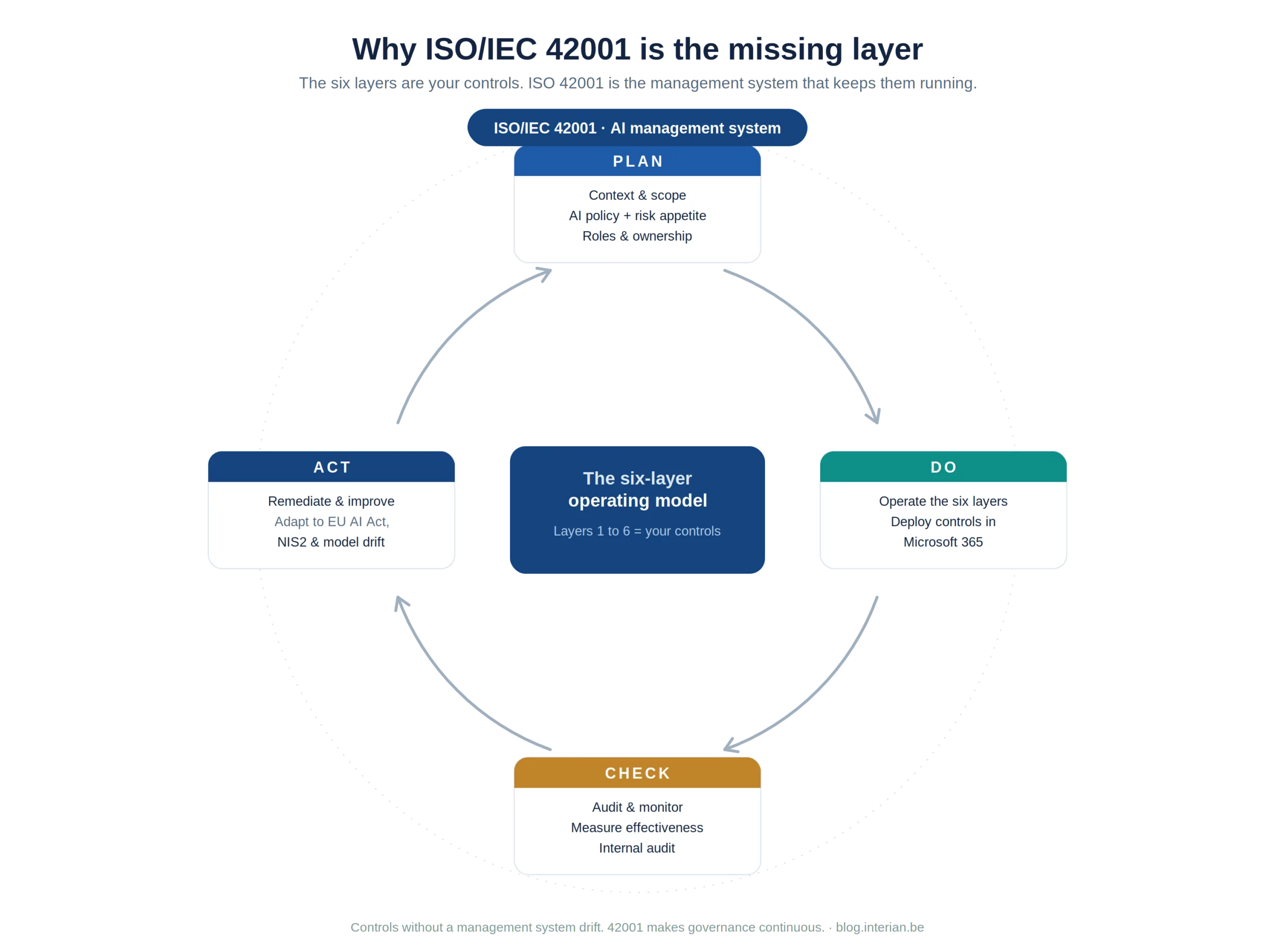
The six layers are your Do. ISO 42001 adds the Plan (context, policy, risk appetite, ownership), the Check (audit, measure, internal review) and the Act (remediate, improve, adapt to new regulation and model drift). It is what turns six good questions into a system that keeps answering them.
The AI governance maturity model
Before you decide what to fix, it helps to know where you stand. AI governance maturity tends to follow a familiar path:
Level 1. AI is in use, with no governance around it.
Level 2. An AI policy is published. Most organisations are here.
Level 3. An AI inventory exists, with named owners.
Level 4. Security and data controls are applied to AI systems.
Level 5. Governance is operational, monitored and measured.
Level 6. An ISO/IEC 42001 aligned management system keeps it all running.
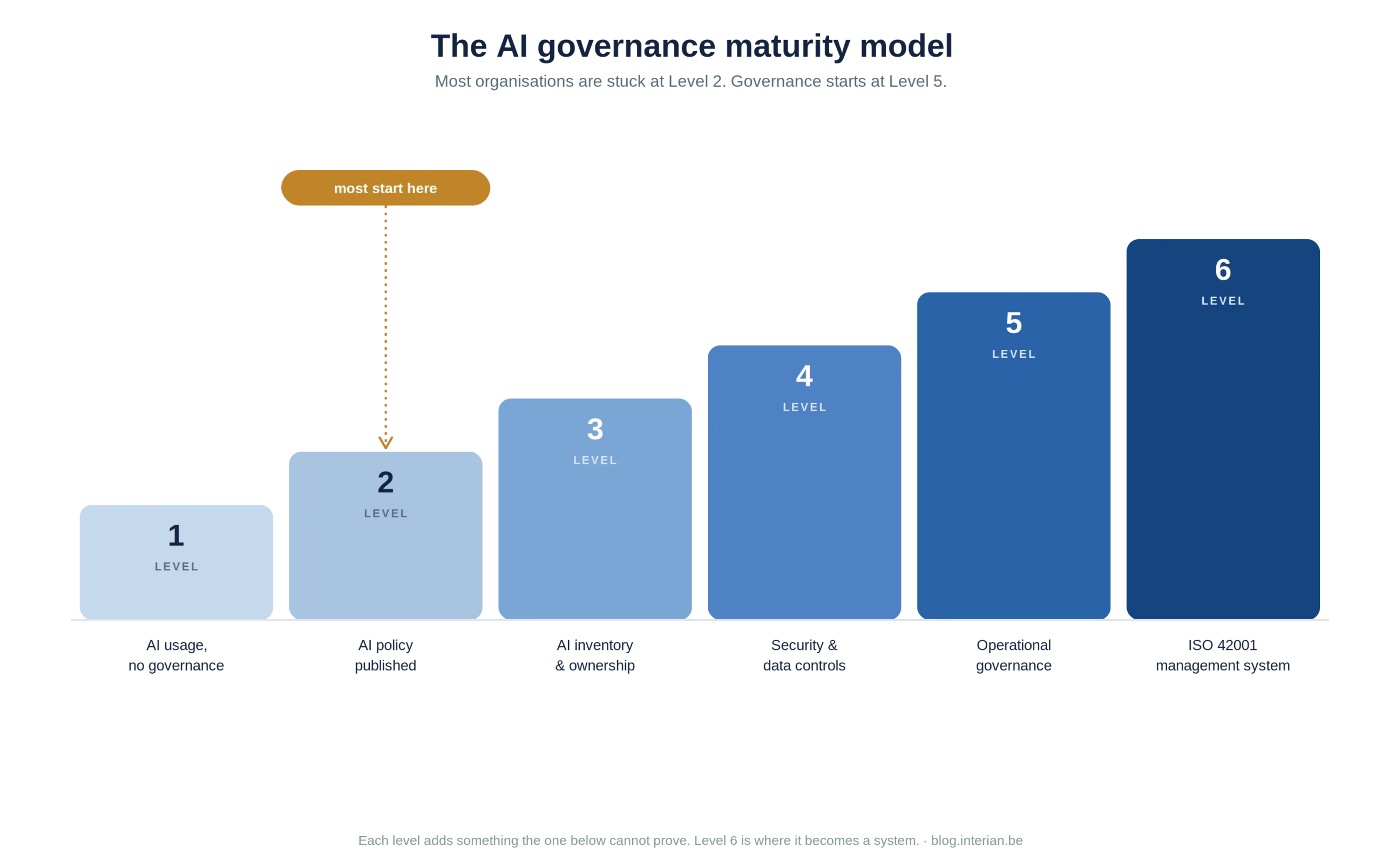
The jump that matters is from Level 2 to Level 5. Everything below Level 5 can be described in a document. Only from Level 5 onward can it be evidenced. Be honest about which level you are on, because your next audit will be.
What we see in real Microsoft 365 tenants
The pattern is remarkably consistent. In practice, most of the organisations we assess are still operating at Level 2. An AI policy exists, often a good one, but the AI inventory, the ownership model, the access controls and the evidence collection are missing. Copilot is frequently switched on before anyone has run an oversharing assessment, so the first DSPM for AI scan is also the first time anyone sees how much sensitive content is within reach.
None of this is negligence. It is simply that AI moved faster than AI risk management. The organisations that close the gap are not the ones with the longest policy. They are the ones that treat AI governance as a set of operating controls, owned by named people and reviewed on a schedule.
What to do this week
Strategy is cheap. Here is where to actually start, and most of these AI security controls live in the Microsoft Purview and Entra portals you already run. Most of it you can begin today.
1. Run DSPM for AI. In the Purview portal, open DSPM for AI and let the default scans run. Within a week you will see your AI usage, your shadow AI, and, uncomfortably, which sensitive content Copilot can already reach. This single step lights up Layers 1, 2 and 6 at once.
2. Close the oversharing gap before you scale Copilot. Act on the DSPM for AI oversharing recommendation, apply sensitivity labels, and use SharePoint Advanced Management AI Governance in Microsoft 365 · Interian blog.interian.be | 83. 4. 5. (Restricted Content Discovery and Restricted SharePoint Search) to stop Copilot surfacing content people were never meant to find.
3. Point your access controls at AI. In Entra, run an Access Review on the groups Copilot can read, and add a Conditional Access policy for unsanctioned AI apps. No new tooling, just your Zero Trust controls aimed at a new target.
4. Turn on the evidence. Confirm Purview Audit is capturing Copilot prompts and responses, and deploy DLP for Copilot to block sensitive prompts and restrict web grounding. Add the Insider Risk “risky AI usage” policy if you are licensed for it.
5. Assign an owner and map to regulation. Give every in-scope AI system a named owner, and open the EU AI Act and NIS2 templates in Compliance Manager so your gaps are tracked from day one, not discovered during an audit.
Why this matters beyond AI
NIS2 does not mention AI governance by name, but it does demand systematic management of technology risk, and AI now sits squarely inside your business processes, your security operations, your supplier chain and your decision-making. Increasingly, AI risk management and AI compliance will not be a standalone programme. They will sit alongside operational risk, supplier risk, incident response and security architecture, governed by the same management system and reported to the same board.
So the question is no longer should we write an AI policy? You almost certainly already have. The real question is the one your next audit will ask:
Is your AI governance running as a document, or as a system?
Further reading
- AI Governance in 2025: Protecting Against Data Exfiltration
- Mastering NIS2 Compliance with Microsoft Purview Compliance Manager
- Securing Windows Recall: Enterprise Management and NIS2 Alignment
- Microsoft Learn: Manage data security and compliance for Microsoft 365 Copilot with Purview
- European Parliament: Digital Omnibus on AI, EU AI Act timeline