Beyond Encryption · Part 3 of 7
Choosing the right Azure confidential computing deployment model.
TL;DR
- Choose an Azure Confidential VM when an existing server workload needs stronger isolation from the Azure host with minimal application change. The guest operating system, kernel and applications remain inside one shared VM trust boundary.
- Choose confidential containers on Azure Container Instances when a Linux container group needs a hardware-backed TEE without the operational weight of Kubernetes. Azure places the entire group in a protected utility VM. Containers in the same group share that boundary.
- Choose an AKS Confidential VM node pool when existing Kubernetes workloads can share a protected worker node. Every pod scheduled on that node remains inside the same VM and guest kernel boundary.
- Evaluate Kata-based AKS Confidential Containers when the required boundary is the workload sandbox rather than the whole node. This is still an AKS preview feature and Microsoft states that preview features are not intended for production use.
- Confidential computing does not replace identity, network security, patching, image signing or least privilege. It reduces trust in infrastructure outside the selected TEE.
- Treat SKU availability, regions, supported operating systems, feature limits and pricing as volatile. Validate them for the target subscription just before design approval and deployment.
- Attestation is the next control to add. A confidential SKU creates a boundary; attestation provides evidence that a relying party can verify before it releases data or keys.
Table of contents
- Start with the trust boundary
- Current Azure support and limitations
- Decision matrix
- Azure Confidential VMs
- Confidential containers on Azure Container Instances
- AKS Confidential VM node pools
- Kata-based AKS Confidential Containers
- Lift-and-shift or enclave-aware
- Operations and observability
- Cost considerations
- Common architecture mistakes
- A practical adoption sequence
- What comes next: attestation
Start with the trust boundary
Confidential computing is not one fixed architecture. It is a family of technologies that protect code and data in a hardware-based trusted execution environment, or TEE. The practical question is which software components must be inside that environment.
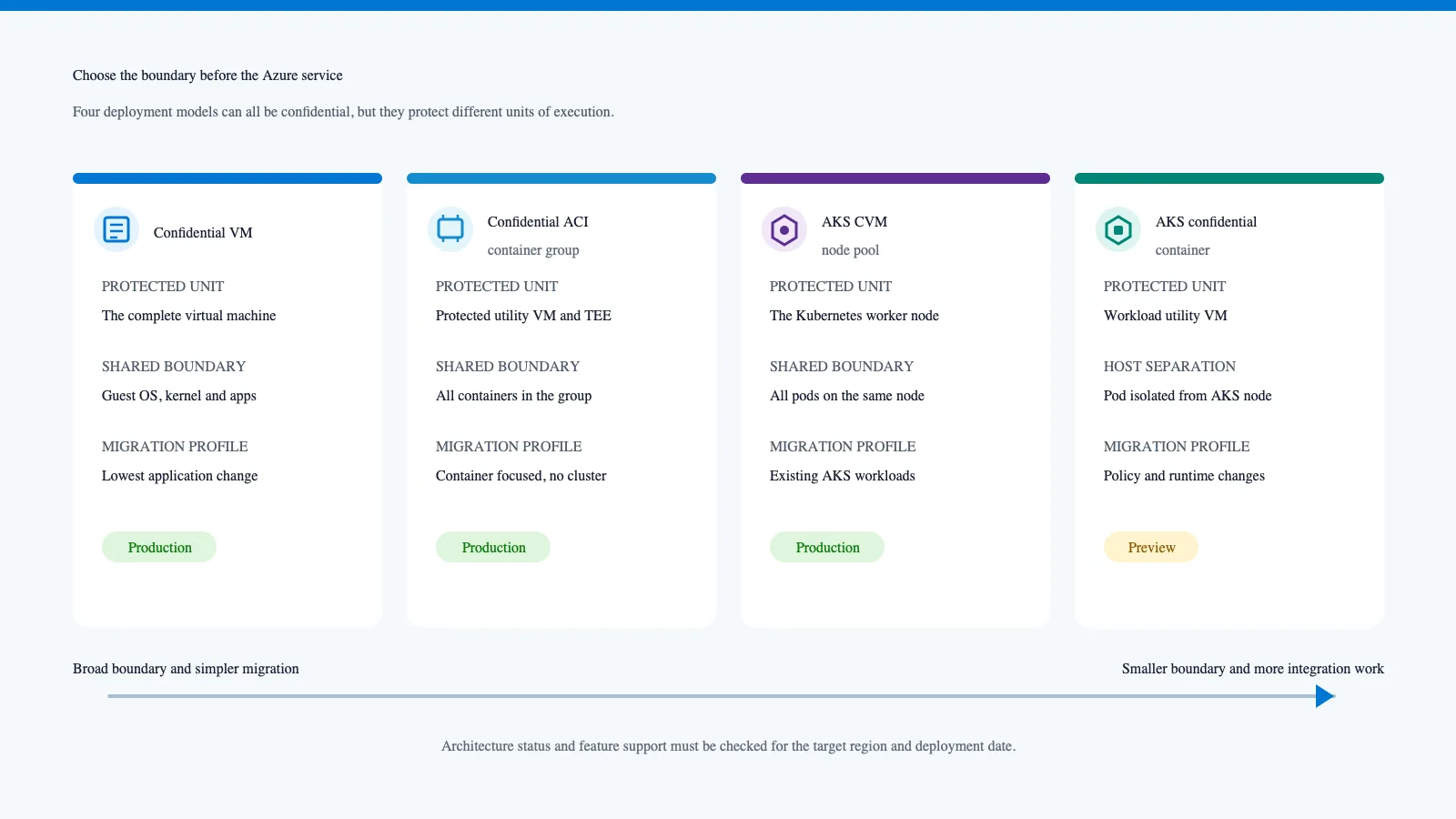
If the boundary is a complete VM, the guest operating system remains trusted. That is useful for rehosting because a conventional application can often run without modification. It does not isolate the application from the VM administrator, kernel or another process with equivalent privilege.
If the boundary is a container group, every container in that group becomes part of one protected execution unit. That can be a good fit for an application container plus tightly coupled sidecars, but it is not one TEE per container.
If the boundary is an AKS worker node, the host outside the VM cannot inspect protected node memory, but pods on that node still share the node operating system and kernel. Kubernetes namespaces do not change that hardware boundary.
If the boundary is a Kata confidential workload sandbox, the selected pod runs inside a confidential utility VM and is separated from the host AKS node. That is a smaller boundary, although it introduces a specialised runtime, policy generation and preview risk.
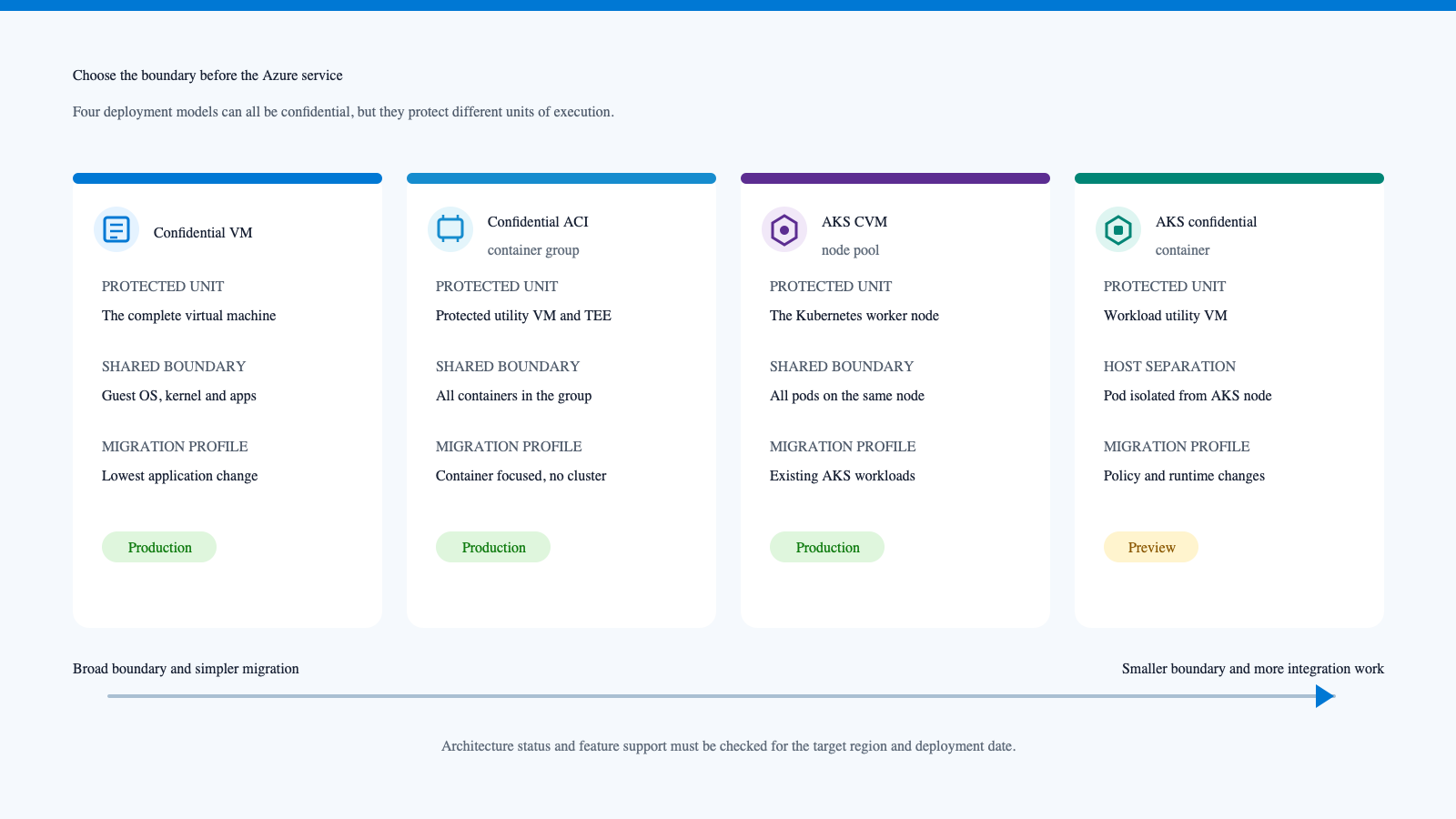
Figure 1. Azure confidential compute selector based on the protected execution unit. Original Interian editorial visual in a Fluent-inspired style. It does not reproduce a Microsoft interface or imply Microsoft endorsement.
Current Azure support and limitations
[!IMPORTANT] Last technical review: 18 August 2026
The details in this box are intentionally dated because Azure regions, VM families, operating system images, previews, feature support and billing can change.
- Azure Confidential VMs currently use AMD SEV-SNP or Intel TDX, depending on the selected family. Microsoft's overview lists DCasv5, DCadsv5, ECasv5 and ECadsv5 families alongside newer AMD and Intel v6 families, plus a confidential H100 GPU family. Availability is regional and subscription quota still applies.
- Qualified Confidential VM images currently include selected Ubuntu, RHEL, SUSE, Rocky Linux and Windows releases. Exact image and processor compatibility must be checked before deployment.
- Microsoft currently lists Azure Backup, Azure Site Recovery, Accelerated Networking, live migration, boot diagnostic screenshots and dynamic memory among unsupported Confidential VM features. Compute Gallery support is limited. Confidential disk encryption currently has a disk size restriction, and customer-managed key rotation is offline rather than automatic.
- Microsoft documents a small encrypted virtual machine guest state disk for Confidential VMs. The managed OS disk, VMGS disk and confidential encryption choices can all affect storage cost. Microsoft also notes a charging change for encrypted OS disks from 30 March 2026. Use the current Azure Pricing Calculator and managed disk pricing page rather than copying a price into an architecture document.
- Confidential ACI is for Linux container groups and depends on supported regions and resource profiles. Verify network, storage and deployment constraints against the current ACI documentation.
- AKS Confidential VM node pools currently support AMD SEV-SNP based CVMs. The AKS documentation says Intel TDX based CVMs are not currently supported. Linux OS support and Kubernetes version compatibility vary, and Windows CVM node pools are not supported.
- Kata-based AKS Confidential Containers remains in preview. It requires preview registration and a compatible node pool and runtime. Microsoft states that AKS previews are provided as available, are excluded from service level agreements and are not intended for production use.
Recheck the Confidential VM overview, AKS CVM documentation, AKS Confidential Containers preview and Azure products by region during implementation.
This dated frame separates the design principles from facts that may expire. The trust boundaries described in this article are architectural. The exact SKU names, quotas and limitations are operational inputs.
Decision matrix
| Azure option | Hardware protection boundary | Best fit | Application change | Shared inside the boundary | Main trade-off |
|---|---|---|---|---|---|
| Azure Confidential VM | Complete VM | Existing server, appliance or stateful workload | Usually low | Guest OS, kernel, services and applications | Broad trusted computing base and VM operations |
| Confidential ACI | Protected utility VM and TEE for one container group | Event-driven jobs, APIs, confidential inference and compact multi-container applications | Low to moderate | Every container in the group | Less orchestration flexibility than AKS |
| AKS CVM node pool | Complete Kubernetes worker node | Existing AKS workloads that can share a protected node | Usually low | All pods scheduled on the node plus the node OS | Node-level, not pod-level, hardware isolation |
| AKS Confidential Containers | Confidential utility VM for the selected pod sandbox | Workload isolation from the AKS host node | Moderate | Containers within the confidential pod sandbox | Preview status and specialised runtime policy |
| Intel SGX application enclave | Selected application code and data | Small, highly controlled trusted computing base | High | Only code and data deliberately placed in the enclave | Enclave-aware design and operational complexity |
The first four rows are deployment choices discussed in this article. SGX is included to show the alternative enclave-aware model. It is not a direct configuration mode for the other services.
Azure Confidential VMs
An Azure Confidential VM is the most direct route for a conventional workload. AMD SEV-SNP or Intel TDX protects VM memory and CPU state from the hypervisor and host management software. Azure also exposes a virtual TPM, Secure Boot and optional confidential OS disk encryption.
Why it suits lift-and-shift
The application continues to see a normal Windows or Linux virtual machine. Existing agents, services and deployment tooling can often remain in place, subject to image qualification and platform limitations. That makes the VM model suitable for line-of-business services, legacy middleware and stateful applications that cannot be redesigned quickly.
The security boundary is broad. The application still trusts its guest operating system, drivers, privileged users and everything else with access inside the VM. A compromised root or SYSTEM context is not placed outside the TEE merely because the host is.
What this looks like in the Azure portal
The Azure portal exposes the choice directly in the normal VM creation flow. Under Security type, select Confidential virtual machines. Azure then limits the available images and sizes to compatible combinations for the selected region and subscription.
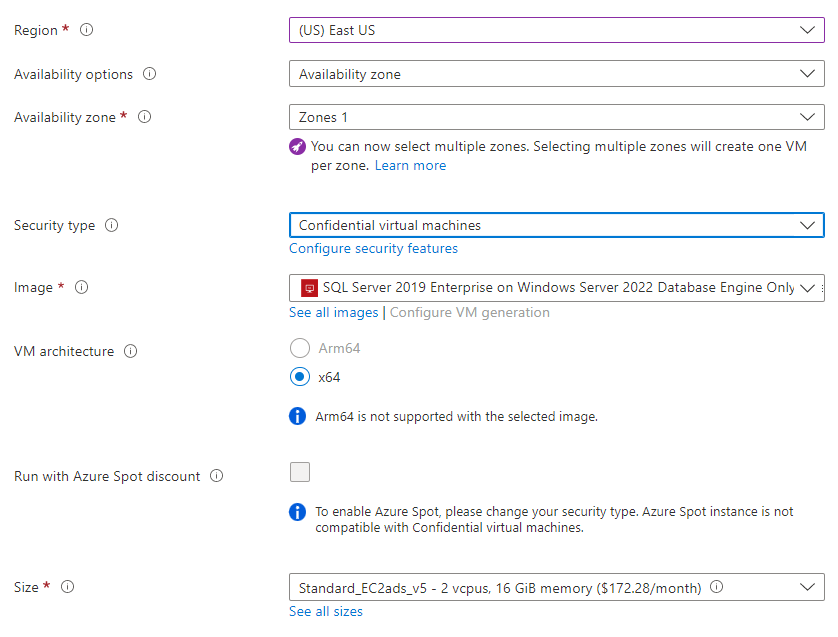
Figure 2. Azure portal instance details with Confidential virtual machines selected as the security type. Source: Microsoft Learn, Create SQL Server on a Windows virtual machine in the Azure portal, with the source documentation published in MicrosoftDocs/sql-docs under CC BY 4.0. This documentation image is included to show the portal control, not to recommend the displayed region, VM generation, image, size or price. Those values are volatile and must be checked in the target subscription. This is not an Interian Azure tenant or deployment.
Disk encryption, vTPM and Secure Boot
Memory protection is only one layer. Microsoft supports optional confidential OS disk encryption with either a platform-managed key or a customer-managed key. The keys are bound to the VM's vTPM, and Azure uses attestation as part of the protected boot and key release flow. The setting cannot be changed after the VM has been deployed, so it belongs in the original design.
Secure Boot checks that trusted publishers signed boot components. The vTPM protects measurements and secrets associated with the VM. Neither control proves that the application is currently healthy. They establish and record parts of the boot trust chain.
Temporary disks need separate attention. They can contain swap, caches and logs. Microsoft documents confidential temporary disk encryption as an opt-in capability, so do not assume the OS disk choice automatically covers every local data path.
A minimal ARM parameter choice
The current Microsoft Learn quickstart exposes the security choice as a template parameter. This shortened example uses the platform-managed confidential OS disk option:
{
  "parameters": {
    "vmSize": {
      "value": "Standard_DC2as_v5"
    },
    "osImageName": {
      "value": "Ubuntu 24.04 LTS Gen 2"
    },
    "securityType": {
      "value": "DiskWithVMGuestState"
    }
  }
}
vmSize selects confidential compute hardware and must be available in the target region. osImageName must resolve to a qualified Generation 2 image. DiskWithVMGuestState asks the Microsoft template for confidential OS disk encryption and protected VM guest state. Microsoft's template also offers VMGuestStateOnly when confidential OS disk encryption is not required. NonPersistedTPM is documented for supported Intel TDX Linux configurations and creates a different vTPM persistence model.
Source: Microsoft Learn ARM quickstart. Treat the snippet as a design fragment. It omits networking, identity, image version pinning, patch configuration, diagnostics and recovery controls needed in a production template.
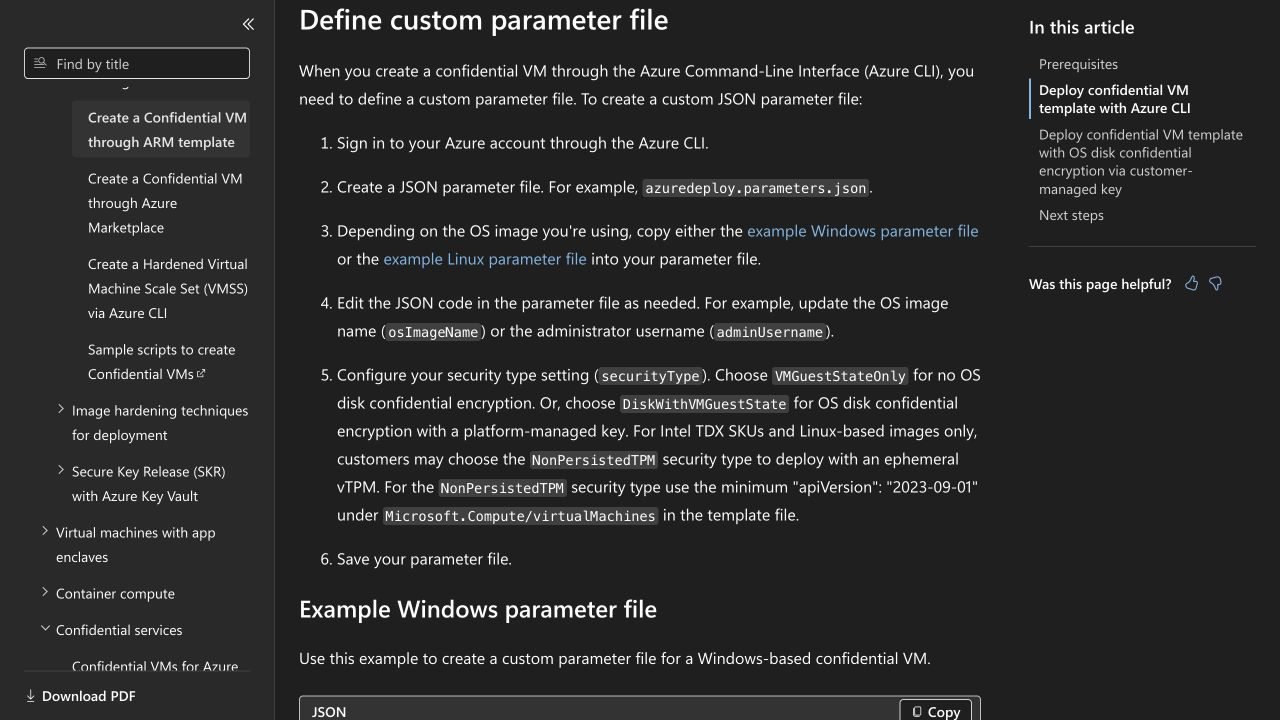
Figure 3. Current Microsoft Learn documentation showing the Confidential VM securityType choices, including VMGuestStateOnly, DiskWithVMGuestState and the Intel TDX Linux option NonPersistedTPM. Source: Microsoft Learn and MicrosoftDocs/azure-docs, licensed under CC BY 4.0. Captured and cropped from the documentation on 18 August 2026. This is not an Interian Azure tenant or deployment.
Confidential containers on Azure Container Instances
Confidential ACI provides a serverless container model for Linux applications. The crucial detail is the unit that Azure protects.
Azure deploys the whole container group inside a protected utility VM and hardware TEE. Microsoft documents a Hyper-V isolated TEE backed by AMD SEV-SNP. Every container in that group runs inside the same protected environment. If the group contains an application, an attestation sidecar and a file-system sidecar, they share one confidential boundary.
This is not one independent TEE per container. Kubernetes-style container names and process isolation do not turn the group into multiple hardware trust zones. Place only mutually trusted components in the same group and treat sidecars as part of the trusted computing base.
Expressing a confidential container group
The relevant ARM properties are compact:
{
  "type": "Microsoft.ContainerInstance/containerGroups",
  "apiVersion": "2023-05-01",
  "name": "confidential-api",
  "location": "[resourceGroup().location]",
  "properties": {
    "sku": "Confidential",
    "osType": "Linux",
    "confidentialComputeProperties": {
      "ccePolicy": ""
    },
    "containers": []
  }
}
sku: Confidential requests the confidential container group. osType: Linux reflects the supported container operating system. confidentialComputeProperties.ccePolicy carries the Base64 encoded confidential computing enforcement policy. The empty value is only the policy generation input, not the desired deployed state.
Microsoft's confcom Azure CLI extension can derive the policy from the complete ARM template:
az confcom acipolicygen -a template.json
The tool writes a generated policy into the template. That policy constrains allowed images, commands, environment variables and mounts. Regenerate and review it whenever those inputs change. A permissive policy can preserve the hardware boundary while weakening the workload integrity claim.
Source: Microsoft Learn ACI confidential container tutorial and the Azure CLI confidential computing extension.
Attestation and sidecars
The container group can obtain an AMD SEV-SNP attestation report. A relying party can validate the report through Microsoft Azure Attestation before it releases a key or sensitive dataset. Microsoft also publishes open-source sidecars for attestation, secure key release and encrypted file systems.
Sidecars improve composition, but they remain security-critical code inside the shared group boundary. Pin images by digest, minimise environment variables, review mounts and make the enforcement policy part of change control.
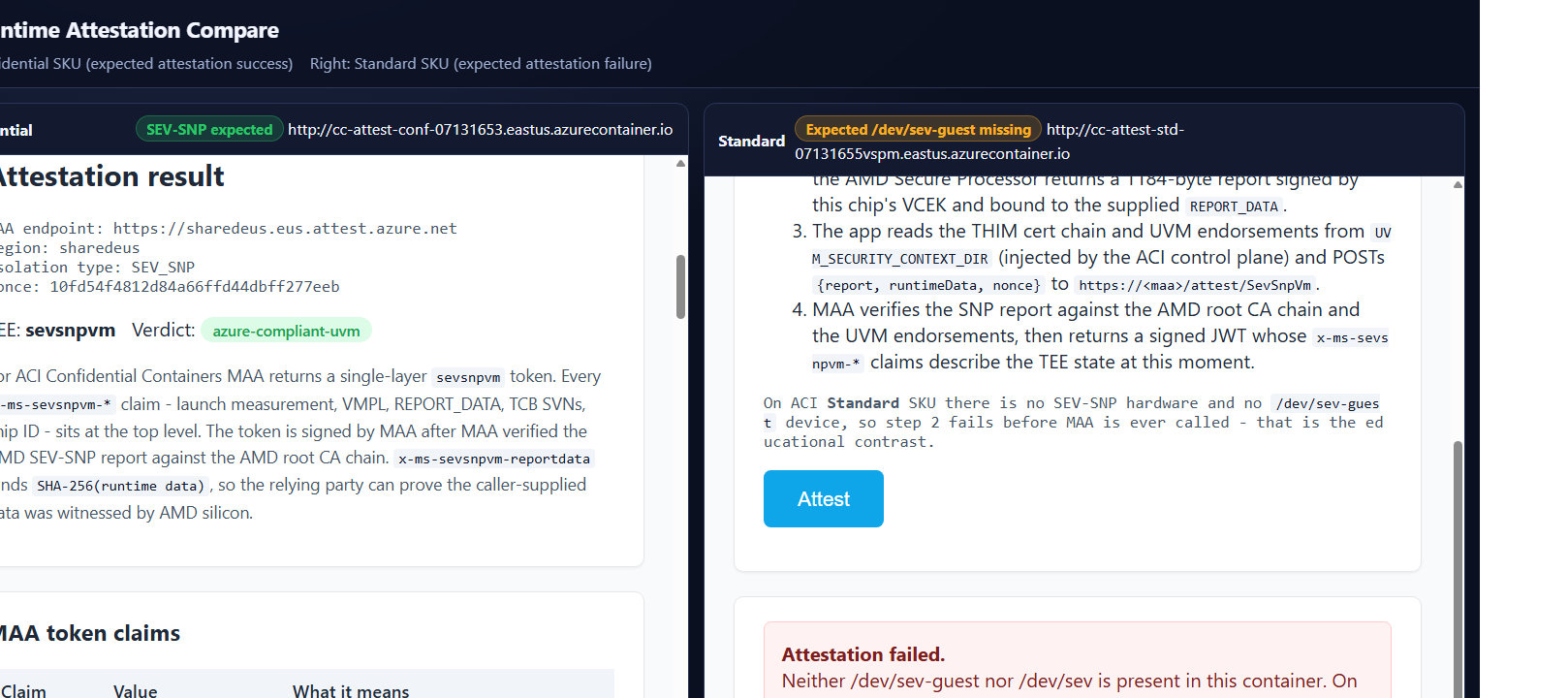
Figure 4. Official Azure Samples visual attestation demo comparing a confidential ACI group with a standard ACI group. The confidential side shows SEV-SNP evidence and an Azure compliant verdict; the standard side cannot obtain the SEV guest device. Source: Azure-Samples/confidential-computing visual attestation demo, licensed under MIT. Cropped to remove unused whitespace. This is an official Microsoft sample capture, not an Interian deployment.
AKS Confidential VM node pools
AKS can place worker nodes on Confidential VM sizes. This gives existing Kubernetes workloads VM-level protection from the host without requiring every application to understand a TEE.
The boundary is the node. Microsoft states that all pods on a CVM node are part of the same trust boundary. The node operating system, kubelet, container runtime, kernel and scheduled pods are inside it. A pod is protected from the Azure host, but not given a separate hardware boundary from a privileged pod or compromised kernel on that same node.
A node pool can be added with Azure CLI:
az aks nodepool add \
  --resource-group myResourceGroup \
  --cluster-name myAKSCluster \
  --name cvmnodepool \
  --node-count 3 \
  --node-vm-size Standard_DC4as_v5
--node-vm-size is the property that selects the confidential hardware family. The example is taken from Microsoft's current AKS documentation, but the exact size must be revalidated for region, quota and support. The command does not migrate an existing pool in place. Microsoft instructs customers to create or resize to a suitable pool when moving to a CVM size.
Source: Use Confidential VMs in AKS.
Schedule as if the boundary matters
Create a dedicated node pool for sensitive workloads. Add labels and taints, then require matching node affinity or selectors and tolerations. This reduces accidental co-location and makes the boundary visible in code and operations.
That scheduling policy is an administrative control. It does not create cryptographic pod isolation. If two pods reach the same CVM node, they share that node's guest trust boundary even when they are in different namespaces.
Kata-based AKS Confidential Containers
Kata-based AKS Confidential Containers changes the boundary. A selected pod uses the kata-cc-isolation runtime class and executes in a confidential utility VM, isolated from the host AKS node. Containers in the same pod sandbox share that workload boundary, while ordinary pods can continue to use the normal node runtime.
The workload manifest selects the runtime:
apiVersion: v1
kind: Pod
metadata:
  name: confidential-consumer
spec:
  runtimeClassName: kata-cc-isolation
  containers:
    - name: consumer
      image: contoso.azurecr.io/consumer@sha256:<digest>
runtimeClassName routes the pod to the Kata confidential runtime. The digest placeholder illustrates that an immutable image reference should feed the policy. It is not a complete deployable manifest.
The node pool must also be configured with the KataCcIsolation workload runtime, on compatible hardware and an operating system supported by the preview. Microsoft requires the KataCcIsolationPreview feature registration and uses confcom katapolicygen to generate a workload security policy.
[!WARNING] Preview warning, reviewed 18 August 2026: Microsoft still labels AKS Confidential Containers as preview. AKS preview features are excluded from the normal service level agreement and are not intended for production use. Use this model for evaluation unless Microsoft changes its support status and your risk owner approves the resulting service posture.
This option can reduce the application trust boundary compared with a CVM node pool. It also adds more moving parts: nested confidential virtualisation, a specialised runtime, workload policy, preview registration, attestation integration and different debugging characteristics.
Lift-and-shift or enclave-aware
Confidential VMs, confidential ACI and AKS CVM node pools support a largely lift-and-shift model. The operating system or container runtime handles the hardware integration. The application can often run unchanged, but the complete guest or group remains trusted.
An enclave-aware design moves only selected code and data into an enclave such as Intel SGX. It can exclude more operating system code from the trusted computing base, but the application must define enclave entry points, validate untrusted input and control data moving across the boundary. Libraries, memory limits and debugging also become architecture concerns.
Kata-based AKS Confidential Containers sits between these ends. The application remains container based, yet the platform creates a smaller workload VM and policy boundary than an ordinary CVM node. It is more portable than a bespoke enclave application, but less transparent than changing only the worker node size.
Choose the smallest boundary that the team can operate correctly. A theoretically smaller TEE with weak image control, stale policies or unusable diagnostics can be worse than a broader boundary that is consistently patched, attested and monitored.
Operations and observability
A confidential workload still needs normal cloud operations, with several additional constraints.
Image and patch management
Use qualified operating system images and pin container images by digest. Record which image, firmware baseline and policy measurement are approved. Test updates before making new reference values trusted. Keep a rollback path that does not silently accept an older vulnerable measurement.
Identity and key access
Use managed identities or Microsoft Entra Workload ID instead of static credentials. Identity answers which principal is requesting access. Attestation answers what environment is making the request. A strong key release flow checks both.
Logging without leaking
Logs leave the protected memory boundary when they are exported. Avoid secrets, plaintext records and key material in application logs, crash dumps or traces. Redact before export and apply retention and access controls at the destination.
Some familiar diagnostics may be unavailable. The current Confidential VM limitations include no boot diagnostic screenshots. Design serial console, health probes, structured logs and recovery procedures before a failure occurs.
Availability and recovery
Confidential hardware can have narrower regional capacity than general compute. Quota is not capacity, and a supported SKU on a product page is not proof that the desired scale is available in a subscription.
The current lack of Azure Backup, Site Recovery and live migration support for Confidential VMs affects recovery architecture. Application-level replication, immutable deployment and tested data restore may be more important than host-level recovery features.
Policy lifecycle
Treat confidential computing enforcement policies and attestation reference values as release artefacts. Store them with the deployment definition, review differences and revoke approval for vulnerable versions. A signed report only tells you what ran. Your policy decides whether that state is acceptable.
Cost considerations
Confidential computing cost is more than the hourly compute rate.
- Compute: specialised hardware and a narrower size selection can change price and packing efficiency. Compare the smallest supported size that meets performance and availability requirements.
- Storage: a Confidential VM uses an OS disk and a small encrypted VMGS disk. Confidential OS disk encryption and customer-managed keys may affect storage and key management cost.
- Orchestration: ACI avoids a standing Kubernetes control and node footprint for compact or bursty workloads. AKS can be more economical when many services already share a cluster, but dedicated confidential pools may reduce utilisation.
- Isolation density: a CVM node can host several pods within one boundary. A smaller workload VM boundary can consume more overhead per workload.
- Operations: preview engineering, policy maintenance, restricted recovery features and specialist incident response all create labour cost.
- Data services: Key Vault Premium, Managed HSM, Azure Attestation, private networking, logging and replicated storage may belong in the complete design.
Do not publish a fixed percentage premium. Azure prices vary by region, agreement, reservation, operating system, disk and time. Build comparable architectures in the current Azure Pricing Calculator and document every included dependency.
Common architecture mistakes
Calling every container a separate TEE
Confidential ACI protects a container group inside one utility VM. Containers in the group share the boundary. Separate groups are required when components must not share that hardware trust zone.
Calling an AKS CVM node pool pod isolation
The CVM protects the worker node from the external host. All pods on the node share its guest kernel boundary. Namespaces, network policies and container isolation remain valuable, but they are not separate TEEs.
Assuming encryption at rest covers data in use
Disk and database encryption protect stored bytes. TLS protects network transport. The TEE addresses memory and execution state while the workload processes data. All three states need controls.
Enabling a confidential SKU without attestation
A resource configuration is not independently verifiable evidence. Without attestation and a relying-party policy, a data owner cannot make secret release conditional on measured runtime state.
Ignoring privileged code inside the boundary
A confidential VM does not protect an application from its own guest administrator. An ACI application must trust its sidecars. An AKS pod on a CVM node must account for the node kernel and other privileged workloads.
Designing around a feature that is currently unavailable
Backup, disaster recovery, networking and image workflows can fail late in the project if the team assumes parity with ordinary VMs. Run a support checklist for the target region and deployment date before approving the architecture.
Treating preview as a production promise
Kata-based AKS Confidential Containers has a compelling boundary, but the preview support model is part of the risk decision. A good technical fit does not override the absence of a production service commitment.
A practical adoption sequence
- Write the threat statement. Identify the actor that should lose access, such as the cloud host, a node administrator or another workload.
- Choose the boundary. Decide whether the trusted unit is a VM, ACI container group, AKS node, Kata workload sandbox or application enclave.
- Validate current support. Check region, subscription quota, SKU, image, Kubernetes version, networking, storage, backup and support status.
- Define immutable infrastructure. Pin images, generate enforcement policies and keep deployment settings in version control.
- Separate identities. Use a workload identity with the least required permissions and keep administrative paths outside the application identity.
- Add attestation. Bind fresh evidence to the workload or an ephemeral public key and define accepted claims and reference values.
- Gate the secret. Release keys or sensitive data only after both identity and attestation policy succeed.
- Exercise failure. Test unavailable capacity, rejected attestation, revoked measurements, expired identities, lost nodes and restore procedures.
- Reassess cost and support before production approval. Product maturity and regional capacity can change between proof of concept and launch.
What comes next: attestation
The deployment model creates the protected environment. It does not yet give a remote party proof that the expected environment is running.
Attestation closes that gap. The TEE produces signed evidence about hardware and measured state. Azure Attestation can validate that evidence and issue claims. A relying party then checks freshness, platform properties, policy measurements and any application or key binding before it releases a secret.
That distinction is the bridge to the next article: confidential compute provides isolation, while attestation turns isolation into a verifiable access decision.
Continue the series
Previous: Under the hood: AMD SEV-SNP, Intel TDX and Intel SGX
Next: Azure Attestation explained: cryptographic proof for confidential computing
Primary technical sources
- About Azure Confidential VMs
- Deploy a Confidential VM with an ARM template
- Confidential containers on Azure Container Instances
- Prepare a confidential ACI deployment
- Use Confidential VMs in AKS
- Deploy AKS Confidential Containers with an automatically generated policy
- Choose an Azure confidential container offering
- Azure Samples Confidential Computing repository