Beyond Encryption · Part 6 of 7
Connecting Entra, Intune and Purview with identity, device trust and data governance.
TL;DR
Microsoft Entra, Intune, Purview and Microsoft 365 are not confidential computing services. They solve different security problems.
Entra checks human and workload identities. Intune provides device compliance signals. Purview classifies and protects information. Customer Key gives customers more control over service encryption keys. Customer Lockbox controls exceptional access by Microsoft support staff. Double Key Encryption gives organisations stronger control over a very small set of highly sensitive documents.
Confidential computing adds another layer. It uses a Trusted Execution Environment, or TEE, and attestation to provide evidence about the environment in which a workload is running.
The strongest architecture combines these controls. It does not ask one product to solve every trust problem.
Table of contents
- The questions a trust architecture must answer
- Human identity with Entra and PIM
- Device trust with Intune
- Workload identity and managed identities
- Runtime trust and confidential computing
- Data protection with Microsoft Purview
- Customer Key and service encryption
- Customer Lockbox and operator access
- Double Key Encryption and its limits
- An end-to-end security scenario
- Common design mistakes
- Key takeaways
The questions a trust architecture must answer
A modern security architecture must answer several different questions:
- Who is requesting access?
- Which device is being used?
- Which application or service is acting?
- Where is the workload running?
- Which data is involved?
- Who controls encryption roots and content keys?
- Who may gain exceptional operational access?
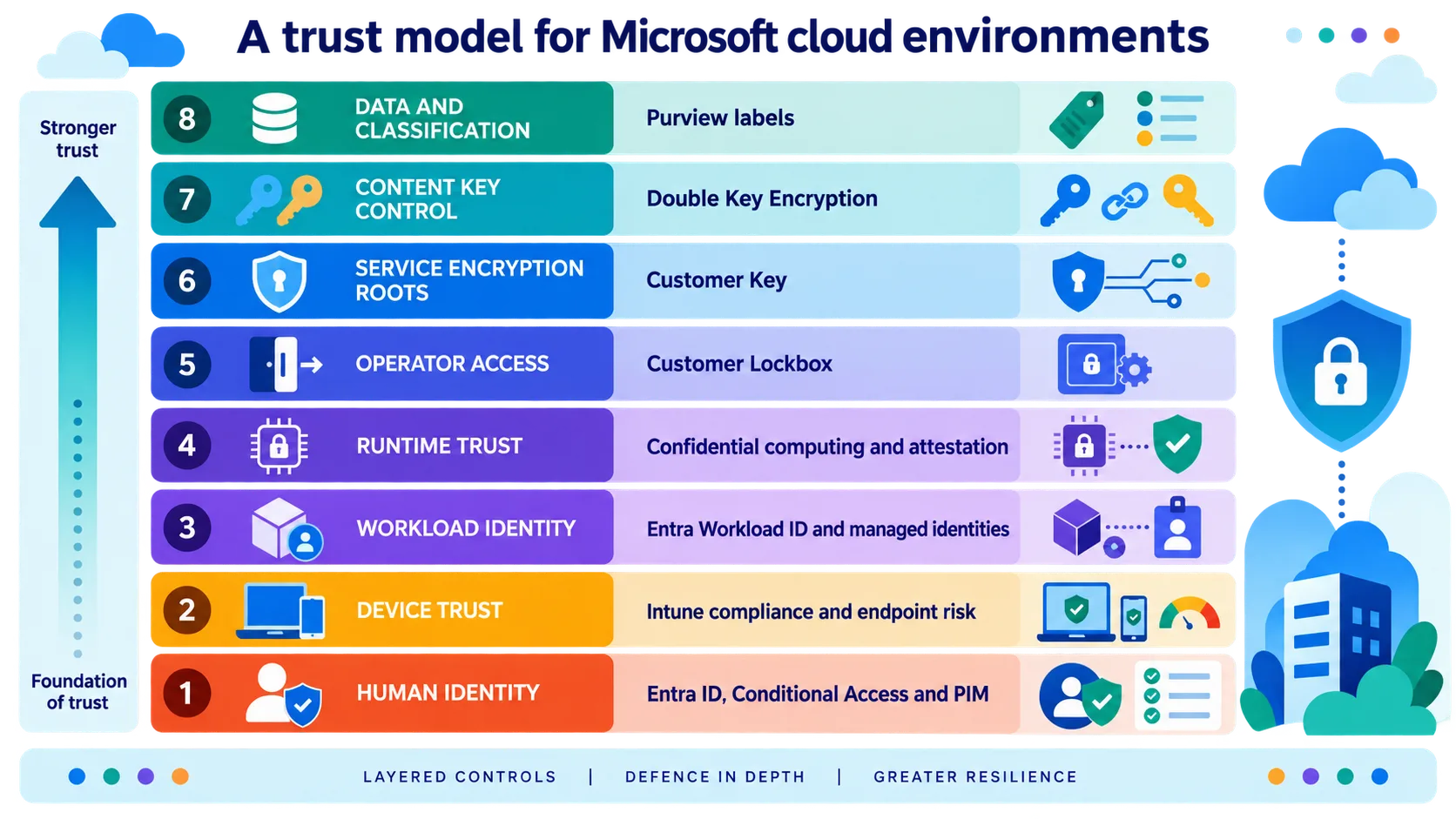
These questions map to different controls. We call the result a trust stack for Microsoft cloud environments. That phrase is an Interian editorial model, not a Microsoft product name or official Microsoft reference architecture.
| Trust question | Main technology | What it can establish | What it cannot establish |
|---|---|---|---|
| Who is the user? | Entra ID and multifactor authentication | User identity and authentication strength | Device or runtime integrity |
| May this person be an administrator now? | Privileged Identity Management | Temporary and governed privileged access | Whether every admin action is safe |
| Which device is being used? | Intune and Conditional Access | Management and compliance status | Continuous proof that the device is free from compromise |
| Which application is acting? | Entra Workload ID and managed identities | Workload identity and permissions | Which binary is running |
| Where is processing taking place? | Confidential computing and attestation | Hardware and runtime properties | Whether the user has a valid business need |
| How sensitive is the information? | Purview sensitivity labels | Classification and linked protection rules | Runtime integrity |
| Who controls service-encryption roots? | Customer Key | Customer-supplied root keys in supported Microsoft 365 service-encryption chains | Content-level two-key protection or runtime integrity |
| Which content needs two-key protection? | Double Key Encryption | Two independently controlled keys must be available to open selected Office content | Service-encryption root control or TEE attestation |
| May Microsoft support access content? | Customer Lockbox | Customer approval and auditing | Hardware isolation or application authorisation |
Human identity with Entra and PIM
Microsoft Entra Conditional Access combines signals such as the user, application, location, device state and detected risk. A policy can block access or require a control such as multifactor authentication, a specific authentication strength or a compliant device.
Conditional Access is evaluated after the first authentication factor. It is a policy engine for access decisions, not a complete defence against every identity attack. Microsoft describes it as its Zero Trust policy engine. Read the Microsoft Entra Conditional Access overview.
Privileged access needs stricter controls. Microsoft Entra Privileged Identity Management can make a user eligible for an administrative role without leaving that role permanently active. Activation can require approval, multifactor authentication, a reason and a time-bound duration. PIM also supports notifications, access reviews and audit history. Read the Microsoft Entra PIM overview.
PIM reduces standing privilege. It does not remove the risk of administrator error or abuse. Sensitive environments still need administrative separation, restricted management paths, monitoring and independent review.
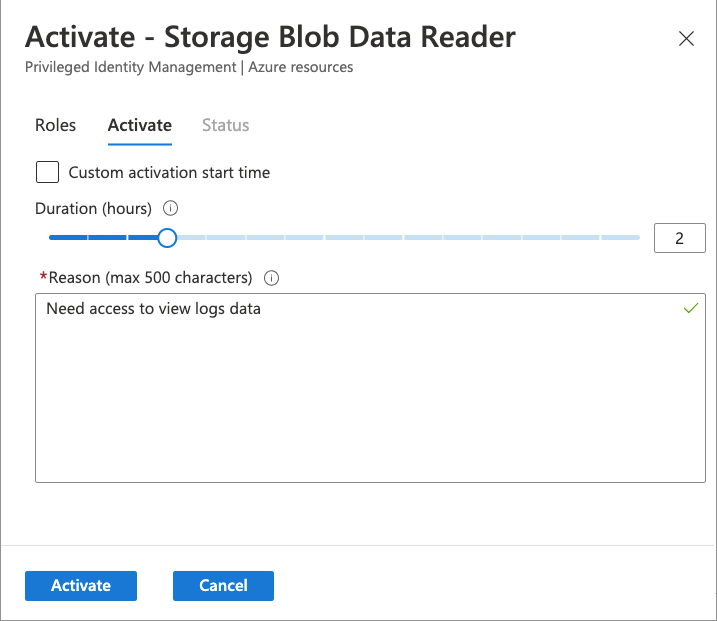
Figure 1. A PIM activation request for a time-bound Azure resource role. Source: MicrosoftDocs/entra-docs, role-activation.png. © Microsoft Corporation, MIT License. Cropped to remove the example account header.
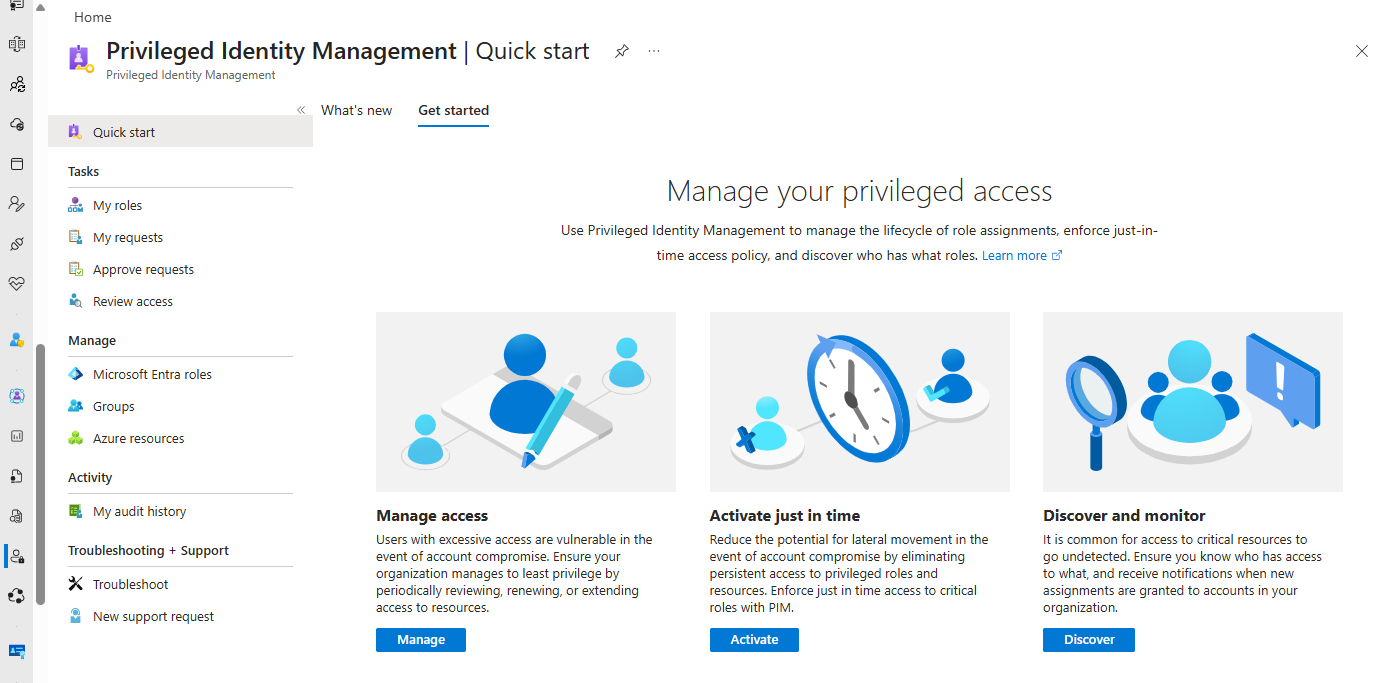
Figure 2. The PIM quick-start view separates access management, just-in-time activation, and monitoring. Source: MicrosoftDocs/entra-docs, pim-quickstart.png. © Microsoft Corporation, MIT License. Cropped to remove the account header.
Device trust with Intune
Microsoft Intune compliance policies evaluate the state of managed devices. A policy can check the operating system version, root or jailbreak state and risk information from integrated threat protection services.
Intune sends the compliance result to Entra. Conditional Access can then allow or block access based on that result. Read the Intune compliance overview.
A compliant status is not a permanent guarantee of safety. Evaluation depends on check-in times, refresh cycles and the configured validity period. Microsoft also documents that devices without an assigned compliance policy can be treated as compliant unless the organisation changes the default.
Intune can also contribute app protection signals and restrict copying and saving, and selectively wipe corporate app data. It still does not prove the integrity of an Azure workload. Read how Intune works with Conditional Access.
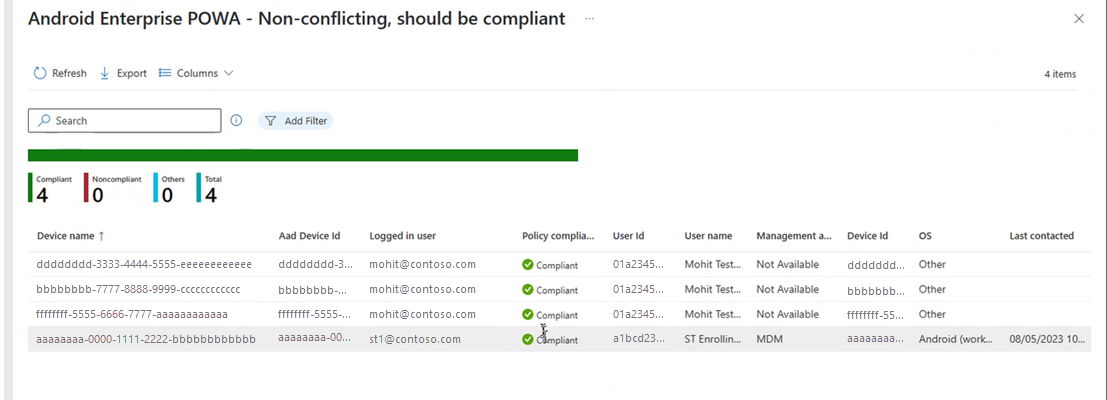
Figure 3. An Intune compliance policy report using Microsoft documentation sample data. Source: MicrosoftDocs/memdocs, view-report-for-compliance-policy.png. © Microsoft Corporation, CC BY 4.0. The source image contains only example identities and identifiers.
Workload identity and managed identities
Microsoft Entra Workload ID covers identities used by applications and services. Its capabilities include service principal governance, workload identity federation, risk controls and Conditional Access for supported workload identities. Explore Microsoft Entra Workload ID.
Conditional Access for workload identities applies to supported service principals owned by your organisation. Managed identities are not covered by these policies. Check the workload identity Conditional Access scope.
Managed identities are often the preferred option for Azure resources. An application can use a managed identity to obtain an Entra token without storing a client secret or certificate in its code or configuration.
A system-assigned identity follows one Azure resource. A user-assigned identity has an independent lifecycle and can serve several resources. Both still need the minimum required permissions. Read the managed identity guidance.
A managed identity is not attestation. It identifies the workload principal, but it does not prove which binary is running, whether Secure Boot is active or whether the workload is inside a Trusted Execution Environment.
The relationship is simple:
| Control | Question answered |
|---|---|
| Managed identity | Which workload is requesting access? |
| Attestation | In which environment is it running? |
| Authorisation | What may the workload do? |
| Secure Key Release | May this identity receive this key in this proven state? |
Runtime trust and confidential computing
Confidential computing protects data during processing by using a hardware-backed Trusted Execution Environment. Attestation allows another party to verify selected properties of that environment before it sends sensitive data or releases a key.
This trust layer is different from Entra and Intune. Entra can issue an access token to an identity. Intune can report the state of a user device. Neither provides hardware evidence about the server environment that processes the data.
An effective design can require both identity and attestation. The application must be an authorised workload and it must run in an approved confidential environment. Explore Azure confidential computing.
Data protection with Microsoft Purview
Microsoft Purview sensitivity labels classify information and can apply protection that matches the classification. Depending on its scope and configuration, a label can apply markings, encryption and usage rights to supported content. Labels for containers such as Teams and SharePoint sites configure container settings; they do not automatically encrypt or label every file inside.
For documents, email and meeting invitations, label-based encryption normally uses the Azure Rights Management service. It combines encryption with identity and authorisation rules. An organisation can allow a user to read a document while preventing printing, copying or forwarding. Read the Purview sensitivity label encryption guide.
The label can remain with a protected file when it leaves SharePoint. Classification is still not a complete security boundary. Incorrectly labelled information receives the wrong protection, and Rights Management does not attest the hardware that processes the document.
Customer Key and service encryption
Microsoft 365 uses service encryption in addition to underlying volume encryption. Customer Key lets an organisation provide root keys for supported service-encryption chains and manage those keys through Azure Key Vault. Microsoft manages the other keys in the chain.
Microsoft documents Customer Key support for services including Exchange, SharePoint, OneDrive and Windows 365. It can help with key lifecycle control, compliance and a controlled data exit. Read about Microsoft 365 service encryption and Customer Key.
Customer Key is mainly a control for stored service data. It does not mean that Microsoft 365 workloads run inside a customer-attested Trusted Execution Environment. It should therefore be described as customer control over service-encryption roots, not as confidential computing for Microsoft 365. It is also different from DKE. Customer Key influences supported service-encryption key chains, whereas DKE protects selected content with two independently controlled keys.
Customer Lockbox and operator access
Customer Lockbox addresses exceptional access by Microsoft support staff. For supported Microsoft 365 services, when the control is enabled and a support case requires access to customer content, the organisation must approve the request first.
If the organisation rejects the request, or does not approve it before expiry, access is not granted. Approval and operator actions are audited, and access is temporary. Lockbox does not encrypt content or attest a runtime. Read the Customer Lockbox documentation.
Double Key Encryption and its limits
Double Key Encryption uses two keys to protect selected Office content. One key is controlled by the organisation through its DKE service. The second is stored in Microsoft Azure. Both are required to open the content. DKE is applied through sensitivity labels. Read the Microsoft Purview DKE overview.
DKE provides stronger key control for a small set of highly sensitive documents. It is not a Trusted Execution Environment. Its controls apply to the document and its keys, not to hardware attestation for every application that opens it.
The operational cost is significant:
- Coauthoring and AutoSave are not supported.
- DKE documents cannot be opened in Office for the web.
- SharePoint and OneDrive cannot process the document content.
- Microsoft 365 content search, service-side DLP and eDiscovery cannot inspect the encrypted document content.
- Copilot cannot use DKE protected content.
- DKE labels do not protect Teams chat, Teams meetings or Loop content.
- Support centres on compatible Windows desktop applications and integrated software.
Microsoft recommends DKE for the most sensitive and tightly controlled subset of information. A broad rollout can remove collaboration, search and governance functions that the business still needs.
An end-to-end security scenario
Consider several organisations that need to analyse sensitive research data together.
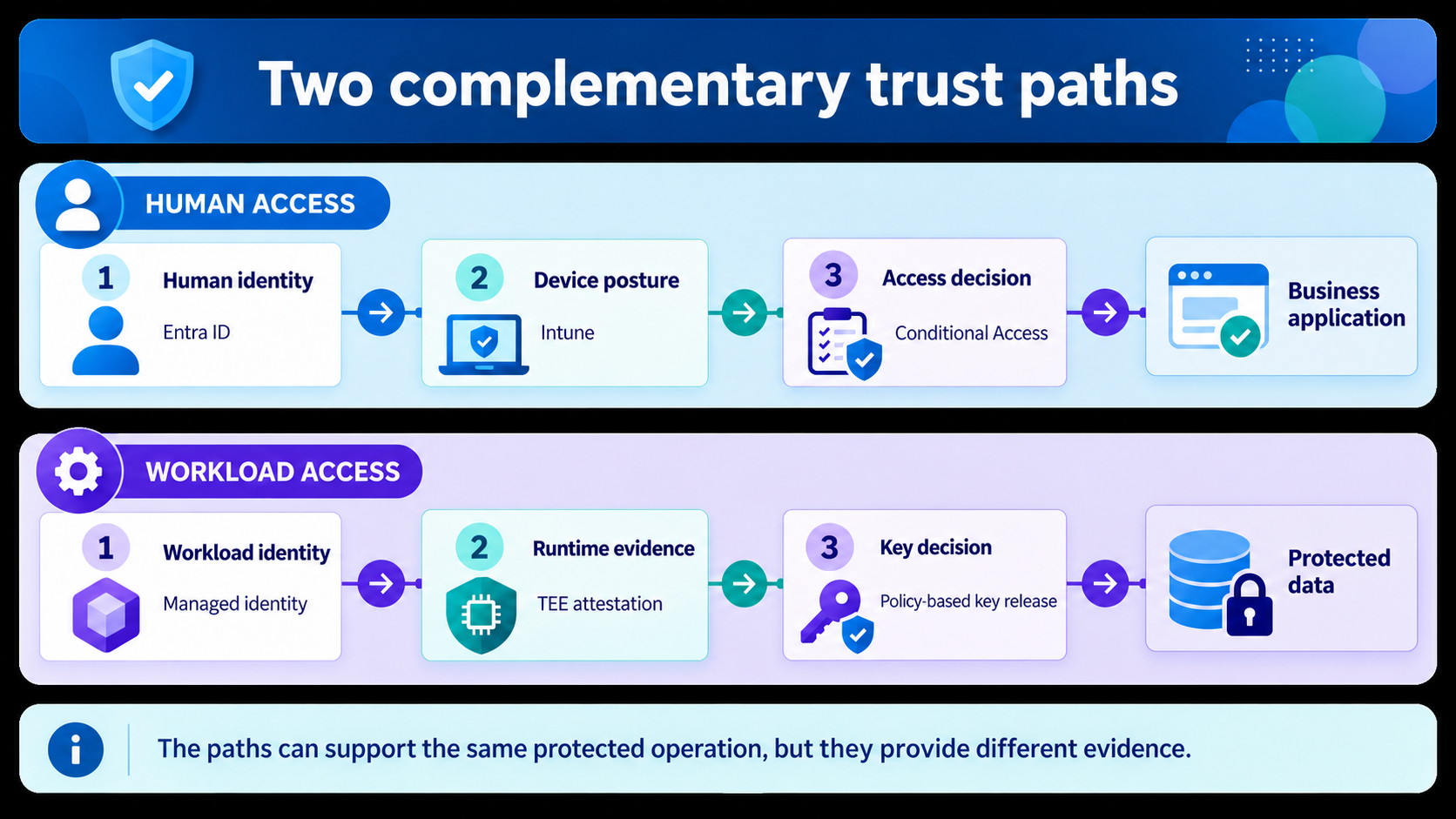
Figure 4. An original Interian infographic separating the human-access path from the workload-access path. Both paths can support the same protected operation, but the evidence and policy decisions remain distinct.
The human-access lane begins when an analyst signs in with Entra ID. Conditional Access evaluates the identity, authentication strength, application and available risk signals. Intune contributes device compliance and, where configured, endpoint risk. If the analyst needs to change the environment, PIM can require just-in-time activation of a privileged role with approval and a time limit. This path decides whether the human may reach the business application and whether elevated administration is allowed.
The workload-access lane begins separately. The application uses a managed identity instead of a stored client secret. The confidential workload produces attestation evidence about its runtime. A policy-based key release decision then checks both the authorised workload identity and the accepted evidence before releasing a key. This path decides whether the workload may decrypt or process protected data.
The two lanes support one business process, but they are not one credential chain. A human token does not become a workload token, and device compliance does not prove TEE integrity. The application must preserve the separation between delegated human authority, application permissions and attested runtime state.
After processing, the application or an authorised user applies a Purview sensitivity label with suitable usage rights to a supported output document. This requires an explicit labelling step or integration; confidential computing does not apply the label automatically. Customer Key can add customer-controlled service-encryption roots for supported stored Microsoft 365 data. Customer Lockbox can require approval if Microsoft support needs exceptional access. DKE remains reserved for a small group of final documents where losing web access, search, eDiscovery and coauthoring is acceptable.
No single control secures this process. Each one closes a different path.
Common design mistakes
| Mistake | Better approach |
|---|---|
| Treating an identity token as runtime proof | Verify attestation separately when runtime integrity matters. |
| Treating compliance as continuous proof | Review freshness, check-in behaviour and validity periods. |
| Keeping permanent privilege for convenience | Use temporary activation and protect emergency accounts separately. |
| Calling Customer Key confidential computing | Describe it as control over service encryption roots. |
| Applying DKE too widely | Start with classification and assess the loss of collaboration features. |
| Leaving links between controls implicit | Document the identity, device state, attestation claims and classification required for each decision. |
Key takeaways
- Entra establishes who or which workload is requesting access.
- Intune provides device and app trust signals, not absolute proof of safety.
- PIM reduces standing privilege through temporary activation and governance.
- Managed identities remove the need to manage application credentials for supported access, but do not prove runtime integrity.
- Purview labels connect data classification to protection and usage rights.
- Customer Key, Customer Lockbox and DKE solve three different problems.
- TEE attestation provides hardware-backed evidence about a confidential runtime.
- A high-sensitivity environment must combine these controls into one explicit policy architecture.
Previous in the series: Part 5: No Proof, No Key – Secure Key Release