Embracing AI’s Potential While Mitigating Risks
Artificial Intelligence (AI) is transforming industries, fuelling innovation, and driving efficiency like never before. From automating repetitive tasks to powering research breakthroughs, AI is a game-changer. But rushing to adopt AI without a solid security plan is like building a house on sand. Data leaks, unauthorised access, and malicious attacks can turn your AI vision into a costly disaster.
A recent report shows 57% of organisations have seen a surge in AI-related security incidents, and 60% still lack basic controls (source: Microsoft Security Blog). These numbers demand action: without robust governance, your AI initiatives could become liabilities.
The ease of spinning up AI tools today is both a gift and a challenge. It’s reminiscent of the MS Access era when “cowboy” developers built apps with no thought for security or structure, leaving IT teams to mop up the chaos. We can’t let that happen with AI. So, how do we secure AI and protect data? Let’s explore the risks and discover powerful tools to safeguard your AI journey in 2025.
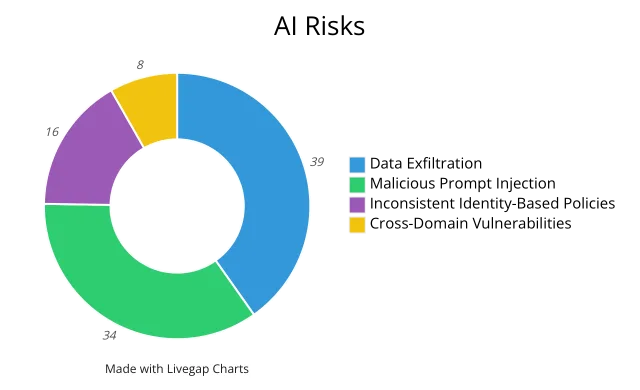
The Numbers: AI Risks
Here are the top AI security risks organisations face, with real-world implications:
- Data Exfiltration (39%): Sensitive data can slip through AI interfaces to untrusted servers. Picture an employee pasting customer details into a public chatbot, and your data’s exposed.
- Malicious Prompt Injection (34%): Hackers use crafty inputs to trick AI systems into spilling secrets, like financial forecasts or strategic plans. This worries 34% of businesses.
- Inconsistent Identity-Based Policies (16%): Weak access controls let unauthorised users run sensitive HR or financial data through unapproved AI tools, risking misuse.
- Cross-Domain Vulnerabilities (8%): AI apps crossing departments, like marketing accessing finance data, can break data segregation, causing compliance headaches.
With 57% of organisations reporting more AI incidents, these risks are real and urgent.
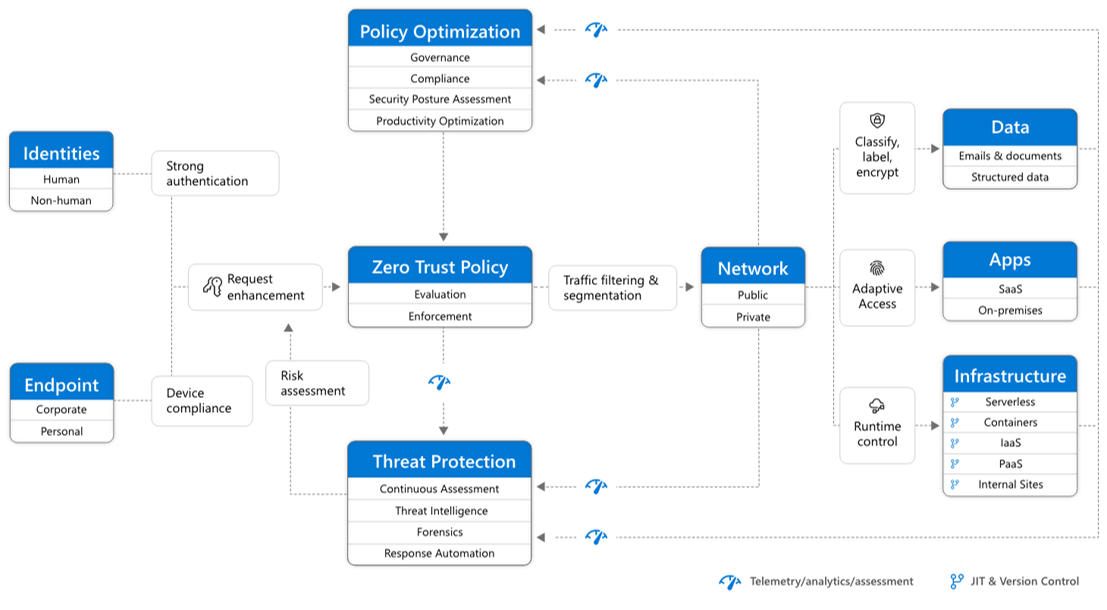
Zero Trust Adoption Framework: Secure AI Apps and Data
As a systems engineer, I can’t overstate the need for a repeatable security strategy in AI. The Zero Trust adoption framework is your blueprint. It’s not just jargon: it’s a practical guide for designing, deploying, and securing AI initiatives. Unlike traditional IT security, Zero Trust addresses AI’s unique challenges: dynamic data flows, decentralised workloads, and unpredictable behaviours.
How to Use This Framework:
- Map your AI estate: Align every AI workload, data store, and app with a phase or category (think “swim lanes” in project management).
- Run a gap analysis: Identify missing controls across phases, Assess, Architect, Migrate & Modernise, and Organise.
- Set controls and policies: Implement identity safeguards, network isolation, device compliance checks, and Data Loss Prevention (DLP) rules tailored to AI.
- Roll out and refine: Deploy controls in phases, measure their impact, gather feedback, and adjust policies as your AI setup evolves.
This approach embeds Zero Trust at every step, ensuring security is scalable, measurable, and repeatable.
For more info, please go the Microsoft Learn page: https://learn.microsoft.com/en-us/microsoft-365/security/microsoft-365-zero-trust?view=o365-worldwide zero trust adoption framework
Solutions: Tools to Protect Your Data (April 2025)
To tackle AI risks, you need a robust toolkit. Below is a snapshot of top solutions, their features, and how they address specific threats:
| Solution | Key Features | Protects Against | Availability (April 2025) |
|---|---|---|---|
| Data Governance Platform for Security and Compliance (Microsoft Purview) | Data Security Posture Management; Sensitivity Labels; DLP Policies; Data Security Investigations; Browser DLP Controls | Data exfiltration; cross-domain vulnerabilities | Available now (Investigations and Browser DLP in preview) |
| Identity and Access Management for Secure AI Use (Microsoft Entra) | AI Web Category Filter; Conditional Access Policies | Inconsistent identity-based policies | Available now |
| Threat Protection for AI Workloads (Microsoft Defender) | AI Security Posture Management; New AI Detections | Malicious prompt injection | Coming May 2025 |
| AI Productivity Tool with DLP for Secure Use (Microsoft 365 Copilot) | DLP Integration; Enterprise-Managed AI Interactions | Day-to-day secure AI usage | Available now |
Consider adding annotated screenshots, such as Purview’s DLP setup, Entra’s access controls, Defender’s alerts, or Copilot’s secure interface, to make these tools vivid for readers.
Tailored Solutions for AI Security Risks
Choosing the right tool for each AI security challenge is critical. Below, I’ve paired each solution’s full, descriptive title with practical guidance on when to use it, how it works, and the latest updates as of April 2025. Drawing from my experience as a systems engineer, these insights are designed to help you deploy AI securely.
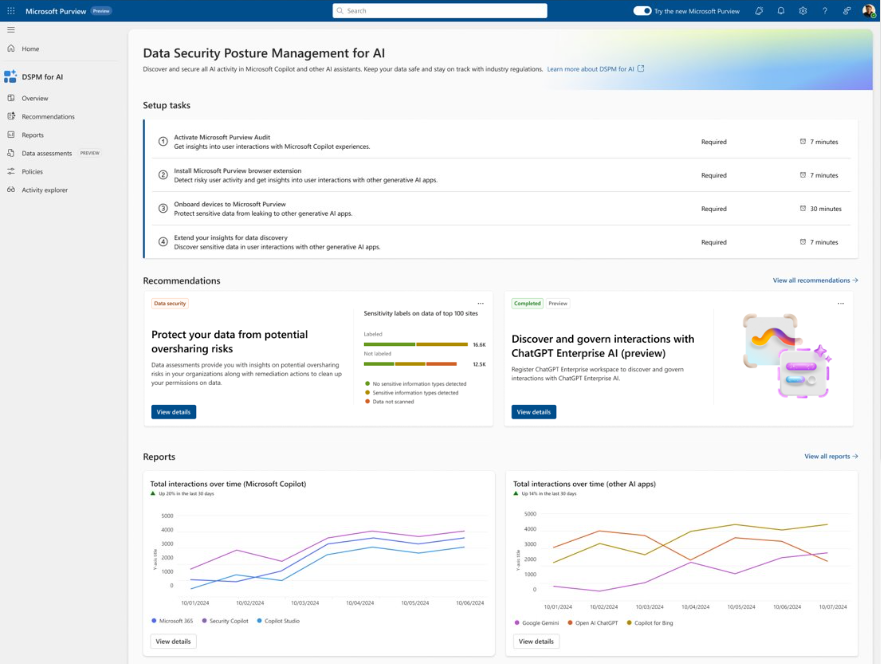
1. Data Governance Platform for Security and Compliance (Microsoft Purview)
- When to use it:
This platform is your cornerstone for preventing data leaks in AI workflows, ensuring compliance, and maintaining data sovereignty across your organisation. It’s essential for AI applications handling sensitive data, such as customer records, financial details, or proprietary research, where strict segregation is critical. For example, if your marketing team uses AI to analyse customer trends, Purview blocks access to finance data, avoiding compliance risks. As of April 2025, Purview’s AI-driven data security investigations leverage deep content analysis to swiftly identify and mitigate exposure risks, with new capabilities to classify and protect data in Microsoft 365 Copilot and Azure AI Studio (Microsoft Purview for AI). - How it works:
Purview scans data repositories, applies sensitivity labels, and enforces Data Loss Prevention (DLP) policies across cloud and on-premises environments. Its AI-powered investigations, enhanced in April 2025, integrate with Microsoft Defender to track data movement in AI workflows, offering real-time insights into potential vulnerabilities. It also supports compliance with regional regulations, such as GDPR, by enforcing data residency controls. - Blocking and alerts:
- Blocks or flags attempts to share labelled data with unapproved AI services, including public chatbots.
- Delivers real-time alerts and comprehensive incident reports via the Purview portal for rapid response.
- Licence required:
Microsoft Purview Information Protection and Governance Plan 1 (IPG P1) provides basic classification and DLP. Plan 2 (IPG P2) unlocks advanced investigations, Browser DLP, and enhanced AI data protection features.
2. Identity and Access Management for Secure AI Use (Microsoft Entra)
- When to use it:
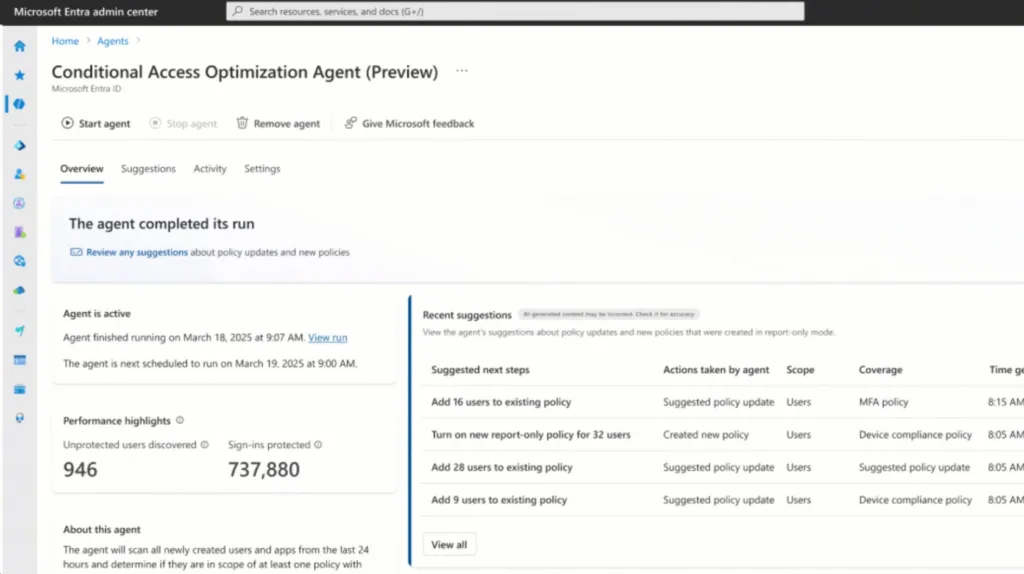
Entra is essential for controlling who accesses AI apps, especially in organisations with remote workers, contractors, or varied device ecosystems. If an employee tries using a personal laptop for an AI tool, Entra ensures only secure, compliant devices get through, tackling inconsistent identity policies. The March 2025 update adds a Conditional Access Optimization Agent that suggests policy updates for new users or apps, keeping your access rules tight (Microsoft Secure 2025). - How it works:
Entra uses Conditional Access and AI Web Category Filtering to verify user identity, device health, and network context before granting access. Its latest optimizations streamline security for AI-specific workloads. - Blocking and alerts:
- Stops unauthorised sign-ins or API calls based on risk levels.
- Generates detailed logs and insights for auditing and monitoring.
- Licence required:
Azure AD Premium P1 for Conditional Access. P2 for risk-based controls and deeper reporting.
3. Threat Protection for AI Workloads (Microsoft Defender)
- When to use it:
Defender is your shield against malicious prompt injection, critical for user-facing apps like customer support chatbots where inputs could be exploited. It’s a must in production environments to catch and stop threats. The March 2025 Phishing Triage Agent in Security Copilot boosts Defender’s ability to handle high-volume threats, strengthening AI security (ZDNET). - How it works:
Defender collects telemetry from AI platforms, builds a baseline of normal behaviour, and uses advanced algorithms to spot anomalies, like rogue prompt patterns. Its new AI Security Posture Management keeps your AI environment secure. - Blocking and alerts:
- Instantly isolates suspicious AI processes.
- Sends real-time alerts to the Defender Security Centre and supports automated responses via Microsoft Sentinel.
- Licence required:
Microsoft Defender for Cloud Plan 2, covering AI workload protection.
4. AI Productivity Tool with DLP for Secure Use (Microsoft 365 Copilot)
- When to use it:
Copilot is perfect for secure, everyday AI tasks, drafting emails, building presentations, or analysing spreadsheets, in teams handling sensitive data. It prevents leaks during routine work, ideal for collaborative settings. April 2025 updates enhance its security, ensuring safe interactions in high-stakes environments (Help Net Security). - How it works:
Integrated with Microsoft 365 DLP, Copilot enforces policies at the document and chat level, scanning and blocking sensitive content in real time to keep data secure. - Blocking and alerts:
- Prevents sensitive content from being generated or shared.
- Shows policy tips to guide users and logs incidents for admin review.
- Licence required:
Microsoft 365 E5 or E5 Compliance, covering Copilot and DLP features.
Conclusion
AI is a powerhouse, but without governance, it’s a recipe for data exfiltration and other threats. The solutions above, from data governance to threat protection, let you apply Zero Trust principles to secure your AI estate and stay compliant.
As AI evolves, risks will grow. By adopting these tools, you’re not just protecting 2025: you’re future-proofing your organisation for the long haul. Don’t let AI become a security wild west. Take control with a structured, secure approach today.
For more insights and deployment tips, visit Microsoft Security for AI and the Microsoft Purview best practices guide.