Every enterprise Microsoft tenant eventually reaches the same crossroads: security controls are in place, PIM is running, RBAC is clean. And yet the tenant still cannot answer a basic governance question. Who is responsible for which users, and how is that enforced architecturally? This article explains why that question matters, why most tenants cannot answer it, and what it takes to change that.
| TL;DR > A tenant can be technically secure and still be governance-fragile. These are not the same thing. > RBAC controls what actions are permitted. PIM governs elevation over time. Neither establishes clear administrative boundaries; that requires deliberate boundary design. > Administrative Units (AUs) are the primary scoping primitive in Entra. But AU design alone is not enough. Segmentation must span all five governance layers. > Most enterprise tenants audit at Level 2 to 3. Level 4 (segmented) is where governance becomes defensible to regulators and auditors, not just internally credible. > This post is grounded in what we observe in real enterprise tenants during governance assessments at Interian. |
The importance of Administrative Boundary Design in Microsoft Entra cannot be overstated, as it is critical for establishing clear governance in enterprise environments.
Understanding Administrative Boundary Design in Microsoft Entra
The difference between “secure” and “governable”
When auditing enterprise tenants at Interian, we consistently encounter the same pattern. The security fundamentals are in place. Conditional Access is enforced. MFA adoption is high. PIM has been rolled out. The role catalogue has been cleaned up. By any technical security measure, the tenant looks well-run.
And then we ask a governance question: “For your subsidiary in Poland, which administrators can modify user identities, and can you demonstrate that their scope is bounded to Polish users only?“
In most tenants, this question cannot be answered with evidence. It can be answered with intent: with documentation, with policy statements, with trust in the team. But not with structural proof.
That is the gap between secure and governable. And in a regulated, multi-entity enterprise environment, that gap matters enormously.
Security controls protect against external threats. Governance architecture protects against the consequences of internal authority, including mistakes, misalignments, and accountability failures.
A flat tenant is not one with poor security. It is one where administrative authority is structurally tenant-wide by default, and where the only thing preventing misuse of that authority is trust, process, and documentation. Not architecture.
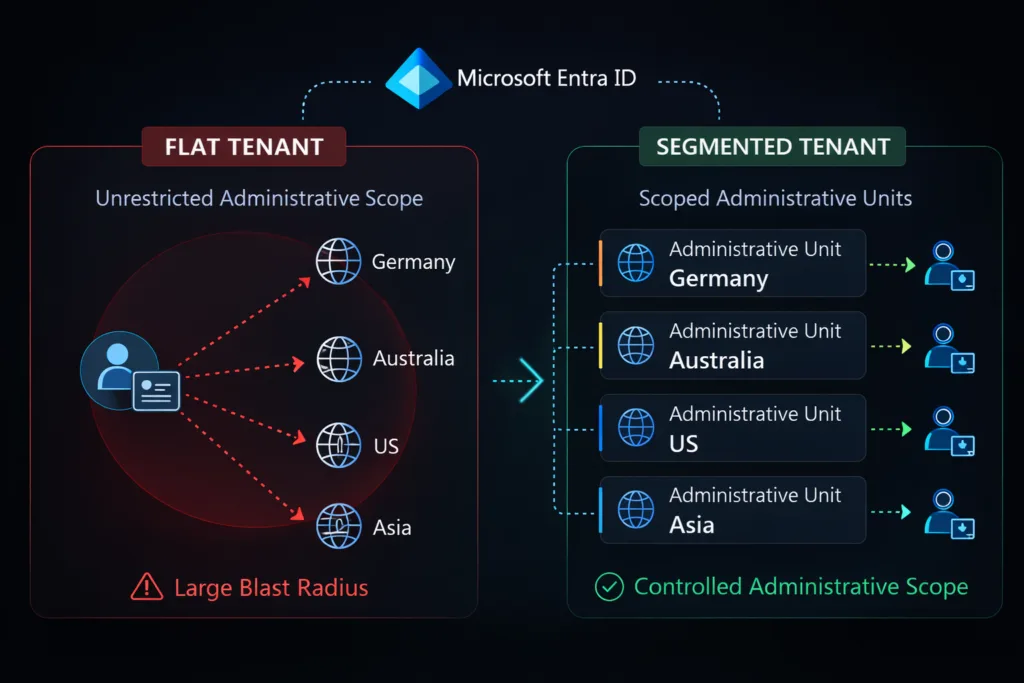
| ⚠ The flat tenant | ✓ The segmented tenant |
| ✗ Admin authority spans the entire tenant by default | ✓ Administrative scope is bounded to defined domains |
| ✗ Delegation is operational, granted when needed to get it done | ✓ Delegation is architectural, designed around accountability |
| ✗ Accountability is documented but not architecturally enforced | ✓ Accountability is structurally enforced, not just stated |
| ✗ Audit evidence requires forensic reconstruction per entity | ✓ Audit evidence is scoped per entity and available on demand |
| ✗ A single mistake or incident has tenant-wide blast radius | ✓ Errors and incidents are contained within boundaries |
What RBAC and PIM don’t solve
The most common misconception we encounter is that RBAC hygiene plus PIM equals a governed tenant. It does not, because they answer different questions than boundary design does.
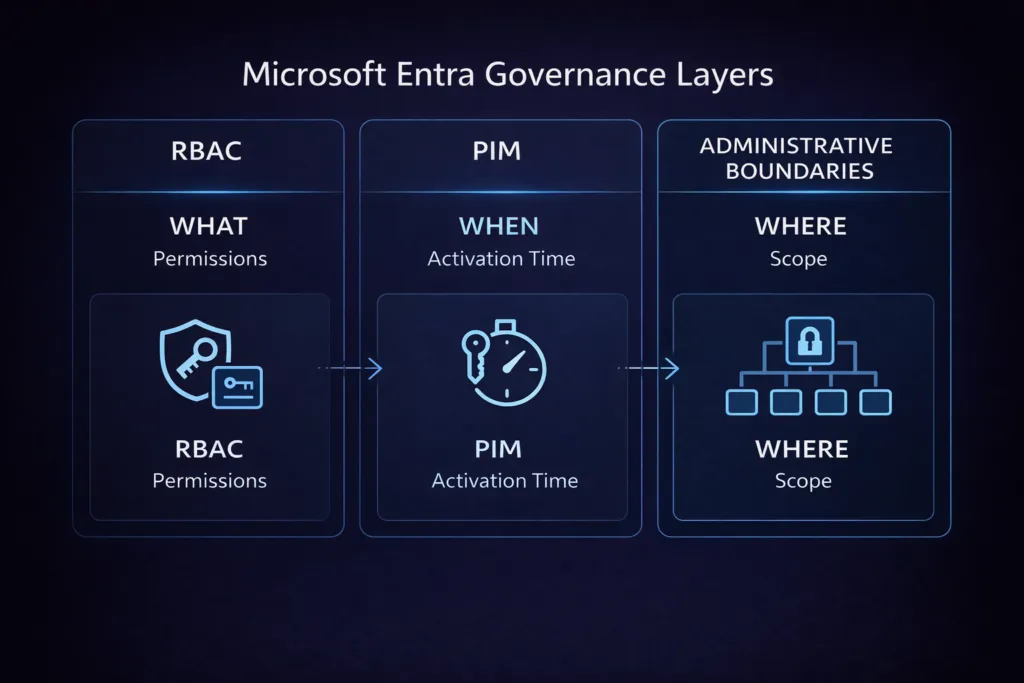
| DISCIPLINE | THE QUESTION IT ANSWERS | WHAT IT LEAVES OPEN |
| RBAC | What can this identity do? | Which objects that capability applies to (scope) |
| PIM | When can this identity activate elevated access? | Which domain the elevated access operates within |
| Conditional Access | Under what conditions is sign-in permitted? | Anything that happens post-authentication in the admin plane |
| Access reviews | Are these entitlements still appropriate? | Whether the scope of those entitlements is correct |
| Boundary design | Where does administrative authority apply? | This is the structural gap the others leave open |
You can have all four of the first disciplines operating well and still have an administrator delegated to manage user accounts in Germany who can structurally see and modify accounts in Australia. Not because of a misconfiguration. Because that is how the tenant is built.
The custom role trap
A common attempted fix is to create narrow custom roles with fewer permissions. This reduces the capability problem but does nothing for the scope problem. A custom role with ten carefully curated permissions, assigned tenant-wide, still has tenant-wide operational reach. The fix for scope is architectural, not a permissions reduction exercise.
Administrative Units: the boundary primitive in Microsoft Entra
Administrative Units (AUs) are the native mechanism in Microsoft Entra for scoping administrative authority. Instead of assigning a role tenant-wide, you assign it scoped to an AU, which means the administrator can only act on users, groups, or devices inside that AU. This turns delegation from an operational decision into an architectural one.
| TYPE | MEMBERSHOP | BEST USED FOR | License |
| Standard AU | Manually managed | Pilot environments, specialised domains, small entity groups | Entra ID P1 |
| Dynamic membership AU | Rule-based on user attributes | Location- or department-based segmentation at scale (e.g. country eq “BE”) | Entra ID P1 |
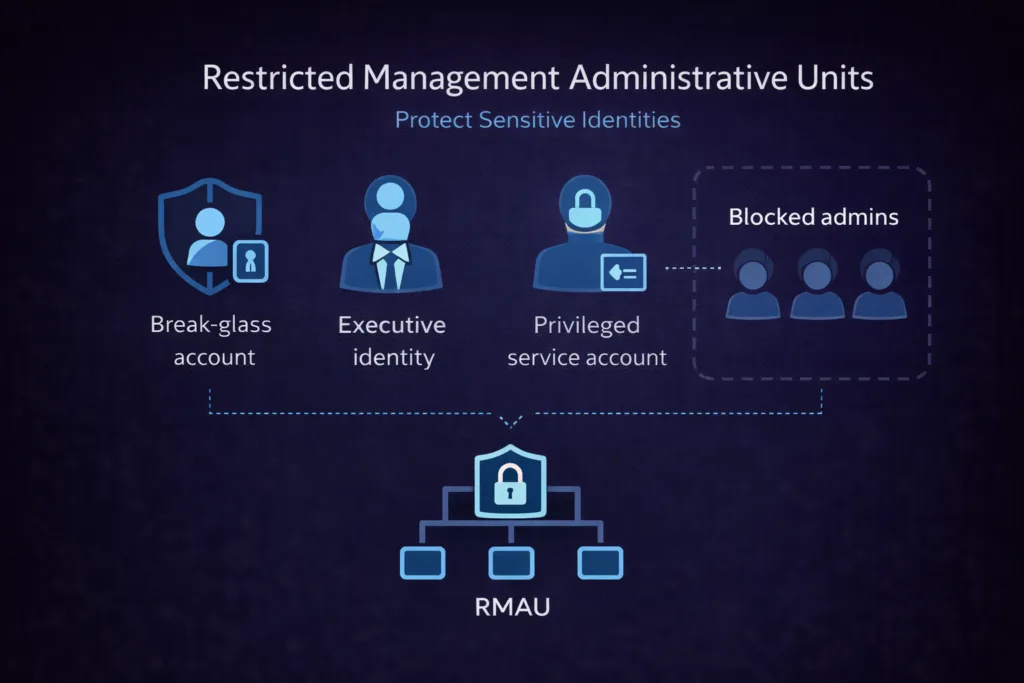
| Restricted Management AU | Manual or dynamic | Protects Tier 0 identities from modification by any scoped admin, including Global Admins outside the AU | Entra ID P2 |
Field observation:
Restricted Management AUs are one of the most underused capabilities we see in enterprise tenants. Most organisations have not protected their break-glass accounts, emergency service principals, or executive identities behind an RMAU. The cost of not doing so becomes apparent the moment a tenant-wide incident involves one of those identities being modified unexpectedly, whether by mistake or by design.
What can and cannot be scoped to an AU today
| Object type | AU scoping | Notes |
| Users | ✓ Full support | The primary and most mature AU use case |
| Groups | ✓ Supported (role-dependent) | AU scoping works for supported directory roles; behaviour varies per role and workload |
| Devices | ✓ Full support | Device-scoped delegation for endpoint teams |
| Applications / Service principals | ✗ Not supported | Application management remains tenant-wide, which is a significant gap for workload identity governance |
| Conditional Access policies | ✗ Not supported | CA policy management is always tenant-wide; must be governed by process and access review |
| PIM role activations | ✗ Not supported | AU-scoped role assignments with PIM are supported for most built-in roles; verify per role before designing |
These limitations matter for honest architecture. An AU-based boundary model is robust for user, group, and device administration. For application and Conditional Access governance, the boundary must be enforced at the process, access review, and monitoring layer. Platform-level structural controls do not cover this today. Plan for that explicitly.
The five-layer segmentation model
The most important framing shift for enterprise governance is this: boundary design is not a single feature or configuration. It is an architectural property that spans five interdependent layers. Weaknesses at any layer undermine the others. This is the model we use at Interian when assessing or designing tenant governance.
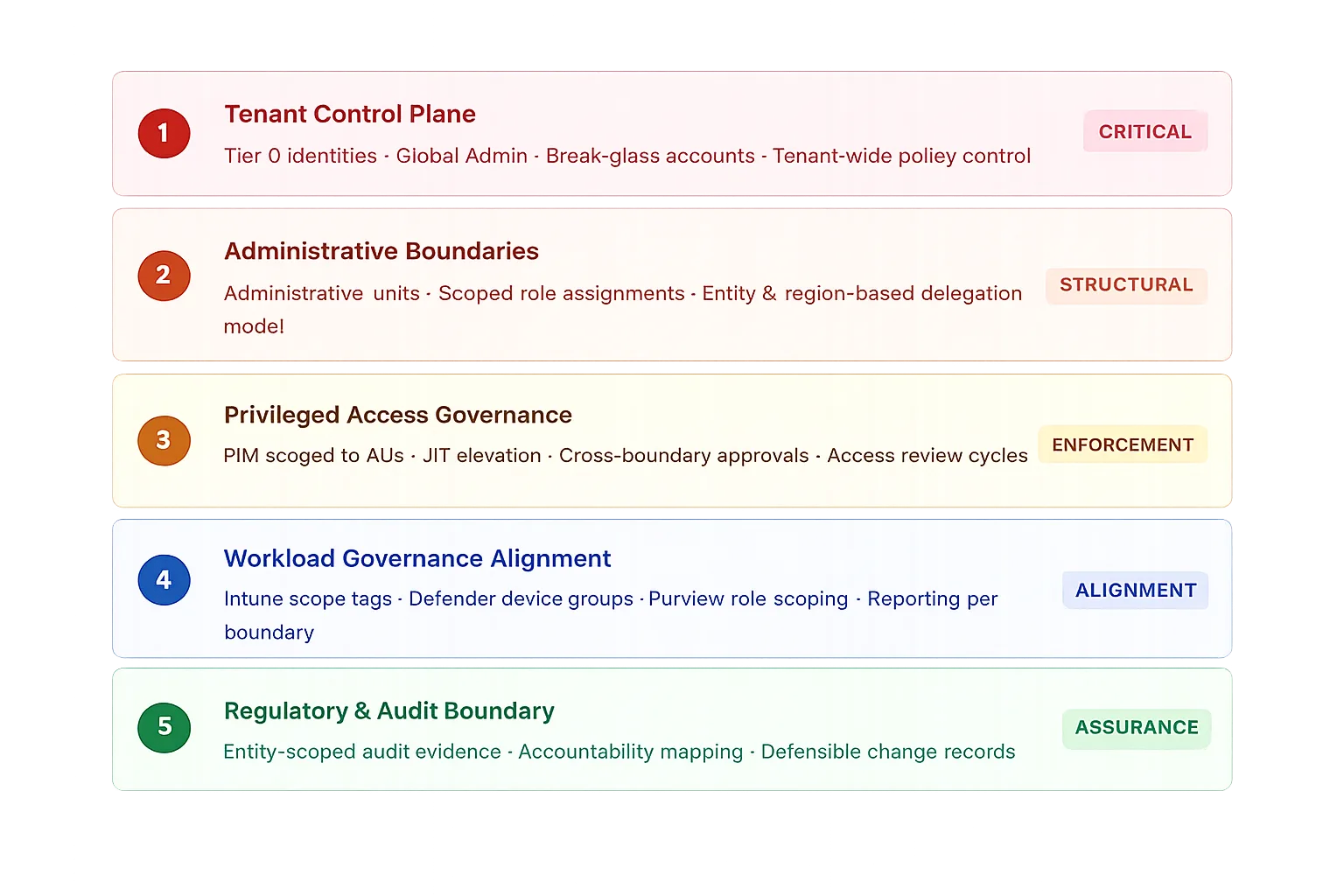
Layer 1: Tenant control plane
If this layer is not treated with Tier 0 discipline, everything built in the layers below is built on unstable ground. This includes Global Administrator, Privileged Role Administrator, and any role with the ability to alter security policy at the tenant level.
What Tier 0 discipline looks like in practice:
✓ Zero standing Global Admin assignments. All elevated access via PIM with approval.
✓ Break-glass accounts in a Restricted Management AU, unused for day-to-day operations
✓ Alerts firing on any Tier 0 role activation or direct sign-in
✗ No shared administrative accounts across regions or teams
✗ No growing exclusion groups used to “route around” Conditional Access policies
Layer 2: Administrative boundaries
The design principle here is simple and must be applied without compromise: administrators should have authority where they have responsibility, and no further. This sounds obvious. In practice, it requires a documented mapping between organisational accountability and AU scope, and the discipline to enforce it rather than creating exceptions when it is inconvenient.
| AU design approach | Maps to | When to use |
| Legal entity-based | Subsidiaries / holding structure | When entities have separate IT ownership and regulatory accountability |
| Geography-based | Country or region | When regional helpdesk or IT teams operate semi-independently |
| Risk domain-based | Business unit risk profile | When corporate, industrial, R&D, or regulated environments need separation |
| Function-based | IT function (helpdesk vs IAM vs SecOps) | Separating break/fix access from lifecycle management authority |
Layer 3: Privileged access governance
Once boundaries exist, PIM should be configured to respect them. The key shift is moving from tenant-wide eligible assignments to AU-scoped eligible assignments. An administrator in Region A should only be able to activate a role scoped to Region A’s AU, not tenant-wide.
Cross-boundary privilege (acting outside your AU) should require an explicit, audited elevation path with documented justification. This is where separation of duties becomes not just a policy statement but a technical reality.
Layer 4: Workload governance alignment
This is where we see the largest gaps in otherwise well-designed tenants. Administrative boundaries in Entra do not propagate automatically into workloads. In Microsoft Intune, scope tags and RBAC roles must be aligned to the same entity model. In Microsoft Defender for Endpoint, device groups must mirror the boundary structure. In Microsoft Purview, role group assignments and compliance boundary configuration must reflect the same accountability model.
Field observation:
The most common failure pattern at Layer 4 is a tenant where Entra AUs are in place for user administration, but Intune scope tags remain “all devices” for most admin roles. The helpdesk team in Country A cannot modify user accounts in Country B, yet they can remotely wipe a device belonging to a Country B executive. The boundary exists in one layer and not the other.
Layer 5: Regulatory and audit boundary
This layer answers the question that regulators, auditors, and risk owners actually ask: can you demonstrate that governance boundaries exist in practice, not just in design documents?
At this layer, the work is about aligning your evidence production to your boundary model. Audit logs filterable per AU or entity. Access reviews scoped per accountability domain. PIM activation records tied to a specific boundary scope. Change records with identifiable owners who have documented authority for that object class.
What actually breaks without boundaries: field observations
Abstract arguments for governance architecture are easy to dismiss. The following observations are from real enterprise tenant assessments. They are not edge cases. They are the pattern.
Field observation: Helpdesk delegation without scope
A regional helpdesk team in Country A is assigned User Administrator to handle password resets and account unlocks for their users. The assignment is tenant-wide because no AUs have been configured. A misdirected support request from Country B reaches them. They reset the password. The Country B account owner is locked out. No policy was violated. The role permitted the action.
With AU-scoped delegation, the agent would have received an access denied response the moment they attempted to modify a Country B user object. No trust mechanism. No process. No policy enforcement required. The architecture prevents it.
✓ Resolved by: AU-scoped User Administrator assignment · Dynamic AU membership based on country attribute.
Field observation: Acquired company inherits tenant-wide admin reach
During an M&A integration, an acquired company’s IT team is onboarded into the parent tenant. They receive roles to manage their own user population. No AUs exist. Within the first weeks, their administrators, who have no malicious intent, discover they can query and modify users across the entire parent tenant. They are simply using the Graph-based tooling they have always used.
Boundary design at integration time contains the blast radius from day one, independent of trust level. The acquired team can do their job. They cannot do anyone else’s.
✓ Resolved by: AU scoped to acquired entity objects · Integration checklist includes AU boundary design before any role assignment.
Field observation: NIS2 assessment reveals undifferentiated governance
During a NIS2 readiness assessment, the auditor asks for evidence that administrative access to a specific regulated subsidiary is bounded and traceable. The security team responds: “We have PIM, access reviews, and clear role documentation.” That answer is factually correct but structurally insufficient. There is no scope boundary. The access reviews cover the tenant as a whole. The role documentation describes capability, not domain.
Generating scoped evidence retrospectively from audit logs is possible but takes significant effort and produces a forensic reconstruction, not a governance artefact. It is not the same thing in an assurance context.
✓ Resolved by: Entity AU with scoped access reviews · Audit log filters exported per AU · Accountability mapping documented and testable.
Administrative Zero Trust: the shift that matters most
Zero Trust is well-established at the user access layer. The same principles are rarely applied with the same rigour to the administrative plane, which is exactly where the most consequential trust relationships in the tenant live.
What most organisations get wrong is treating the administrative plane as an implicit trust zone. Admins are vetted, trained, and trusted. Their actions are assumed to be appropriate. This is understandable. It is also exactly the logic that Zero Trust was designed to replace.
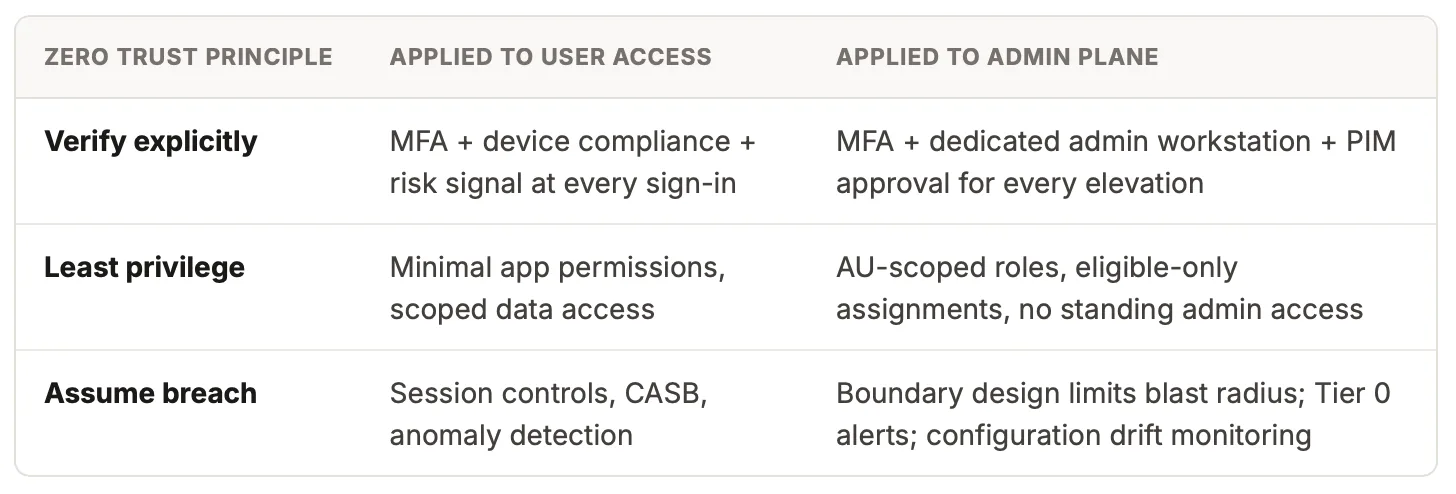
The shift is from “admins are trusted” to “admin actions are controlled.” Boundary design is what makes the second statement architecturally true rather than aspirationally stated.
NIS2 and the accountability gap in multi-entity tenants
NIS2 places direct accountability for cybersecurity governance on management bodies, not on security teams alone. For multi-entity organisations sharing a Microsoft tenant, this creates a structural tension that flat governance cannot resolve.
The tension is specific: NIS2 requires organisations to demonstrate that controls are implemented and maintained at the entity level. A flat tenant can demonstrate tenant-wide controls. It cannot demonstrate entity-scoped accountability without a boundary architecture underneath it.
What boundary design enables for NIS2 Article 21 compliance
Access control measures scoped to legal entities (21.2.i), demonstrable via AU role assignments. Human resources security, verifiable per entity admin scope. Multi-factor authentication governance via PIM activation records scoped per entity. Evidence of ongoing maintenance through entity-scoped access review exports and AU membership change records. These are the artefacts that move a NIS2 assessment from “controls documented” to “controls demonstrated.”
One question worth asking in every multi-entity tenant: if your most heavily regulated subsidiary were audited in isolation tomorrow, could you extract from your tenant governance records clean, scoped evidence that their user population is administered separately and accountably? If the answer is “not easily,” boundary design is the work to prioritise.
Governance maturity: an honest assessment
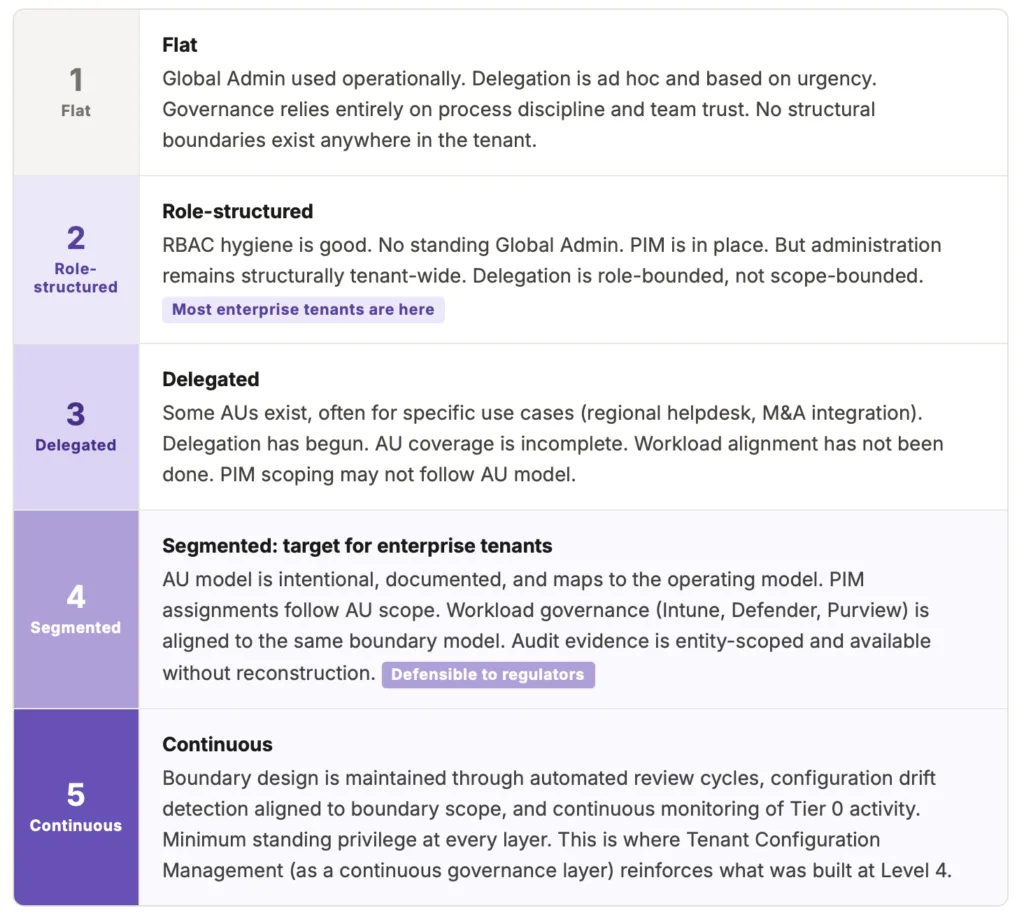
Based on what we observe across enterprise assessments, most tenants sit at Level 2 or early Level 3. Level 4 is reachable. It typically requires six to twelve weeks of focused work across Layers 1 to 3, followed by workload alignment. It is not a multi-year programme. It is a sequenced architecture project.
Where to start: a practical path from flat to segmented
The path from Level 2 to Level 4 is sequenced, not simultaneous. Attempting to design and implement all five layers at once produces complexity without progress. The sequence below is what we use at Interian when working with enterprise clients on tenant governance design.
Protect Tier 0 before anything else
Create a Restricted Management AU for break-glass accounts and Tier 0 service principals. Enable PIM with approval for all Global Admin and Privileged Role Admin assignments. Set up alerts on any Tier 0 role activation. This step is standalone, high-value, and can be completed in a day. It does not require a full AU strategy.
Map accountability before configuring AUs
Document which entities, regions, or risk domains require separate administrative ownership. For each, identify who is responsible, which roles they operationally need, and which existing user attributes (country, department, companyName) can drive dynamic AU membership. This conversation often reveals accountability gaps that exist independent of technology.
Pilot with one boundary domain
Create AUs for a single region or entity. Assign scoped roles. Validate that day-to-day operations work correctly within the scope. Validate that out-of-scope actions produce the expected access denied responses. Collect operational feedback before scaling. Every exception or workaround at this stage is a governance gap that needs a structural answer, not a shortcut.
Scope PIM assignments to match AUs
Revisit existing PIM eligible assignments. Where tenant-wide PIM assignments exist for roles that can be scoped to an AU, convert them. Cross-boundary elevation (acting outside your AU) should require a separate, explicitly justified activation. This is the step that turns PIM from security hygiene into boundary enforcement.
Align workload governance to the same model
Map Intune scope tags, Defender device groups, and Purview role groups to the same boundary structure. This step moves the tenant from Level 3 to Level 4. It is unglamorous and requires coordination across teams. But it is what makes the governance story coherent when a single entity is audited in isolation.
Build entity-scoped evidence as a standing capability
Configure access reviews scoped per AU. Verify that audit logs can be filtered and exported per AU scope. Document the AU-to-accountability mapping in a form that is accessible to auditors and reviewable during incidents. This is governance assurance, not audit preparation. It should be a continuous operational capability, not a pre-audit sprint.
FINAL THOUGHT
The organisations that invest in administrative boundary design now will not just be better prepared for NIS2 or the next audit cycle. They will operate with more clarity: clearer escalation paths, less administrative ambiguity, and accountability that is legible to everyone including the administrators themselves. Segmentation is not a compliance exercise. It is the architecture that makes enterprise governance operationally real.
Further Reading
- Microsoft is auto-enabling passkeys in Entra: configuration, sync and deployment best practices
- Exploring Conditional Access bypasses in Microsoft Entra ID
- Require Risk Remediation: The game-changer for Conditional Access policies
- Administrative units in Microsoft Entra ID (Microsoft Learn)
- Microsoft Entra Restricted Management Administrative Units explained (Chance of Security)